JavaScript Notes
Build a complete Task Scheduler (Todo App) using vanilla JavaScript with CRUD operations, localStorage persistence, filtering, and event delegation. Step-by-step comprehensive guide with full source code.
In this project, we will build a complete Task Scheduler (Todo App) using vanilla JavaScript. This project teaches you real-world CRUD operations, localStorage persistence, DOM manipulation, event delegation, and state management.
Why Build This Project?
Task Scheduler is a classic frontend project that is repeatedly asked in interviews. From this you will learn:
- CRUD — Create, Read, Update, Delete operations
- localStorage — Persist data in browser (data remains even after page refresh)
- Event Delegation — Efficiently handle dynamic elements
- Filtering — Show All, Active, Completed tasks
- Clean Architecture — State-driven rendering pattern
Features List
| Feature | Description |
|---|---|
| ➕ Add Task | Add a new task from the input field |
| ✅ Complete Task | Mark task as done (toggle) |
| 🗑️ Delete Task | Permanently remove a task |
| 🔍 Filter Tasks | All / Active / Completed filter |
| 💾 Persist Data | Save/load data from localStorage |
| 📊 Task Counter | Pending tasks ka count display |
| ⚡ Event Delegation | Single listener for dynamic items |
| 🛡️ Input Validation | Prevent empty input |
Step 1: HTML Structure
First, let's build our HTML skeleton. It's semantic and accessible:
<!DOCTYPE html>
<html lang="en">
<head>
  <meta charset="UTF-8" />
  <meta name="viewport" content="width=device-width, initial-scale=1.0" />
  <title>Task Scheduler — JavaScript Project</title>
  <link rel="stylesheet" href="style.css" />
</head>
<body>
  <div class="app-container">
    <header class="app-header">
      <h1>📋 Task Scheduler</h1>
      <p class="task-counter">
        <span id="pendingCount">0</span> tasks pending
      </p>
    </header>

    <div class="input-section">
      <input
        type="text"
        id="taskInput"
        placeholder="Add a new task..."
        maxlength="100"
        autocomplete="off"
      />
      <button id="addBtn" type="button">Add Task</button>
    </div>

    <div class="filter-section">
      <button class="filter-btn active" data-filter="all">All</button>
      <button class="filter-btn" data-filter="active">Active</button>
      <button class="filter-btn" data-filter="completed">Completed</button>
    </div>

    <ul id="taskList" class="task-list"></ul>

    <footer class="app-footer">
      <button id="clearCompletedBtn">Clear Completed</button>
    </footer>
  </div>

  <script src="app.js"></script>
</body>
</html>
Key points:
data-filterattributes on filter buttons — useful for event delegationmaxlength="100"— input validation at HTML level- Semantic elements:
header,footer,ul,li
Step 2: CSS Styling
Clean, modern styling jo responsive bhi hai:
* {
  margin: 0;
  padding: 0;
  box-sizing: border-box;
}

body {
  font-family: 'Segoe UI', Tahoma, sans-serif;
  background: linear-gradient(135deg, #667eea 0%, #764ba2 100%);
  min-height: 100vh;
  display: flex;
  justify-content: center;
  align-items: flex-start;
  padding: 40px 20px;
}

.app-container {
  background: #fff;
  border-radius: 16px;
  padding: 32px;
  width: 100%;
  max-width: 500px;
  box-shadow: 0 20px 60px rgba(0, 0, 0, 0.15);
}

.app-header h1 { font-size: 1.8rem; color: #333; }
.task-counter { color: #888; margin-top: 4px; font-size: 0.9rem; }

.input-section {
  display: flex;
  gap: 8px;
  margin: 24px 0 16px;
}

#taskInput {
  flex: 1;
  padding: 12px 16px;
  border: 2px solid #e0e0e0;
  border-radius: 8px;
  font-size: 1rem;
  transition: border-color 0.2s;
}

#taskInput:focus { outline: none; border-color: #667eea; }

#addBtn {
  padding: 12px 24px;
  background: #667eea;
  color: #fff;
  border: none;
  border-radius: 8px;
  font-size: 1rem;
  cursor: pointer;
  transition: background 0.2s;
}

#addBtn:hover { background: #5a6fd6; }

.filter-section { display: flex; gap: 8px; margin-bottom: 16px; }

.filter-btn {
  padding: 8px 16px;
  border: 1px solid #e0e0e0;
  background: #f9f9f9;
  border-radius: 20px;
  cursor: pointer;
  font-size: 0.85rem;
  transition: all 0.2s;
}

.filter-btn.active { background: #667eea; color: #fff; border-color: #667eea; }

.task-list { list-style: none; }

.task-item {
  display: flex;
  align-items: center;
  padding: 14px 16px;
  border-bottom: 1px solid #f0f0f0;
  transition: background 0.2s;
  gap: 12px;
}

.task-item:hover { background: #f8f9ff; }
.task-item.completed .task-text { text-decoration: line-through; color: #aaa; }

.task-text { flex: 1; font-size: 0.95rem; color: #333; }

.task-item button {
  background: none;
  border: none;
  cursor: pointer;
  font-size: 1.2rem;
  padding: 4px 8px;
  border-radius: 4px;
  transition: background 0.2s;
}

.task-item button:hover { background: #fee; }

.app-footer { margin-top: 16px; text-align: right; }

#clearCompletedBtn {
  padding: 8px 16px;
  background: none;
  border: 1px solid #e74c3c;
  color: #e74c3c;
  border-radius: 8px;
  cursor: pointer;
  font-size: 0.85rem;
}

#clearCompletedBtn:hover { background: #e74c3c; color: #fff; }
Step 3: JavaScript — Complete Implementation
Now comes the main part. We will write JavaScript step-by-step.
3.1 — State & DOM References
// ===== STATE =====
let tasks = [];
let currentFilter = 'all';

// ===== DOM REFERENCES =====
const taskInput = document.getElementById('taskInput');
const addBtn = document.getElementById('addBtn');
const taskList = document.getElementById('taskList');
const pendingCount = document.getElementById('pendingCount');
const clearCompletedBtn = document.getElementById('clearCompletedBtn');
const filterBtns = document.querySelectorAll('.filter-btn');
Explanation: We maintain a tasks array as our single source of truth. DOM elements are referenced at the top so we don't have to query them repeatedly.
3.2 — localStorage Functions (Persist Data)
// ===== LOCAL STORAGE =====
const STORAGE_KEY = 'taskScheduler_tasks';

function saveToStorage() {
  localStorage.setItem(STORAGE_KEY, JSON.stringify(tasks));
}

function loadFromStorage() {
  const stored = localStorage.getItem(STORAGE_KEY);
  if (stored) {
    try {
      tasks = JSON.parse(stored);
    } catch (error) {
      console.error('Error parsing stored tasks:', error);
      tasks = [];
    }
  }
}// Gets saved in browser localStorage:
// Key: "taskScheduler_tasks"
// Value: '[{"id":1,"text":"Buy groceries","completed":false}, ...]'Important: Always wrap JSON.parse() in a try-catch — if localStorage has corrupted data, the app won't crash.
3.3 — CREATE Operation (Add Task)
// After adding "Buy groceries":
// tasks = [
//   { id: 1718123456789, text: "Buy groceries", completed: false, createdAt: "2026-06-11T..." }
// ]
Key decisions:
Date.now()generates a unique ID (timestamp-based)unshift()— new task appears at the top- Duplicate check case-insensitive hai
3.4 — READ Operation (Render Tasks)
// DOM Output (3 tasks, 1 completed):
// ┌──────────────────────────────────────┐
// │ ☐ Learn JavaScript          🗑️      │
// │ ☐ Build portfolio           🗑️      │
// │ ☑ Buy groceries (strikethrough) 🗑️  │
// └──────────────────────────────────────┘
// Counter: "2 tasks pending"
Security note: The escapeHTML() function prevents XSS attacks. If a user tries to inject <script> in the input, it won't execute.
3.5 — UPDATE Operation (Toggle Complete)
// Before toggle: { id: 123, text: "Buy groceries", completed: false }
// After toggle:  { id: 123, text: "Buy groceries", completed: true }
// Visual: Text gets strikethrough, checkbox becomes checked
3.6 — DELETE Operation
// Before delete: tasks.length = 5
// After deleteTask(123): tasks.length = 4
// After clearCompleted(): All completed tasks removed
3.7 — Filter Logic
// Filter "active" → Shows only tasks where completed === false
// Filter "completed" → Shows only tasks where completed === true
// Filter "all" → Shows everything
3.8 — Event Delegation (Efficient Event Handling)
// ===== EVENT DELEGATION =====
// Single listener on parent handles all child clicks
taskList.addEventListener('click', function (e) {
  const taskItem = e.target.closest('.task-item');
  if (!taskItem) return;

  const taskId = Number(taskItem.dataset.id);

  // Handle checkbox click
  if (e.target.classList.contains('task-checkbox')) {
    toggleTask(taskId);
    return;
  }

  // Handle delete button click
  if (e.target.classList.contains('delete-btn')) {
    deleteTask(taskId);
    return;
  }
});
Why Event Delegation?
If there are 100 tasks, there's no need to attach 100 individual listeners. A single parent listener (on taskList) handles everything. When new tasks are dynamically added, no separate listener attachment is needed — they're automatically covered through delegation.
// Click event bubbles up:
// 🗑️ button click → .task-item → #taskList (listener here catches it)
// e.target = clicked element (button)
// e.target.closest('.task-item') = parent li element
// taskItem.dataset.id = task ID for CRUD operation
3.9 — Event Listeners Setup
// App Initialization:
// 1. loadFromStorage() → Load tasks array from localStorage
// 2. renderTasks() → DOM mein tasks display
// Ready for user interaction!
Complete Source Code (app.js)
Yahan poora JavaScript code ek saath hai — copy-paste ready:
✅ Task Scheduler initialized successfully!
// App is ready — tasks loaded from localStorage (if any exist)
How localStorage Works in This Project
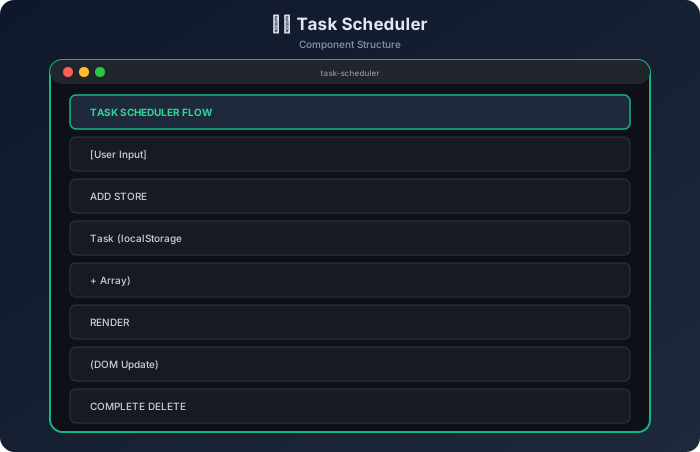
localStorage limitations:
- Maximum ~5MB storage per origin
- Only strings can be stored (that's why JSON.stringify is necessary)
- Synchronous API — IndexedDB is better for large data
- Follows same-origin policy
Key Takeaways
- State-Driven Rendering — Always maintain a central state (array/object) and render the UI from state. Avoid direct DOM manipulation.
- localStorage for Persistence — The
JSON.stringify()andJSON.parse()combo is perfect for persisting simple data. Always usetry-catchwhen parsing.
- Event Delegation Pattern — For dynamic elements, attach a single listener to the parent. Use
e.target.closest()to find the parent element anddata-*attributes for context.
- Input Validation is Essential — Handle empty strings, duplicates, and edge cases before state updates. Give users clear feedback (alert/message).
- XSS Prevention — Always escape user-generated content before injecting into innerHTML. The
textContentapproach is simple and effective.
- Unique IDs with Date.now() —
Date.now()is sufficient for simple projects. For production, usecrypto.randomUUID()for guaranteed uniqueness.
- Separation of Concerns — Storage logic, render logic, aur event handling alag-alag functions mein rakho. Code readable aur testable banta hai.
- Filter Without Mutating —
Array.filter()doesn't modify the original array; it returns a new array. This is a core principle of functional programming — always work with copies.
Frequently Asked Questions (FAQ)
Q1: Tasks disappear after page refresh — what's wrong?
Answer: This happens when loadFromStorage() is not being called during app initialization. Check that these two lines exist at the end of the script:
loadFromStorage();  // Load from localStorage into the tasks array
renderTasks();      // Render from array to DOM
If localStorage.getItem() returns null, then JSON.parse(null) can cause an error — so always check first:
const stored = localStorage.getItem(STORAGE_KEY);
if (stored) {  // null check important hai
  tasks = JSON.parse(stored);
}
Q2: Event delegation isn't working — click doesn't work on newly added tasks?
Answer: Common mistakes:
- Listener is attached on individual
lielements instead of parentul— new elements won't have the listener e.targetis being checked directly — if a nested element (like span) is clicked thene.targetwill be that element, notli
Fix: Always use .closest():
Q3: How much data can be stored in localStorage? Should it be used in production apps?
Answer: The localStorage limit is typically 5MB per origin. It's perfect for simple apps (todo, preferences, cache). But in production, consider:
| Scenario | Recommendation |
|---|---|
| Small data (< 100 items) | ✅ localStorage fine hai |
| Large datasets | ❌ Use IndexedDB |
| Sensitive data (passwords) | ❌ Never in localStorage |
| Cross-device sync needed | ❌ Backend database needed |
| Offline-first app | ✅ localStorage + Service Worker |
localStorage is synchronous — if you read/write too much data, it can block the main thread. IndexedDB is an asynchronous alternative for complex apps.
Next Steps — Extend This Project
Add these features for your portfolio:
- Edit task — Double-click pe inline editing
- Drag & drop reordering
- Due dates — Date picker + overdue highlighting
- Categories/Tags — Color-coded task groups
- Dark mode toggle
- Export to JSON/CSV
This project solidifies your JavaScript fundamentals. CRUD, localStorage, event delegation, and state management — all these concepts follow the same patterns in React/Vue too, just with different syntax.
Continue the lesson path