JavaScript Notes
Master JavaScript async/await syntax, error handling with try/catch, sequential vs parallel execution, and real-world API patterns. Complete guide with diagrams.
Introduction
async/await is syntactic sugar over Promises — it doesn't introduce new capabilities, but makes asynchronous code look and read like clean, synchronous code. Introduced in ES2017 (ES8), it has become the preferred way to write asynchronous JavaScript.
Before async/await, even simple sequential async operations required deeply nested .then() chains. Now we can write them as naturally as step-by-step instructions.
Why learn async/await?
- Makes async code readable and maintainable
- Simplifies error handling with familiar
try/catch - Easier debugging — stack traces are cleaner
- Works with every Promise-based API (fetch, timers, file I/O)
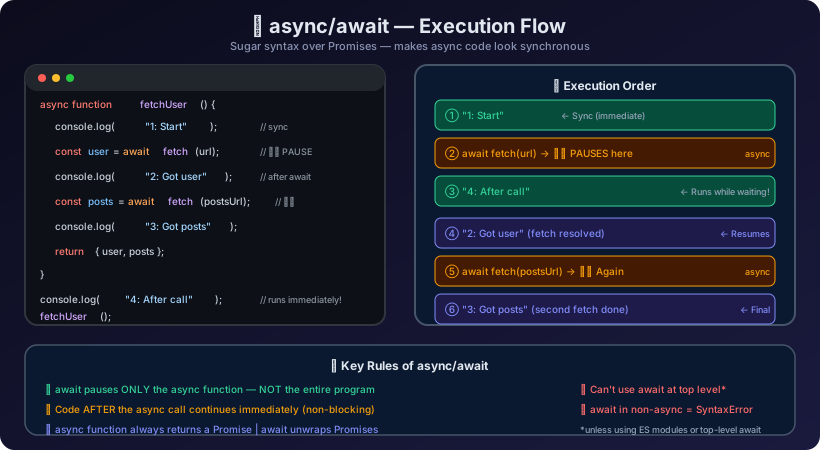
How async/await Works Internally
Key insight: await does NOT block the JavaScript thread. It suspends only that async function, while the rest of the program keeps running.
Basic Syntax
The async Keyword
An async function always returns a Promise, even if you return a plain value.
Promise { 42 }
42
The await Keyword
await can only be used inside an async function. It pauses the function until the Promise resolves.
This runs BEFORE the async function resumes!
Got value: 7
Final result: 14
Step-by-Step Execution Tracing
A - Start
B - Inside async fn
C - After calling run()
D - After await: hello
E - Resolved: done
Execution trace:
"A - Start"— synchronous, runs immediately"B - Inside async fn"— async function body starts synchronouslyawait Promise.resolve("hello")— function suspends, control returns to caller"C - After calling run()"— outer code continues while fn is paused"D - After await: hello"— microtask resumes the function"E - Resolved: done"— the async function's return value
Error Handling with try/catch
The biggest advantage of async/await over .then().catch() is familiar, clean error handling.
User found: Leanne Graham
Fetch attempt complete
Failed to fetch user: HTTP Error: 404
Fetch attempt complete
Real-World Usage: API Data Fetching
Loading profile for user 1...
✅ User: Leanne Graham (Sincere@april.biz)
✅ Total posts: 10
✅ Comments on latest post: 5
Sequential vs Parallel Execution
This is one of the most important performance concepts with async/await.
Sequential (One After Another)
sequential: ~450ms ← sum of all request times
Parallel (All at Once with Promise.all)
parallel: ~150ms ← only the slowest request time
Rule of thumb: Use await sequentially only when each step depends on the previous one. Use Promise.all when operations are independent.
Common Mistakes ⚠️
Mistake 1: Missing await — Getting a Promise Instead of a Value
// ❌ WRONG: forgot await
async function wrong() {
  const data = fetch("https://jsonplaceholder.typicode.com/posts/1");
  console.log(data); // Promise { <pending> } — NOT the data!
  console.log(data.title); // undefined
}

// ✅ CORRECT: use await
async function correct() {
  const response = await fetch("https://jsonplaceholder.typicode.com/posts/1");
  const data = await response.json();
  console.log(data.title); // "sunt aut facere..."
}
Mistake 2: Using await Outside async Function
// ❌ WRONG: await outside async function (syntax error)
function notAsync() {
  const result = await Promise.resolve(42); // SyntaxError!
  return result;
}

// ✅ CORRECT: mark function as async
async function isAsync() {
  const result = await Promise.resolve(42); // Works!
  return result;
}
Mistake 3: Unhandled Async Errors
// ❌ WRONG: error will be an unhandled rejection
async function dangerousCall() {
  const result = await Promise.reject(new Error("Oops!"));
  return result;
}
dangerousCall(); // UnhandledPromiseRejectionWarning!

// ✅ CORRECT: always catch errors
async function safeCall() {
  try {
    const result = await Promise.reject(new Error("Oops!"));
    return result;
  } catch (err) {
    console.error("Handled:", err.message);
    return null;
  }
}
safeCall();Handled: Oops!
Mistake 4: Sequential await in a Loop (Performance Anti-Pattern)
Interview Questions 🎯
Q1. What is the difference between async/await and Promises?
async/awaitis syntactic sugar built on top of Promises. Internally, everyasyncfunction returns a Promise, andawaitunwraps a Promise's resolved value. The difference is purely syntactic —async/awaitmakes code more readable and error handling cleaner viatry/catch, but the underlying mechanics are identical.
Q2. Does await block the JavaScript thread?
No.awaitsuspends only the *current async function*, not the entire thread. While the async function is paused waiting for a Promise, the JavaScript engine continues executing other code. This is why you see synchronous code after anasynccall run before the awaited value is returned.
Q3. What does an async function return if you return a plain value?
It wraps the value in a resolved Promise automatically.async function f() { return 42; }returnsPromise.resolve(42). If you throw inside an async function, it returnsPromise.reject(error).
Q4. What happens if you forget await before a Promise?
You get the Promise object itself (inpendingstate), not the resolved value.const data = fetch(url)gives you a Promise, not the response. Always useawaitor.then()to extract the value.
Q5. How do you handle errors in async/await?
Usetry/catch/finallyblocks. Thecatchblock catches both synchronous throws and rejected Promises. Thefinallyblock always runs, making it perfect for cleanup like hiding loading spinners.
Q6. How do you run multiple async operations in parallel with async/await?
UsePromise.all():const [a, b] = await Promise.all([fetchA(), fetchB()]). This starts both requests simultaneously and waits for both to complete, instead of running them one after the other.
Q7. Can you use await at the top level (outside any function)?
In modern JavaScript (ES2022+), yes — top-level await is supported in ES Modules. In older environments or CommonJS, you must wrap code in anasyncfunction:(async () => { await someCall(); })().
Q8. What is the execution order of async/await with other async operations?
1. Synchronous code runs first. 2. await suspends the async function and returns control. 3. Remaining synchronous code runs. 4. Microtask queue (Promise callbacks) runs. 5. Macrotask queue (setTimeout) runs.Key Takeaways 📌
asyncfunctions always return a Promiseawaitcan only be used insideasyncfunctions (or top-level in ES Modules)awaitsuspends the function, not the entire thread- Use
try/catchfor error handling — it catches both sync throws and Promise rejections - Use
Promise.all()for parallel operations; sequentialawaitis for dependent operations - Forgetting
awaitgives you a Promise object, not the resolved value async/awaitis just cleaner syntax — it uses the same Promise machinery underneath
Quick Reference
Continue the lesson path