JavaScript Notes
Learn all JavaScript data types: string, number, boolean, null, undefined, BigInt, Symbol, and objects. Includes typeof, type checking, memory model & interview Q&A.
Every value in JavaScript has a type. Understanding data types is the single most important foundational concept in JavaScript — it explains why "5" + 3 gives "53" instead of 8, why null == undefined is true, and how memory is managed differently for objects vs numbers.
Real World Analogy
Think of data types like different types of containers in a kitchen:
- A glass (string) holds liquid text
- A weight scale (number) holds numeric values
- A light switch (boolean) is only ON or OFF
- An empty shelf (null) is intentionally left empty
- A shelf that hasn't been set up yet (undefined) — it exists but has no content
- A box with many items (object/array) holds multiple things at once
Each container is used for a specific purpose, and mixing them up causes confusion — just like JavaScript type errors!
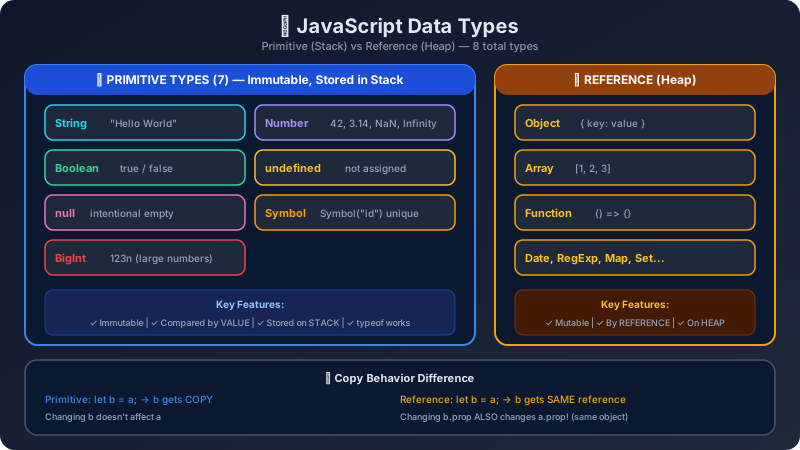
The Two Categories: Primitive vs Reference
Memory Model: Stack vs Heap
What this means practically:
// Primitives: copy by VALUE
let a = 10;
let b = a;  // b gets a COPY of 10
b = 20;
console.log(a); // 10 — a is NOT affected
console.log(b); // 20

// Objects: copy by REFERENCE
let obj1 = { score: 100 };
let obj2 = obj1;  // obj2 points to the SAME object
obj2.score = 999;
console.log(obj1.score); // 999 — obj1 IS affected!10 20 999
All 7 Primitive Data Types in Detail
1. String
A string is a sequence of characters enclosed in single quotes ', double quotes ", or backticks ` ``.
const firstName = "Rahul";
const lastName = 'Sharma';
const greeting = `Hello, ${firstName} ${lastName}!`; // Template literal

console.log(greeting);
console.log(typeof greeting);
console.log(greeting.length);Hello, Rahul Sharma! string 19
2. Number
JavaScript has only one number type for both integers and decimals. It also includes special values: NaN (Not a Number) and Infinity.
const price = 499;
const rating = 4.5;
const result = "hello" * 2; // Invalid math → NaN
const big = 1 / 0;          // Division by zero → Infinity

console.log(price, rating);
console.log(result);
console.log(big);
console.log(typeof result);499 4.5 NaN Infinity number
⚠️ Surprise:typeof NaN === "number"istrue! NaN is technically of the number type even though it means "not a number."
3. Boolean
A boolean has only two values: true or false. It's the foundation of all conditionals and logic.
const isLoggedIn = true;
const hasPremium = false;

if (isLoggedIn && !hasPremium) {
  console.log("Show upgrade prompt");
}
console.log(typeof isLoggedIn);Show upgrade prompt boolean
4. Null
null represents an intentionally empty value — a developer explicitly sets something to null to say "this has no value on purpose."
let selectedUser = null; // No user selected yet
console.log(selectedUser);
console.log(typeof selectedUser); // ⚠️ Famous JS bug: says "object"!null object
⚠️typeof null === "object"is a known JavaScript bug from 1995 that was never fixed to avoid breaking the web.nullis NOT an object!
5. Undefined
undefined means a variable has been declared but not yet assigned a value. JavaScript itself sets this automatically.
let score;
console.log(score);         // undefined — declared but not assigned
console.log(typeof score);  // "undefined"

function greet(name) {
  console.log(name); // undefined if called without argument
}
greet();undefined undefined undefined
6. Symbol (ES6)
A Symbol is a guaranteed-unique primitive value, used mainly as object property keys to avoid name collisions.
const id1 = Symbol("userID");
const id2 = Symbol("userID");
console.log(id1 === id2);   // false — every Symbol is unique
console.log(typeof id1);false symbol
7. BigInt (ES2020)
BigInt lets you work with integers larger than Number.MAX_SAFE_INTEGER (2^53 - 1). Add n suffix to create one.
const bigNumber = 9007199254740993n; // larger than MAX_SAFE_INTEGER
const normal = 9007199254740993;     // loses precision!

console.log(bigNumber);
console.log(normal);
console.log(typeof bigNumber);9007199254740993n 9007199254740992 bigint
Reference Types: Object, Array, Function
Object
const student = {
  name: "Priya",
  age: 20,
  city: "Mumbai"
};
console.log(student.name);
console.log(typeof student);Priya object
Array
JavaScript
object
true
Function
function add(a, b) {
  return a + b;
}
console.log(add(3, 4));
console.log(typeof add); // "function" — special subtype of object7 function
The typeof Operator – Quick Reference
Comparison Table: Primitive vs Reference
| Feature | Primitive | Reference (Object/Array) |
|---|---|---|
| Stored in | Stack | Heap |
| Copied by | Value | Reference |
| Mutable | No (immutable) | Yes (mutable) |
| Comparison | By value | By reference (memory address) |
| Examples | string, number, boolean | object, array, function |
Type Checking Best Practices
true
false
false
true
true
false
Common Mistakes
❌ Mistake 1: Using typeof to check for arrays
// ✅ CORRECT
if (Array.isArray(arr)) {
  console.log("it's an array");
}
❌ Mistake 2: Forgetting that typeof null === "object"
// ❌ WRONG
function processUser(user) {
  if (typeof user === "object") {
    console.log(user.name); // will CRASH if user is null!
  }
}
processUser(null); // TypeError: Cannot read properties of null// ✅ CORRECT
function processUser(user) {
if (user !== null && typeof user === "object") {
console.log(user.name);
}
}❌ Mistake 3: Comparing objects with ===
// ❌ UNEXPECTED behavior
const a = { x: 1 };
const b = { x: 1 };
console.log(a === b); // false! Different references in memory// ✅ To compare object contents, use JSON.stringify (for simple objects)
console.log(JSON.stringify(a) === JSON.stringify(b)); // trueKey Takeaways
- JavaScript has 7 primitive types: string, number, boolean, null, undefined, symbol, bigint
- Primitives are stored in the stack and copied by value
- Objects, arrays, and functions are reference types stored in the heap
typeof null === "object"is a historic bug —nullis NOT an objecttypeof NaN === "number"is true — useNumber.isNaN()to check for NaN- Use
Array.isArray()to check if something is an array, nottypeof - JavaScript is dynamically typed — a variable can change its type at runtime
Interview Questions & Answers
Q1. How many data types does JavaScript have?
Answer: JavaScript has 8 data types total: 7 primitives (string, number, boolean, null, undefined, symbol, bigint) and 1 reference type (object — which includes plain objects, arrays, and functions as subtypes).
Q2. What is the difference between primitive and reference types?
Answer: Primitives are stored directly in the stack and are copied by value (changing a copy doesn't affect the original). Reference types are stored in the heap and variables hold a reference (pointer) to the memory location. Changing one reference changes the underlying object for all references pointing to it.
Q3. Why does typeof null return "object"?
Answer: This is a well-known bug in JavaScript from its first version (1995). The original implementation stored type tags for values, and null was represented with the same bit pattern as objects (all zeros). By the time it was recognized as a bug, too much of the web depended on this behavior to fix it without breaking things.
Q4. What is NaN and what type is it?
Answer: NaN stands for "Not a Number" and is returned when a mathematical operation produces an invalid/undefined result (like "hello" * 2). Its typeof is "number", which is counterintuitive. Use Number.isNaN(value) to reliably check for NaN (not the global isNaN() which coerces first).
Q5. How do you check if a value is an array in JavaScript?
Answer: Use Array.isArray(value). Do not use typeof value === "array" (that never works) or value instanceof Array (unreliable across iframes/realms). Array.isArray() is the standard, cross-realm safe method.
Q6. What is the difference between null and undefined?
Answer: undefined is what JavaScript automatically assigns to a declared-but-not-yet-assigned variable. null is what a developer explicitly assigns to say "this is intentionally empty." Both represent "no value" but at different layers — engine vs developer intent.
Q7. What is dynamic typing in JavaScript?
Answer: Dynamic typing means variable types are determined at runtime, not at declaration time. In JavaScript, you can write let x = 5; x = "hello"; — the variable x changes from number to string. This is the opposite of statically typed languages like TypeScript or Java where types are fixed at compile time.
Q8. When would you use Symbol in JavaScript?
Answer: Symbols are used when you need a guaranteed-unique property key on an object — most commonly in library/framework code to avoid key name collisions with user-defined properties. They are also used to implement well-known behaviors like Symbol.iterator for custom iterables.
Continue the lesson path