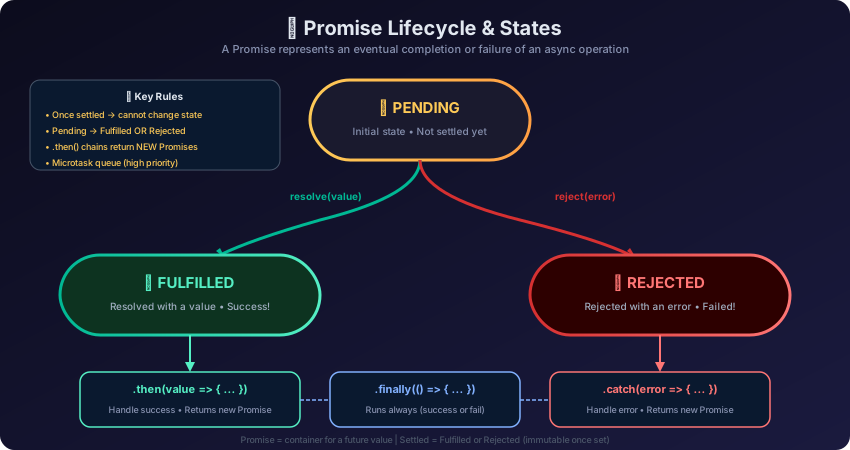
Master JavaScript Promises from creation to advanced chaining patterns. Learn Promise states, resolve/reject, .then/.catch/.finally, microtask queue behavior, and real-world API patterns with fetch.
Introduction
A Promise is an object representing the eventual completion or failure of an asynchronous operation. Introduced in ES6 (2015), Promises solve the fundamental problems of callbacks: callback hell, inversion of control, and fragile error handling.
Think of a Promise like ordering food at a restaurant: you place your order (create a Promise), receive a receipt/ticket (the Promise object), and eventually either get your food (fulfilled) or learn it's unavailable (rejected). You don't stand at the kitchen waiting — you're free to do other things.
Fulfilled: Operation completed successfully, has a result value
Rejected: Operation failed, has a reason (error)
Settled: Either fulfilled or rejected (not pending)
Creating Promises
The Promise Constructor
Example
// Basic Promise creation
const myPromise = new Promise(function(resolve, reject) {
// This function is called the "executor"
// It runs IMMEDIATELY when the Promise is created
setTimeout(() => {
const success = true;
if (success) {
resolve("Operation completed!"); // Fulfills the promise
} else {
reject(new Error("Operation failed!")); // Rejects the promise
}
}, 1000);
});
// Consuming the promise
myPromise
.then(result => console.log("Success:", result))
.catch(error => console.error("Error:", error.message));
Output
Success: Operation completed!
The Executor Runs Immediately
Example
// IMPORTANT: The executor function runs synchronously!
console.log("1. Before Promise");
const promise = new Promise((resolve, reject) => {
console.log("2. Inside executor (runs immediately!)");
resolve("done");
});
console.log("3. After Promise creation");
promise.then(value => {
console.log("4. Then handler:", value);
});
console.log("5. After .then registration");
Output
1. Before Promise
2. Inside executor (runs immediately!)
3. After Promise creation
5. After .then registration
4. Then handler: done   ← Microtask, runs after all sync code
Why does "5" print before "4"? The .then() handler is a microtask — it goes into the microtask queue and runs after all synchronous code completes.
Consuming Promises: .then(), .catch(), .finally()
.then() — Handle Fulfillment
Example
const promise = new Promise((resolve, reject) => {
setTimeout(() => resolve(42), 1000);
});
// Success handler
promise.then(value => {
console.log("Value:", value); // "Value: 42"
});
// .then() ALWAYS returns a new Promise
const promise2 = promise.then(value => {
return value * 2; // Return value becomes the next promise's resolved value
});
promise2.then(value => {
console.log("Doubled:", value); // "Doubled: 84"
});
Output
Value: 42
Doubled: 84
.catch() — Handle Rejection
Example
const failingPromise = new Promise((resolve, reject) => {
setTimeout(() => {
reject(new Error("Something went wrong!"));
}, 1000);
});
failingPromise.catch(error => {
console.error("Caught:", error.message); // "Caught: Something went wrong!"
});
// .catch() also returns a Promise - recovery is possible!
const recovered = failingPromise
.catch(error => {
console.log("Handling error:", error.message);
return "default value"; // Recovery value
})
.then(value => {
console.log("Recovered with:", value); // "Recovered with: default value"
});
Output
Caught: Something went wrong!
Handling error: Something went wrong!
Recovered with: default value
.finally() — Always Execute (Cleanup)
Example
function fetchUserData(userId) {
console.log("Loading...");
return fetch(`https://jsonplaceholder.typicode.com/users/${userId}`)
.then(response => {
if (!response.ok) throw new Error(`HTTP ${response.status}`);
return response.json();
})
.then(user => {
console.log("User:", user.name);
return user;
})
.catch(error => {
console.error("Failed:", error.message);
throw error; // Re-throw to keep the rejection
})
.finally(() => {
console.log("Loading complete (success or failure)");
// Hide loading spinner, re-enable button, etc.
});
}
fetchUserData(1);
Output
Loading...
User: Leanne Graham
Loading complete (success or failure)
Promise Chaining
The most powerful feature of Promises is chaining — each .then() returns a new Promise, allowing sequential async operations without nesting.
// ❌ Anti-pattern: Wrapping a Promise in another Promise
function fetchUser(id) {
return new Promise((resolve, reject) => { // ← Unnecessary!
fetch(`https://jsonplaceholder.typicode.com/users/${id}`)
.then(r => r.json())
.then(resolve)
.catch(reject);
});
}
// ✅ Correct: Just return the fetch Promise
function fetchUser(id) {
return fetch(`https://jsonplaceholder.typicode.com/users/${id}`)
.then(r => r.json());
}
Interview Questions 🎯
Q1. What is a Promise in JavaScript?
A Promise is an object representing the eventual completion or failure of an asynchronous operation. It has three states: pending (initial), fulfilled (success), and rejected (failure). Once settled, a Promise cannot change state. Promises were introduced in ES6 to solve callback hell and provide better error handling.
Q2. What are the three states of a Promise?
Pending: Initial state, the async operation is in progress. Fulfilled: The operation completed successfully — the Promise has a value and .then() handlers run. Rejected: The operation failed — the Promise has an error reason and .catch() handlers run. Together, fulfilled and rejected are called "settled."
Q3. What is the difference between .then() and .catch()?
.then(onFulfilled, onRejected) handles both success and failure. .catch(onRejected) is shorthand for .then(null, onRejected) — it handles only rejections. Using .catch() at the end of a chain catches any rejection in the entire chain, not just the last step.
Q4. What does .finally() do?
.finally(callback) executes the callback regardless of whether the Promise fulfilled or rejected. It doesn't receive the value/error as an argument. Perfect for cleanup: hiding loading spinners, closing database connections, re-enabling buttons.
Q5. What is Promise chaining?
Since .then() always returns a new Promise, you can chain multiple .then() calls. Each returns a new Promise whose value is whatever is returned from the handler. This creates flat, readable sequential async code without nesting.
Q6. When does a .then() handler run? Synchronously or asynchronously?
Always asynchronously — even for already-settled Promises. .then() callbacks go into the microtask queue and run after all synchronous code completes. This ensures consistent behavior regardless of whether the Promise resolved synchronously or asynchronously.
Q7. What is an "unhandled promise rejection"?
When a Promise is rejected but has no .catch() handler (or .then(null, onRejected)) attached, it becomes an unhandled rejection. Modern environments throw warnings or errors for this. In Node.js 15+, it crashes the process. Always attach .catch() to Promise chains.
Q8. What's the difference between Promise.resolve(value) and new Promise((resolve) => resolve(value))?
They're equivalent in behavior — both create an immediately-resolved Promise. Promise.resolve(value) is a shorthand factory method. Use it when you need to normalize a value: if value is already a Promise, Promise.resolve() returns it as-is; if it's a plain value, it wraps it.
Key Takeaways 📌
A Promise is a placeholder for a future value — always pending, fulfilled, or rejected
The executor function runs synchronously; .then() callbacks run as microtasks
.then() always returns a new Promise — this enables chaining
Chain.then() calls for sequential operations; never nest them
Always add .catch() at the end of chains — unhandled rejections are serious bugs
.finally() runs after success OR failure — perfect for cleanup
Return Promises from .then() to chain properly — the chain waits for nested Promises
Promise.resolve() and Promise.reject() create instantly-settled Promises