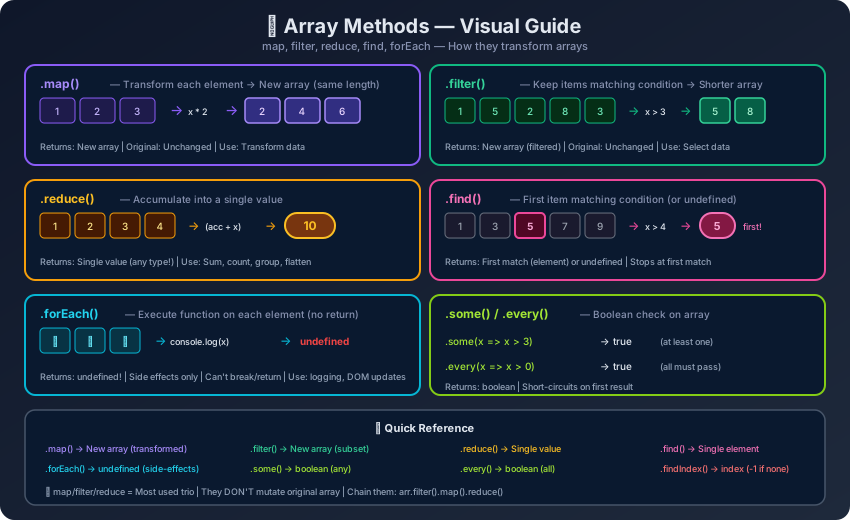
JavaScript Array Methods - Complete Reference Guide with Examples
Comprehensive guide to all JavaScript array methods: push, pop, splice, slice, sort, flat, map, filter, reduce, ES2023 methods with examples, outputs, and performance tips.
JavaScript arrays come with a rich set of built-in methods for adding, removing, searching, transforming, and iterating over elements. This guide covers every array method with syntax, examples, and outputs.
Adding and Removing Elements
Example
┌────────────────────────────────────────────────────────────┐
│ ARRAY: Adding & Removing Elements │
│ │
│ unshift() ──→ [ elem1, elem2, elem3, ..., elemN ] ←── push() │
│ shift() ←── [ elem1, elem2, elem3, ..., elemN ] ──→ pop() │
│ │
│ ┌─ splice(index, deleteCount, ...items) ─┐ │
│ │ Can INSERT, DELETE, or REPLACE at any │ │
│ │ position within the array │ │
│ └─────────────────────────────────────────┘ │
└────────────────────────────────────────────────────────────┘
push() — Add to End
Example
// Syntax: arr.push(element1, element2, ..., elementN)
// Returns: new length of the array
// Mutates: YES
const fruits = ["apple", "banana"];
const newLength = fruits.push("cherry", "date");
console.log(fruits); // ["apple", "banana", "cherry", "date"]
console.log(newLength); // 4
// Push an array (adds as single element)
fruits.push(["elderberry", "fig"]);
console.log(fruits); // ["apple", "banana", "cherry", "date", ["elderberry", "fig"]]
// Push spread (adds individual elements)
const more = ["grape", "honeydew"];
fruits.push(...more);
console.log(fruits.length); // 7
┌────────────────────────────────────────────────────────────────┐
│ slice() vs splice() — Key Differences │
├────────────────────────────┬───────────────────────────────────┤
│ slice(start, end) │ splice(start, delCount, items) │
├────────────────────────────┼───────────────────────────────────┤
│ Does NOT mutate original │ MUTATES original array │
│ end is EXCLUSIVE │ deleteCount = how many to remove │
│ Returns extracted portion │ Returns DELETED elements │
│ Only 2 params (start/end) │ Can accept unlimited new items │
│ Used for copying/reading │ Used for insert/delete/replace │
└────────────────────────────┴───────────────────────────────────┘
concat() — Merge Arrays (Non-Mutating)
Example
// Syntax: arr.concat(value1, value2, ..., valueN)
// Returns: new merged array
// Mutates: NO
const a = [1, 2];
const b = [3, 4];
const c = [5, 6];
const merged = a.concat(b, c);
console.log(merged); // [1, 2, 3, 4, 5, 6]
console.log(a); // [1, 2] — unchanged
// Concat with values
const result = a.concat(3, 4, [5, 6]);
console.log(result); // [1, 2, 3, 4, 5, 6]
// Only flattens one level
const deep = a.concat([[3, 4]]);
console.log(deep); // [1, 2, [3, 4]]
┌─────────────────────────────────────────────────────────────────┐
│ SEARCHING METHODS — Decision Tree │
│ │
│ Need to know if value EXISTS? │
│ └─→ includes(value) → boolean │
│ │
│ Need the INDEX of a value? │
│ └─→ indexOf(value) / lastIndexOf(value) → number (-1 if none) │
│ │
│ Need the ELEMENT matching a condition? │
│ └─→ find(fn) → element | undefined │
│ │
│ Need the INDEX matching a condition? │
│ └─→ findIndex(fn) → number (-1 if none) │
│ │
│ Need ALL elements matching a condition? │
│ └─→ filter(fn) → new array │
└─────────────────────────────────────────────────────────────────┘
// ❌ WRONG — wanted to copy but used splice (which mutates)
const arr = [1, 2, 3, 4, 5];
const portion = arr.splice(1, 3); // Deletes elements!
console.log(arr); // [1, 5] — original is modified!
console.log(portion); // [2, 3, 4]
Output
[1, 5]
[2, 3, 4]
Example
// ✅ CORRECT — use slice() to extract without mutating
const arr = [1, 2, 3, 4, 5];
const portion = arr.slice(1, 4); // end is exclusive
console.log(arr); // [1, 2, 3, 4, 5] — unchanged!
console.log(portion); // [2, 3, 4]
Output
[1, 2, 3, 4, 5]
[2, 3, 4]
Mistake 4: fill() with Object References
Example
// ❌ WRONG — all elements share the SAME object reference
const grid = new Array(3).fill([]);
grid[0].push("hello");
console.log(grid); // [["hello"], ["hello"], ["hello"]] — all affected!
Output
[["hello"], ["hello"], ["hello"]]
Example
// ✅ CORRECT — create unique objects with Array.from()
const grid = Array.from({ length: 3 }, () => []);
grid[0].push("hello");
console.log(grid); // [["hello"], [], []] — only first changed
Output
[["hello"], [], []]
Mistake 5: Using indexOf() to Find NaN
Example
// ❌ WRONG — indexOf uses strict equality, NaN !== NaN
const arr = [1, NaN, 3];
console.log(arr.indexOf(NaN)); // -1 (not found!)
console.log(arr.indexOf(NaN) !== -1); // false — thinks NaN isn't there
Output
-1
false
Example
// ✅ CORRECT — use includes() which handles NaN properly
const arr = [1, NaN, 3];
console.log(arr.includes(NaN)); // true ✅
// Or use findIndex with Number.isNaN
console.log(arr.findIndex(Number.isNaN)); // 1
Output
true
1
Mistake 6: Forgetting that sort() Mutates
Example
// ❌ WRONG — accidentally mutates state (e.g., in React)
const state = [5, 3, 8, 1];
const sorted = state.sort((a, b) => a - b);
console.log(state === sorted); // true — same array!
console.log(state); // [1, 3, 5, 8] — state is mutated!
Output
true
[1, 3, 5, 8]
Example
// ✅ CORRECT — use toSorted() or spread + sort
const state = [5, 3, 8, 1];
const sorted = state.toSorted((a, b) => a - b); // ES2023
// OR: const sorted = [...state].sort((a, b) => a - b);
console.log(state); // [5, 3, 8, 1] — unchanged!
console.log(sorted); // [1, 3, 5, 8]
Output
[5, 3, 8, 1]
[1, 3, 5, 8]
Mistake 7: Using map() When You Don't Need the Return Value
Example
// ❌ WRONG — map creates a new array that's wasted
const users = ["Alice", "Bob", "Charlie"];
users.map(user => console.log(user)); // Creates unused array of undefineds
Output
Alice
Bob
Charlie
Example
// ✅ CORRECT — use forEach for side effects
const users = ["Alice", "Bob", "Charlie"];
users.forEach(user => console.log(user)); // No wasted array
Output
Alice
Bob
Charlie
🎯 Key Takeaways
Mutating vs Non-Mutating — Know which methods mutate (sort, reverse, splice, push, pop, shift, unshift, fill, copyWithin) vs which return new arrays (slice, map, filter, reduce, concat, flat, flatMap)
ES2023 Immutable Alternatives — toSorted(), toReversed(), toSpliced(), with() provide safe, non-mutating versions — prefer these in React/Redux/state management
sort() is Lexicographic by Default — Always pass (a, b) => a - b for numbers; default sort converts to strings first
includes() vs indexOf() for NaN — includes() handles NaN correctly; indexOf() cannot find NaN because NaN !== NaN
push/pop are O(1), shift/unshift are O(n) — In performance-critical code, prefer operations at the end of arrays
Method Chaining — filter → map → sort → slice creates clean, readable data pipelines; each step returns a new array
splice() vs slice() — splice = "surgery" (mutates, can add/remove/replace); slice = "photocopy" (never mutates, just extracts)
fill() Object Trap — new Array(n).fill({}) shares ONE reference; use Array.from({length: n}, () => ({})) for independent objects
flatMap() > map().flat() — flatMap() is more efficient (single pass) and is perfect for mapping that also filters or expands
find() vs filter() — find() stops at first match (early exit); filter() always scans everything — use find() when you only need one result
❓ Interview Questions
Q1. What's the difference between splice() and slice()?
splice()mutates the original array — it can add, remove, or replace elements and returns the deleted elements. slice()never mutates — it returns a new array containing a portion of the original. Remember: splice = change, slice = copy.
Q2. How does sort() work without a compare function?
It converts elements to strings and sorts lexicographically (Unicode code point order). [10, 9, 2, 21] becomes [10, 2, 21, 9] because "10" < "2" (compares character by character: "1" < "2"). Always provide a compare function for numbers.
Q3. What is the difference between find() and filter()?
find() returns the first matching element (or undefined) and stops early — O(1) best case. filter() returns an array of all matches and always scans the entire array — O(n). Use find() when you need just one result.
Q4. How do you shuffle an array randomly?
Example
// Fisher-Yates shuffle — O(n), unbiased
function shuffle(arr) {
const result = [...arr];
for (let i = result.length - 1; i > 0; i--) {
const j = Math.floor(Math.random() * (i + 1));
[result[i], result[j]] = [result[j], result[i]];
}
return result;
}
console.log(shuffle([1, 2, 3, 4, 5])); // e.g., [3, 1, 5, 2, 4]
Output
[3, 1, 5, 2, 4]
Q5. What is the difference between includes() and indexOf()?
includes() returns a boolean and correctly handles NaN (uses SameValueZero algorithm). indexOf() returns an index (or -1) and cannot find NaN because it uses strict equality (===), and NaN !== NaN.
Q6. What are ES2023 immutable array methods?
toSorted(), toReversed(), toSpliced(), and with() — non-mutating versions of sort(), reverse(), splice(), and index assignment. They all return new arrays, making them ideal for functional programming and state management (React, Redux).
Q7. When should you prefer flatMap() over map().flat()?
flatMap() is more efficient because it combines mapping and flattening in a single pass. Use it when your map function returns arrays that need to be flattened by one level. It's also great for simultaneously filtering and transforming (return [] to exclude, [value] to include).
📝 FAQ
Q: Can I use forEach() with break or return to stop early?
No. forEach() always iterates over every element — return inside the callback only skips that single iteration (like continue in a for loop). To break early, use a regular for loop, for...of with break, or methods like find()/some()/every() that have built-in short-circuiting.
Example
// ❌ Cannot break out of forEach
[1, 2, 3, 4, 5].forEach(n => {
if (n === 3) return; // Only skips this iteration
console.log(n);
});
// ✅ Use for...of to break early
for (const n of [1, 2, 3, 4, 5]) {
if (n === 3) break;
console.log(n);
}
Output
1
2
4
5
1
2
Q: What's the difference between Array.from() and the spread operator [...] for creating arrays?
Both create new arrays, but Array.from() is more powerful: it accepts array-like objects (with .length property), iterables, and a mapping function as the second argument. Spread ([...]) only works with iterables. Array.from({length: 5}, (_, i) => i) creates [0, 1, 2, 3, 4] — spread can't do this.
Example
// Array.from with array-like object (has .length)
console.log(Array.from({ length: 3 }, (_, i) => i * 2)); // [0, 2, 4]
// Spread only works with iterables
console.log([..."hello"]); // ["h", "e", "l", "l", "o"]
// [...{length: 3}] → TypeError: not iterable
Output
[0, 2, 4]
["h", "e", "l", "l", "o"]
Q: Does sort() guarantee stable sorting in JavaScript?
Yes! As of ECMAScript 2019 (ES10), Array.prototype.sort() is required to be stable — elements that compare equal retain their original relative order. All modern browsers (Chrome 70+, Firefox 3+, Safari 10.1+, Node.js 12+) implement stable sort.
Use reduce() for transforming an array into a single value (sum, product, grouped object, flattened array). Use a for loop when: (1) you need early termination, (2) the logic is complex with multiple accumulators, or (3) readability suffers. A common guideline: if your reduce() callback is more than 3 lines, consider a for loop instead.
Example
// ✅ Good use of reduce — simple accumulation
const sum = [1, 2, 3, 4, 5].reduce((acc, n) => acc + n, 0);
console.log(sum); // 15
// ✅ Good use of reduce — grouping
const words = ["hello", "hi", "hey", "world", "wow"];
const grouped = words.reduce((acc, word) => {
const key = word[0];
(acc[key] = acc[key] || []).push(word);
return acc;
}, {});
console.log(grouped); // { h: ["hello", "hi", "hey"], w: ["world", "wow"] }