JavaScript Notes
HubYour First JavaScript Program — Hello World & Beyond Complete Guide 2026History of JavaScript — Complete Timeline from 1995 to 2026How JavaScript Runs — Complete Guide to Execution, Call Stack & Event LoopJavaScript Engine Explained — V8, JIT Compilation & How Code Gets FastJavaScript Use Cases — 15 Things You Can Build with JavaScript (2026)JavaScript vs Other Languages — Complete Comparison Guide 2026What is JavaScript? Complete BeginnerWhy Learn JavaScript in 2026? Career, Salary, Scope & Benefits GuideJavaScript Break Statement Tutorial – Complete Guide with ExamplesJavaScript Break and Continue Statements – Complete Guide with ExamplesJavaScript Continue Statement Tutorial – Skip Iterations with ExamplesJavaScript Do While Loop Tutorial – Execute at Least Once with ExamplesJavaScript Do-While Loop Tutorial – Complete Guide with ExamplesJavaScript For Loop Tutorial – Complete Guide with ExamplesJavaScript If Statement Tutorial – Conditional Logic with ExamplesJavaScript If Else Statement Tutorial – Complete Guide with ExamplesJavaScript If Statement Tutorial – Complete Guide with ExamplesJavaScript Nested If Statement Tutorial – Multi-Level Conditions with ExamplesNested Loops in JavaScriptJavaScript Control Flow Practice Programs – 20+ Exercises with SolutionsJavaScript Switch Statement Tutorial – Case Matching with ExamplesSwitch Statement in JavaScriptJavaScript While Loop Tutorial – Complete Guide with ExamplesJavaScript Arrow Functions Tutorial – Syntax, Use Cases & this BindingJavaScript Callback Functions Explained – Synchronous & AsynchronousJavaScript Closures Explained – Lexical Scope, Private State & MemoryJavaScript Function Declaration Tutorial – Hoisting, Syntax & ScopeJavaScript Function Expression Tutorial – Anonymous, Named & AssignedJavaScript Higher Order Functions Tutorial – map, filter, reduce & Custom HOFsJavaScript IIFE Explained – Immediately Invoked Function ExpressionJavaScript Functions Practice Programs – 20+ Exercises with SolutionsJavaScript Recursion Tutorial – Call Stack, Base Case & Recursive PatternsJavaScript Array Basics - Complete BeginnerJavaScript Array Methods - Complete Reference Guide with ExamplesJavaScript Array Programs - 20+ Practice Problems with SolutionsJavaScript Arrays Basics - Complete Guide with Examples & DiagramsJavaScript Array filter() Method - Complete Tutorial with ExamplesJavaScript filter() Method — Complete Guide with Examples 2026JavaScript Array find() Method - Complete Tutorial with ExamplesJavaScript find() & findIndex() — Complete Guide 2026JavaScript Array map() Method - Complete Tutorial with ExamplesJavaScript map() Method — Transform Arrays Complete Guide 2026JavaScript map() vs forEach() - Key Differences with ExamplesJavaScript Array push() and pop() - Complete Tutorial with ExamplesJavaScript Array reduce() Method - Complete Tutorial with ExamplesJavaScript reduce() Method — Complete Deep Dive with Examples 2026JavaScript Array shift() and unshift() - Complete Tutorial with ExamplesJavaScript Array sort() Method - Complete Tutorial with ExamplesJavaScript splice() vs slice() - Complete Tutorial with ExamplesJavaScript Object Destructuring - Complete Guide with ExamplesJavaScript Objects - Complete Guide to Object Basics with ExamplesJavaScript Object Methods - Built-in Methods & Custom Methods Complete GuideJavaScript Object Programs - Practice Problems with SolutionsJavaScript Object Properties - Keys, Values, Descriptors & Dynamic PropertiesJavaScript Rest Operator (...) - Parameters, Destructuring & Complete GuideJavaScript Spread Operator (...) - Complete Guide with ExamplesJavaScript this Keyword - Complete Guide with Binding Rules & ExamplesJavaScript String Basics - Complete Guide to Strings with ExamplesJavaScript String Methods - Complete Reference with Examples & OutputJavaScript String Programs - Practice Problems with SolutionsJavaScript String Replacing - replace(), replaceAll() & Regex Patterns GuideJavaScript String Searching Methods - includes, indexOf, startsWith, match GuideJavaScript Template Literals (ES6) - Complete Guide with Tagged TemplatesJavaScript DOM Changing Content - textContent, innerHTML, setAttribute Complete GuideJavaScript DOM Changing Styles - CSS Manipulation, classList & getComputedStyleJavaScript DOM Creating Elements - createElement, appendChild, DocumentFragment GuideJavaScript DOM Introduction - Complete Guide to Document Object ModelJavaScript DOM Traversal - Navigate Parent, Child & Sibling NodesJavaScript DOM Forms - Form Handling, Validation & FormData Complete GuideJavaScript localStorage - Complete Guide to Web Storage APIlocalStorage vs sessionStorage - JavaScript Web Storage Comparison GuideJavaScript DOM Removing Elements - remove(), removeChild() Complete GuideJavaScript DOM Selecting Elements - querySelector, getElementById Complete GuideJavaScript sessionStorage - Complete Guide to Session-Based Web StorageJavaScript Click Event - addEventListener, Event Handler Complete GuideEvent Bubbling in JavaScript – Complete Guide with Examples (2026)Event Capturing in JavaScript – Complete Guide to Capture Phase (2026)Event Delegation in JavaScript – Complete Guide with Examples (2026)JavaScript Event Object – Complete Guide with Examples (2026)JavaScript Form Events – Complete Guide with Examples (2026)JavaScript Keyboard Events – Complete Guide to keydown, keyup & Key Properties (2026)JavaScript Mouse Events – Complete Guide with Examples (2026)JavaScript Async Await - Complete Guide with Examples & Error HandlingJavaScript Call Stack - Complete Guide with Visual Diagrams & ExamplesJavaScript Callback Queue (Task Queue) - Complete Guide with DiagramsJavaScript Callbacks - Complete Guide with Callback Hell & PatternsJavaScript Event Loop - Complete Guide with Visual Diagrams & ExamplesJavaScript Fetch API - Complete Guide with Examples, Error Handling & Async/AwaitJSON in JavaScript - Complete Guide: Parse, Stringify, Fetch & Error HandlingJavaScript Promise.all, Promise.race, Promise.any, Promise.allSettled — Complete Guide 2026JavaScript Promises - Complete Guide with Chaining, Error Handling & Event LoopSynchronous vs Asynchronous JavaScript — Complete Explanation 2026JavaScript Web APIs - Complete Guide: setTimeout, fetch, DOM Events & MoreClosures in JavaScript — Complete Guide with Examples 2026Hoisting in JavaScript — Complete Guide with Examples 2026Prototype in JavaScript — Complete Guide with Examples 2026Scope in JavaScript — Complete Guide with Examples 2026Browser Object Model (BOM) in JavaScript — Complete GuideCanvas API in JavaScript — Complete Drawing & Animation GuideDrag and Drop API in JavaScript — Complete TutorialGeolocation API in JavaScript — Get User Location TutorialHistory API in JavaScript — SPA Routing & pushState GuideNotification API in JavaScript — Push Notifications TutorialService Workers in JavaScript — Offline, Caching & PWA GuideWeb Storage API in JavaScript — localStorage & sessionStorage GuideWeb Workers in JavaScript — Multithreading & Background Tasks GuideJavaScript Interview — Behavioral Questions and Soft Skills Guide 2026Common JavaScript Interview Mistakes — What to Avoid 2026JavaScript Interview Tips — Strategy and Preparation Guide 2026JavaScript Mock Interview — Practice Questions with Solutions 2026JavaScript System Design — Frontend Architecture Interview Guide 2026JavaScript apply() Method - Complete Guide with ExamplesJavaScript bind() Method - Complete Guide with ExamplesJavaScript call() Method - Complete Guide with ExamplesJavaScript call() vs apply() vs bind() - Complete Comparison GuideJavaScript Currying - Complete Guide with ExamplesJavaScript Debounce - Complete Guide with Timeline DiagramsJavaScript Execution Context - Complete Guide with Stack DiagramsJavaScript Garbage Collection - Memory Lifecycle & Mark-and-Sweep GuideJavaScript Generators - Complete Guide with yield and IterationJavaScript Hoisting - Complete Guide with var, let, const & FunctionsJavaScript Iterators - Complete Guide with Iterator ProtocolJavaScript Lexical Scope - Complete Guide with Scope Chain DiagramsJavaScript Memory Management - Complete Guide with Lifecycle DiagramsJavaScript Modules - Complete Guide with import export ExamplesJavaScript Scope - Complete Guide with var, let, const & Scope ChainJavaScript Symbols - Complete Guide with Well-Known SymbolsJavaScript Throttle - Complete Guide with Timeline DiagramsJavaScript Comments Complete Guide – Single Line, Multi-line & JSDoc with ExamplesJavaScript Data Types Complete Guide – Primitives, Objects & typeof with ExamplesJavaScript Input and Output Complete Guide – console.log, prompt, alert & DOM with ExamplesJavaScript Keywords Complete Guide – Reserved Words List with Examples for BeginnersJavaScript null vs undefined – Complete Guide with Differences, Examples & Interview Q&AJavaScript Operators Complete Guide – Arithmetic, Comparison, Logical & More with ExamplesJavaScript Strict Mode Complete Guide – JavaScript Type Conversion Complete Guide – Explicit & Implicit Coercion with ExamplesJavaScript var vs let vs const – Complete Guide with Scope, Hoisting & Best PracticesJavaScript Variables Complete Guide – Declaration, Naming Rules & Memory Model for BeginnersDeque (Double-Ended Queue) in JavaScript — Complete GuideLinked List in JavaScript — Nodes, Pointers & Operations GuideJavaScript Map — Key-Value Data Structure Complete GuideJavaScript Numbers — IEEE 754, Precision, and Number Methods GuidePriority Queue in JavaScript — Min Heap Implementation GuideQueue Data Structure in JavaScript — FIFO, Enqueue & Dequeue ExplainedJavaScript Set — Unique Values Data Structure GuideSorting Algorithms in JavaScript — Bubble, Merge, Quick Sort GuideStack Data Structure in JavaScript — LIFO, Push, Pop ExplainedJavaScript Typed Arrays — ArrayBuffer, Int32Array, Float64Array GuideJavaScript WeakMap — Weak References, Memory Management GuideJavaScript WeakSet — Complete Guide with Examples 2026Applications of JavaScript — Where JS is Used in 2026 Complete GuideJavaScript Backend Frameworks — Node.js, Express, NestJS Complete Guide 2026JavaScript Frontend Libraries — React, Vue, Angular, Svelte Complete Overview 2026JavaScript Full-Stack Frameworks — Next.js, Remix, Astro Complete Guide 2026JavaScript Career Paths & Jobs — Salary, Roles & Roadmap 2026JavaScript Libraries vs Frameworks — Difference & Examples Complete Guide 2026JavaScript Custom Errors – Extend Error Class, Custom Error Types & instanceofJavaScript Debugging – console Methods, DevTools, Breakpoints & Error Stack TracesJavaScript throw Statement – Throw Errors, Custom Messages & Error TypesJavaScript Try Catch Finally – Error Handling Complete GuideTop 30 JavaScript Closure Interview Questions & Answers 2026Top 30 JavaScript Coding Interview Questions 2026 (With Solutions)Top 25 JavaScript Event Loop Interview Questions & Answers 2026Top 50 JavaScript Interview Questions & Answers 2026Top 30 JavaScript Promise Interview Questions & Answers 202650 Tricky JavaScript Output Questions 2026 (With Answers)Build a JavaScript Calculator - Step by Step Project TutorialBuild a JavaScript Image Carousel - Step by Step Project TutorialBuild a JavaScript Counter Application - Step by Step Project TutorialBuild a JavaScript Digital Clock - Step by Step Project TutorialBuild a Dynamic Resume Builder in JavaScript - Step by Step TutorialBuild a JavaScript Email Validator - Step by Step Project TutorialBuild a JavaScript Employee Database Management App - Step by Step TutorialBuild a JavaScript Expense Tracker - Step by Step Project TutorialBuild a GitHub Profile Search App in JavaScript - Step by Step TutorialBuild a JavaScript Image Slider - Step by Step Project TutorialBuild a JavaScript Multi-Step Progress Bar - Step by Step TutorialBuild JavaScript Nested Chat Comments - Step by Step Project TutorialBuild a JavaScript Notes App - Step by Step Project TutorialBuild a JavaScript OTP Input Field - Step by Step Project TutorialBuild a JavaScript Palindrome Checker - Step by Step Project TutorialBuild a JavaScript Price Range Slider - Step by Step Project TutorialBuild a JavaScript Prime Number Checker - Step by Step Project TutorialBuild a JavaScript QR Code Generator - Step by Step Project TutorialBuild a JavaScript QR Code Scanner - Step by Step Project TutorialBuild a JavaScript Quiz App - Step by Step Project TutorialBuild a JavaScript Random Number Generator - Step by Step TutorialBuild a JavaScript Random Password Generator - Step by Step TutorialJavaScript Image Resize & Compress — Canvas API Project 2026JavaScript Responsive Admin Dashboard — DOM & CSS Project 2026JavaScript Show/Hide Password Toggle — Beginner DOM Project 2026JavaScript Sortable Filterable Table — DOM & Array Methods Project 2026JavaScript Stopwatch Project — setInterval & DOM Tutorial 2026JavaScript Student Grade Calculator — Arrays & Logic Project 2026JavaScript Task Scheduler Project — CRUD & localStorage Tutorial 2026JavaScript Tic-Tac-Toe Game — DOM Manipulation Project Tutorial 2026JavaScript Toast Notification Project — Custom Alerts Tutorial 2026Build a Todo App in JavaScript - Step by Step Project TutorialJavaScript Unicode Character Value Finder — charCodeAt & fromCharCode Project 2026JavaScript Weather App Project — Fetch API & DOM Complete Tutorial 2026JavaScript Cheat Sheet 2026 — Complete Quick ReferenceImportant JavaScript Concepts Every Developer Must Know in 2026JavaScript One Shot Notes 2026 — Complete JS in One PageJavaScript Quick Revision Notes — Interview Prep in 30 Minutes 2026Abstraction in JavaScript OOP – Hide Complexity, Expose SimplicityJavaScript Classes Tutorial – ES6 Class Syntax, Inheritance & MoreJavaScript Constructor Functions – new Keyword, Prototype & OOP PatternsEncapsulation in JavaScript – Private Fields, Getters, Setters & Data ProtectionJavaScript Inheritance – extends, super, and Prototype-Based InheritanceObject-Oriented Programming in JavaScript – OOP Concepts Complete GuideJavaScript OOP Projects – Build Real-World Apps with Classes & OOPPolymorphism in JavaScript – Method Overriding, Duck Typing & Many FormsJavaScript Prototype Chain – How Property Lookup Works in JavaScriptJavaScript Prototypes – Prototype-Based Inheritance, Object.create & prototype PropertyJavaScript Advanced Practice Problems — 15+ Interview-Level Challenges 2026JavaScript Assignments — 10 Project-Based Learning Tasks 2026JavaScript Beginner Practice Problems — 20+ Coding Exercises 2026JavaScript Coding Challenges — 25 Interview-Style Problems 2026JavaScript Intermediate Practice Problems — 20+ Coding Challenges 2026JavaScript MCQs — 50 Multiple Choice Questions with Answers 2026JavaScript Regex Character Classes – [abc], [^abc], Ranges & ShortcutsJavaScript Regex Email Validation – Pattern, Edge Cases & Best PracticesJavaScript Regex Flags – g, i, m, s, u, y Flags Explained with ExamplesJavaScript Regex Groups – Capturing, Non-Capturing & Named GroupsJavaScript Number Validation with Regex — Complete Patterns & Examples 2026JavaScript Password Validation with Regex — Strength Checker & Patterns 2026JavaScript Regex Quantifiers – *, +, ?, {n,m}, Greedy vs Lazy MatchingJavaScript Regex Basics – Regular Expressions Tutorial for BeginnersJavaScript Regex Projects — 10 Practical Mini-Projects with Code 2026JavaScript URL Validation with Regex — Complete Patterns & Examples 2026JavaScript Username Validation with Regex — Patterns & Form Examples 2026JavaScript TutorialJavaScript Lazy Loading — Images, Modules & Components Complete Guide 2026JavaScript Performance Optimization — Speed Up Your Code Complete Guide 2026JavaScript Unit Testing with Jest — Complete Guide for Beginners 2026
Learn to build a random number generator in JavaScript with min/max range, integer/decimal modes, history log, exclude list, and bulk generation.
What You'll Learn
- How
Math.random()works and its range[0, 1) - How to generate integers and decimals in a custom range
- How to exclude specific numbers from results
- How to generate bulk batches of random numbers
- How
crypto.getRandomValues()provides cryptographically secure randomness
Project Overview
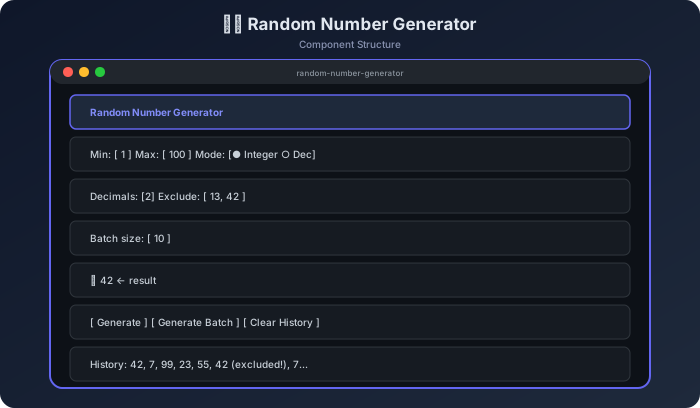
This project goes beyond a single button — it lets users configure min/max, integer vs decimal mode, decimal precision, excluded values, and batch size. A history panel keeps track of every generated number.
Component Structure
How It Works — Flow Diagram
text example
getRandomInt(min, max)
  → Math.floor(Math.random() * (max - min + 1)) + min

getRandomFloat(min, max, decimals)
  → (Math.random() * (max - min) + min).toFixed(decimals)

generate()
  → loop until a non-excluded number is found (with escape hatch)
  → push to history[]
  → render
Step-by-Step Build
Step 1 — HTML Structure
html example
<div class="rng-app">
  <h1>🎲 Random Number Generator</h1>

  <div class="config-panel">
    <div class="config-row">
      <label>Min: <input type="number" id="minVal" value="1"></label>
      <label>Max: <input type="number" id="maxVal" value="100"></label>
    </div>
    <div class="config-row">
      <label><input type="radio" name="mode" value="integer" checked> Integer</label>
      <label><input type="radio" name="mode" value="decimal">  Decimal</label>
      <label id="decPrecisionLabel">Precision: <input type="number" id="precision" value="2" min="1" max="10"></label>
    </div>
    <div class="config-row">
      <label>Exclude (comma-separated): <input type="text" id="excludeInput" placeholder="e.g. 13, 42"></label>
    </div>
    <div class="config-row">
      <label>Batch size: <input type="number" id="batchSize" value="10" min="1" max="1000"></label>
    </div>
  </div>

  <div id="resultDisplay" class="result-display">
    <span id="resultNumber">—</span>
  </div>

  <div class="btn-row">
    <button id="generateBtn" class="btn-gen">🎲 Generate</button>
    <button id="batchBtn"    class="btn-batch">📋 Batch</button>
    <button id="clearBtn"    class="btn-clear">🗑 Clear</button>
  </div>

  <div class="history-section">
    <h3>History (<span id="histCount">0</span>)</h3>
    <div id="historyDisplay" class="history-display"></div>
  </div>

  <div id="batchOutput" class="batch-output hidden"></div>
</div>
Step 2 — Core Random Functions
js example
function getRandomInt(min, max) {
  min = Math.ceil(min);
  max = Math.floor(max);
  return Math.floor(Math.random() * (max - min + 1)) + min;
}

function getRandomFloat(min, max, decimals) {
  const raw = Math.random() * (max - min) + min;
  return parseFloat(raw.toFixed(decimals));
}
Step 3 — Generate with Exclusion
Example
const history = [];
function generate(addToHistory = true) {
const min = parseFloat(document.getElementById("minVal").value);
const max = parseFloat(document.getElementById("maxVal").value);
const mode = document.querySelector("[name=mode]:checked").value;
const precision = parseInt(document.getElementById("precision").value) || 2;
const excludeRaw = document.getElementById("excludeInput").value;
const excluded = excludeRaw
.split(",")
.map(v => parseFloat(v.trim()))
.filter(v => !isNaN(v));
if (min >= max) {
alert("Min must be less than Max");
return null;
}
let result, attempts = 0;
do {
result = mode === "integer"
? getRandomInt(min, max)
: getRandomFloat(min, max, precision);
attempts++;
if (attempts > 1000) { alert("Too many exclusions — couldn't find a valid number"); return null; }
} while (excluded.includes(result));
if (addToHistory) {
history.unshift(result);
if (history.length > 100) history.pop();
renderHistory();
}
document.getElementById("resultNumber").textContent = result;
document.getElementById("resultDisplay").classList.add("pop");
setTimeout(() => document.getElementById("resultDisplay").classList.remove("pop"), 300);
return result;
}
Step 4 — Batch Generation
Example
document.getElementById("batchBtn").addEventListener("click", () => {
const n = parseInt(document.getElementById("batchSize").value) || 10;
const results = Array.from({ length: n }, () => generate(false)).filter(v => v !== null);
history.unshift(...results.slice(0, 100 - history.length));
renderHistory();
const batchOut = document.getElementById("batchOutput");
batchOut.classList.remove("hidden");
batchOut.textContent = results.join(", ");
document.getElementById("resultNumber").textContent = results[0];
});
Step 5 — Render History
Example
function renderHistory() {
const div = document.getElementById("historyDisplay");
div.innerHTML = history.map(n => `<span class="hist-num">${n}</span>`).join(" ");
document.getElementById("histCount").textContent = history.length;
}
Step 6 — Clear History
Example
document.getElementById("clearBtn").addEventListener("click", () => {
history.length = 0;
renderHistory();
document.getElementById("resultNumber").textContent = "—";
document.getElementById("batchOutput").classList.add("hidden");
});
Step 7 — Generate Button & Keyboard
Example
document.getElementById("generateBtn").addEventListener("click", () => generate());
document.addEventListener("keydown", (e) => {
if (e.code === "Space" && document.activeElement.tagName !== "INPUT") {
e.preventDefault();
generate();
}
});
Step 8 — Crypto-Secure Alternative (Bonus)
Example
function secureBoundedInt(min, max) {
const range = max - min + 1;
const arr = new Uint32Array(1);
let result;
do {
crypto.getRandomValues(arr);
result = arr[0] % range + min;
} while (arr[0] >= Math.floor(0xFFFFFFFF / range) * range); // remove modulo bias
return result;
}
// Use this when randomness quality matters (e.g., lottery, security codes)
Console Output
Output
getRandomInt(1, 100) → 42
getRandomInt(1, 100) → 7
getRandomInt(1, 100) → 99

// With exclusions: [13, 42]
generate() → tries 42 → excluded → tries again → 17 ✅

// Decimal mode, precision=2, min=0, max=1
getRandomFloat(0, 1, 2) → 0.73
getRandomFloat(0, 1, 2) → 0.09

// Batch of 5, integer, 1-6 (dice)
[3, 6, 1, 4, 2]
Edge Cases to Handle
| Situation | Expected Behavior |
|---|---|
| min >= max | Alert and block generation |
| All values excluded | Error after 1000 attempts |
| Decimal mode, precision 0 | Same as integer mode |
| Batch size 1000 | Works, but may be slow |
| Space bar on input | Don't trigger generate |
Challenge Yourself
- Dice roller — preset buttons for D4, D6, D8, D10, D12, D20
- Lottery picker — generate 6 unique numbers from 1–49 (no repeats)
- Normal distribution — generate numbers following a bell curve
- Random color — generate a random hex color code and show a preview
- Statistics — after 100 generates, show mean, min, max, and distribution histogram
Best Practices
- Use
Math.ceil(min)andMath.floor(max)ingetRandomIntto handle float inputs correctly - The
do/whileexclusion loop needs an escape hatch (max attempts) Math.random()is not cryptographically secure — usecrypto.getRandomValues()for security-sensitive cases- Keep generated number history in an array, not the DOM
toFixed()returns a string — useparseFloat()to convert back to a number
Continue the lesson path
Study next in this module
01Mini ProjectsBuild a JavaScript Quiz App - Step by Step Project TutorialLearn to build an interactive quiz app in JavaScript with multiple-choice questions, timer, score tracking, progress bar, result screen, and localStorage high score.02Mini ProjectsBuild a JavaScript Random Password Generator - Step by Step TutorialLearn to build a secure random password generator in JavaScript with length control, character type toggles, strength meter, copy to clipboard, and history.03Mini ProjectsBuild a JavaScript QR Code Scanner - Step by Step Project TutorialLearn to build a QR code scanner in JavaScript using the device camera with jsQR library, file upload fallback, decoded result display, and link detection.04Mini ProjectsJavaScript Image Resize & Compress — Canvas API Project 2026Learn to build a complete Image Resizer and Compressor using JavaScript Canvas API. Resize dimensions, control quality, preview results, and download compressed images — all client-side.