JavaScript Notes
Master the JavaScript DOM (Document Object Model) from scratch. Learn DOM tree structure, node types, window vs document, and how JS manipulates web pages. What is DOM in JavaScript — explained simply.
What is the DOM?
Imagine you write an HTML file and open it in Chrome. The browser reads your HTML text and builds a living, interactive object in memory — that object is the DOM (Document Object Model).
The DOM is not your HTML file. It is a JavaScript-accessible tree of objects that represents your entire web page. JavaScript can read, add, change, or delete any part of this tree — and the browser instantly reflects those changes on screen.
You write HTML text  →  Browser parses it  →  DOM Tree is built in memory
                                                      ↓
                                             JavaScript can now access,
                                             modify, add, or remove anything
Simple analogy: Think of HTML as a blueprint and the DOM as the actual house built from that blueprint. You can renovate the house (DOM) without changing the original blueprint (HTML file).
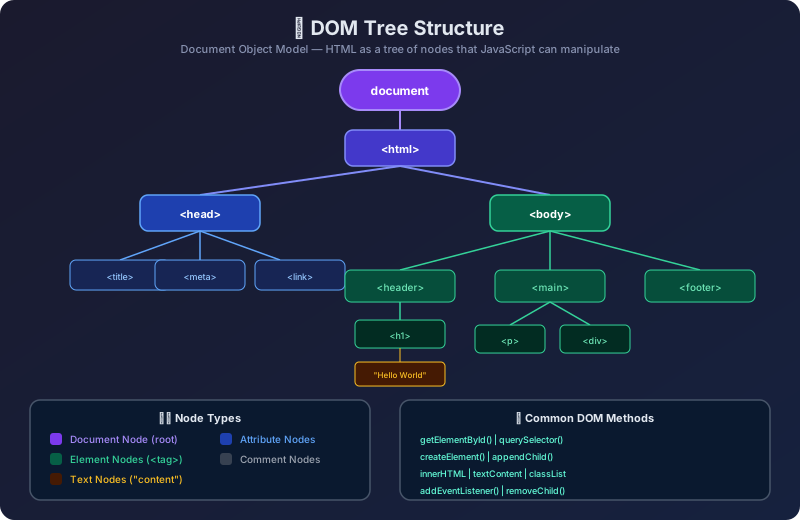
Node Types in the DOM
Every item in the DOM tree is a node. There are several important types:
| Node Type | nodeType Value | Description | Example |
|---|---|---|---|
| Element Node | 1 | HTML elements | <div>, <p>, <a> |
| Attribute Node | 2 | Element attributes (deprecated API) | class="box" |
| Text Node | 3 | Text content inside elements | "Hello World" |
| Comment Node | 8 | HTML comments | <!-- comment --> |
| Document Node | 9 | The document root itself | document |
| DocumentType Node | 10 | The DOCTYPE declaration | <!DOCTYPE html> |
| DocumentFragment | 11 | Lightweight in-memory container | Created via JS |
// Checking node types in the browser
const body = document.body;
console.log(body.nodeType);   // 1  (Element)
console.log(body.nodeName);   // "BODY"
console.log(body.nodeValue);  // null (elements have no value)

const h1 = document.querySelector('h1');
const textNode = h1.firstChild;
console.log(textNode.nodeType);   // 3  (Text)
console.log(textNode.nodeName);   // "#text"
console.log(textNode.nodeValue); // "Welcome"1 "BODY" null 3 "#text" "Welcome"
Why DOM ≠ Your HTML Source
The browser auto-corrects errors and adds missing elements when building the DOM:
This is why you should always inspect the actual DOM in browser DevTools (F12 → Elements), not just look at your HTML source.
The document Object
The document object is your entry point to the entire DOM. It is a property of window.
// document is a global object available everywhere in browser JS
console.log(typeof document);         // "object"
console.log(document === window.document); // true

// Useful document properties
console.log(document.title);          // "My Page"
console.log(document.URL);            // "https://example.com/"
console.log(document.domain);         // "example.com"
console.log(document.readyState);     // "complete" (after page loads)
console.log(document.characterSet);   // "UTF-8"
console.log(document.doctype.name);   // "html"

// Key element shortcuts
console.log(document.documentElement); // <html> element
console.log(document.head);            // <head> element
console.log(document.body);            // <body> element
console.log(document.forms.length);    // number of <form> elements
console.log(document.images.length);   // number of <img> elements
console.log(document.links.length); // number of <a> elements"object" true "My Page" "https://example.com/" "example.com" "complete" "UTF-8" "html" <html lang="en">...</html> <head>...</head> <body>...</body> 0 0 0
window vs document — Key Difference
// window is the global object — you can omit "window."
window.alert('Hello');   // same as:
alert('Hello');          // ← shorthand (window is implicit)

console.log(window.innerWidth);   // browser viewport width
console.log(window.innerHeight);  // browser viewport height
console.log(window.scrollY);      // how far user has scrolled

// document is a property of window
console.log(window.document === document); // true// alert popup appears 1440 900 0 true
DOM Ready — When is the DOM Available?
// Approach 1 & 2 & 3: btn = <button id="myBtn">Click Me</button>
// Approach (wrong): btn = null → TypeError: Cannot read properties of null
Real World Use Cases
| Use Case | What You Do with the DOM |
|---|---|
| 🛒 Shopping cart counter | Change the number inside <span id="cart-count"> |
| 🌙 Dark mode toggle | Add/remove .dark-theme class on <body> |
| ✅ Form validation | Read input values, show/hide error <p> elements |
| 📋 Dynamic to-do list | Create new <li> elements and append to <ul> |
| 🔔 Notifications | Create <div> popups, auto-remove after 3 seconds |
| 📊 Live data charts | Update <canvas> or SVG elements with new data |
Common Mistakes
❌ Mistake 1: Accessing DOM before it loads
// ❌ Wrong — script runs before <body> elements exist
const el = document.getElementById('box');
el.style.color = 'red'; // TypeError: Cannot set properties of null❌ Mistake 2: Confusing nodeType numbers
// ❌ Wrong assumption
if (node.nodeType === 'element') { }  // nodeType is a NUMBER, not string!

// ✅ Correct
if (node.nodeType === 1) { }          // 1 = Element node
if (node.nodeType === Node.ELEMENT_NODE) { } // Named constant (cleaner)
❌ Mistake 3: Modifying HTML source and expecting DOM to change
❌ Wrong mental model:
  Edit index.html in VS Code → DOM changes automatically

✅ Correct mental model:
  DOM lives in browser memory
  JS modifies the DOM → page updates visually
  Refreshing the page resets DOM from HTML source again
Interview Questions
Q1. What is the DOM and how is it different from HTML? > The DOM is a live, in-memory object tree that the browser builds by parsing HTML. HTML is just static text; the DOM is the interactive, JavaScript-accessible representation of that text. The browser also auto-corrects HTML errors in the DOM.
Q2. What is the difference between window and document? > window represents the entire browser tab environment (global scope, location, history, etc.). document is a property of window that represents only the HTML DOM. All global variables become properties of window, but document specifically handles the HTML structure.
Q3. What are the different node types? What is nodeType 3? > nodeType 1 = Element, 2 = Attribute (deprecated), 3 = Text, 8 = Comment, 9 = Document, 10 = DocumentType, 11 = DocumentFragment. nodeType 3 is a Text node — the raw text content inside an element.
Q4. Why does document.getElementById() return null? > Most commonly because the script runs before the HTML element exists in the DOM (script tag in <head> without defer or DOMContentLoaded). Also returns null if the ID doesn't exist or is misspelled.
Q5. What is DOMContentLoaded and when does it fire? > It fires when the HTML is fully parsed and the DOM is built, but before external resources (images, stylesheets) finish loading. It's the right moment to start DOM manipulation. window.onload fires later, after all resources load.
Q6. Can the DOM have more elements than the original HTML? > Yes! The browser auto-adds missing elements like <head>, <tbody>, and closing tags during parsing. JavaScript can also add new elements dynamically at runtime.
Q7. What does document.readyState tell you? > It has 3 values: "loading" (HTML is being parsed), "interactive" (DOM is ready, resources still loading — same timing as DOMContentLoaded), and "complete" (everything including images has loaded — same timing as window.onload).
Key Takeaways
✅ DOM = Browser's live, in-memory object tree of your HTML
✅ DOM ≠ HTML source — browser auto-corrects and JS modifies it
✅ Every element, text, comment = a node in the tree
✅ document = your gateway to the DOM
✅ window ⊃ document (document is part of window)
✅ Always wait for DOMContentLoaded before manipulating DOM
✅ nodeType 1 = Element, nodeType 3 = Text, nodeType 9 = Document
✅ Parent → Child → Sibling — these are the tree relationships
Continue the lesson path