JavaScript Notes
Understand JavaScript
Introduction
The call stack is the core mechanism that JavaScript uses to track function execution. It's a data structure that records where in the program we currently are — which function is running, and which functions called it.
Understanding the call stack is essential because:
- It explains how JavaScript executes code synchronously
- It shows why JavaScript is "single-threaded"
- It explains stack overflow errors
- It's the first step to understanding the full async execution model (call stack → Web APIs → callback queue → event loop)
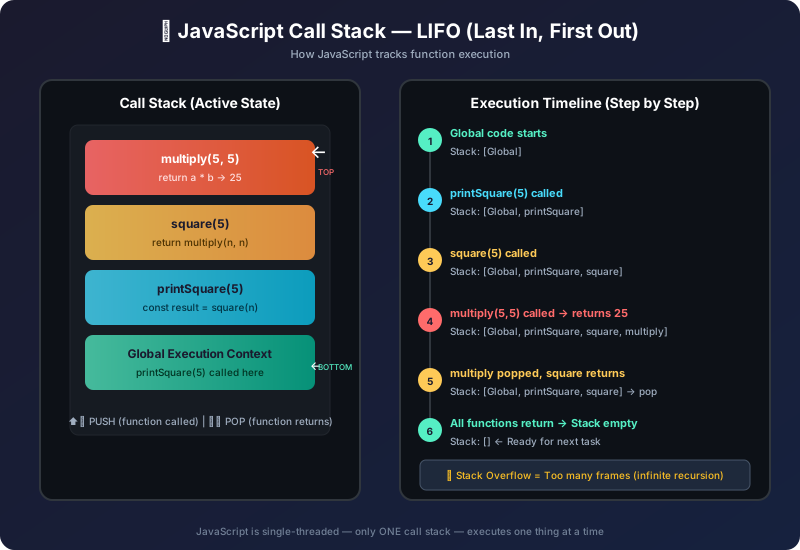
What is the Call Stack?
The call stack is a LIFO (Last In, First Out) data structure that the JavaScript engine uses to manage function calls. Each time a function is called, a stack frame is pushed onto the stack. When the function returns, its frame is popped off.
Step-by-Step Execution Tracing
Example 1: Simple Nested Functions
function multiply(a, b) {
  return a * b;       // Step 3: executes, returns 25
}

function square(n) {
  return multiply(n, n); // Step 2: calls multiply
}

function printSquare(n) {
  const result = square(n); // Step 1: calls square
  console.log(result);       // Step 4: logs 25
}

printSquare(5);25
Call Stack Timeline:
Stack Frames — What's in Each Frame?
Each function call creates a stack frame (also called an execution context) that stores:
function greet(name) {
  // This function's stack frame stores:
  // - name: "Alice"
  // - greeting: "Hello, Alice!"
  const greeting = `Hello, ${name}!`;
  return greeting;
}

function main() {
  const message = greet("Alice"); // pushes greet's frame
  console.log(message);           // logs after greet pops off
}

main(); // pushes main's frameHello, Alice!
Stack Overflow — When the Stack Gets Too Deep
A stack overflow occurs when too many function calls accumulate on the stack, exceeding the browser's/runtime's limit (typically 10,000–16,000 frames in Chrome).
The Most Common Cause: Infinite Recursion
// ❌ No base case — infinite recursion → stack overflow!
function countDown(n) {
  console.log(n);
  countDown(n - 1); // Calls itself forever
}

countDown(5);
// 5, 4, 3, 2, 1, 0, -1, -2 ... CRASH!
// RangeError: Maximum call stack size exceeded5 4 3 2 1 0 -1 ... RangeError: Maximum call stack size exceeded
The Fix: Always Have a Base Case
// ✅ With base case — recursion stops at 0
function countDown(n) {
  if (n < 0) return; // BASE CASE — stops recursion
  console.log(n);
  countDown(n - 1);
}

countDown(5);5 4 3 2 1 0
Reading Stack Overflow Errors
RangeError: Maximum call stack size exceeded
    at countDown (script.js:3)   ← Most recent call
    at countDown (script.js:3)
    at countDown (script.js:3)
    at countDown (script.js:3)
    ... (repeated thousands of times)
The Call Stack and Asynchronous Code
When you call setTimeout, the callback does NOT go on the call stack immediately. It goes through Web APIs → Callback Queue → Event Loop.
A
B
C
Full Async Flow Diagram
Critical rule: The event loop ONLY pushes a callback onto the call stack when the stack is completely empty. This is why setTimeout(fn, 0) still runs after all synchronous code.
Reading Stack Traces for Debugging
When an error occurs, the call stack gives you a stack trace — a snapshot of all active function calls at that moment. Reading it top to bottom shows the most recent call first.
function level3() {
  throw new Error("Something broke!");
}

function level2() {
  level3();
}

function level1() {
  level2();
}

level1();Error: Something broke!
at level3 (script.js:2) ← Where error was thrown
at level2 (script.js:6) ← Called level3
at level1 (script.js:10) ← Called level2
at script.js:13 ← Entry pointHow to read a stack trace:
- Top line = where the error originated
- Each line below = the chain of function calls that led to it
- Bottom line = where execution started
Common Mistakes ⚠️
Mistake 1: Infinite Recursion Without Base Case
// ❌ Will crash
function factorial(n) {
  return n * factorial(n - 1); // No base case!
}

// ✅ With base case
function factorial(n) {
  if (n <= 1) return 1;        // Base case
  return n * factorial(n - 1);
}
console.log(factorial(5)); // 120120
Mistake 2: Thinking setTimeout(fn, 0) Runs Immediately
slow
fast
The callback goes through the Web API and callback queue — it can never run while the stack has other code on it.
Mistake 3: Mutually Recursive Functions Without Exit
// ❌ Mutual recursion without exit → stack overflow
function isEven(n) {
  if (n === 0) return true;
  return isOdd(n - 1);
}
function isOdd(n) {
  if (n === 0) return false;
  return isEven(n - 1);
}

console.log(isEven(4)); // ✅ Works for small n
// console.log(isEven(100000)); // ❌ Stack overflow for large n
Interview Questions 🎯
Q1. What is the JavaScript call stack?
The call stack is a LIFO (Last In, First Out) data structure that tracks which functions are currently being executed. When a function is called, it's pushed onto the stack. When it returns, it's popped off. JavaScript's single thread means it can only execute one function at a time — always the one at the top of the stack.
Q2. What is a stack overflow in JavaScript?
A stack overflow occurs when the call stack exceeds its size limit, typically caused by infinite recursion (a function that calls itself without a base case to stop). The error thrown is RangeError: Maximum call stack size exceeded.Q3. Why is JavaScript called "single-threaded"?
Because it has only one call stack. Only one piece of code executes at any given time. This is why the event loop and async mechanisms exist — to allow non-blocking operations while keeping the single-threaded model.
Q4. When does the event loop push a callback to the call stack?
The event loop monitors the call stack and the callback queue. It only moves a callback from the queue to the call stack when the call stack is completely empty. This ensures callbacks never interrupt running code.
Q5. What is a stack frame?
A stack frame (also called an execution context) is the data structure created for each function call. It stores the function's local variables, arguments, this context, and the return address (where to continue after the function returns).Q6. What is the difference between the call stack and the heap?
The call stack stores function call records (local variables, arguments, return addresses) in a structured LIFO manner. The heap is a large, unstructured memory region where objects and data are dynamically allocated. Variables on the stack may reference objects in the heap.
Q7. How do you read a JavaScript stack trace?
Read from top to bottom. The top line shows where the error was thrown (most recent call). Each subsequent line shows the function that called the one above it. The bottom is the entry point of execution.
Key Takeaways 📌
- The call stack is a LIFO data structure — last function called is first to return
- JavaScript is single-threaded because it has only one call stack
- Each function call creates a stack frame with local variables, arguments, and return address
- Stack overflow = too many frames from infinite recursion (no base case)
- The event loop only moves callbacks to the stack when it's completely empty
- Stack traces read top-to-bottom: most recent call first, entry point last
- The call stack is synchronous only — async code flows through Web APIs and queues
Continue the lesson path