JavaScript Notes
HubYour First JavaScript Program — Hello World & Beyond Complete Guide 2026History of JavaScript — Complete Timeline from 1995 to 2026How JavaScript Runs — Complete Guide to Execution, Call Stack & Event LoopJavaScript Engine Explained — V8, JIT Compilation & How Code Gets FastJavaScript Use Cases — 15 Things You Can Build with JavaScript (2026)JavaScript vs Other Languages — Complete Comparison Guide 2026What is JavaScript? Complete BeginnerWhy Learn JavaScript in 2026? Career, Salary, Scope & Benefits GuideJavaScript Break Statement Tutorial – Complete Guide with ExamplesJavaScript Break and Continue Statements – Complete Guide with ExamplesJavaScript Continue Statement Tutorial – Skip Iterations with ExamplesJavaScript Do While Loop Tutorial – Execute at Least Once with ExamplesJavaScript Do-While Loop Tutorial – Complete Guide with ExamplesJavaScript For Loop Tutorial – Complete Guide with ExamplesJavaScript If Statement Tutorial – Conditional Logic with ExamplesJavaScript If Else Statement Tutorial – Complete Guide with ExamplesJavaScript If Statement Tutorial – Complete Guide with ExamplesJavaScript Nested If Statement Tutorial – Multi-Level Conditions with ExamplesNested Loops in JavaScriptJavaScript Control Flow Practice Programs – 20+ Exercises with SolutionsJavaScript Switch Statement Tutorial – Case Matching with ExamplesSwitch Statement in JavaScriptJavaScript While Loop Tutorial – Complete Guide with ExamplesJavaScript Arrow Functions Tutorial – Syntax, Use Cases & this BindingJavaScript Callback Functions Explained – Synchronous & AsynchronousJavaScript Closures Explained – Lexical Scope, Private State & MemoryJavaScript Function Declaration Tutorial – Hoisting, Syntax & ScopeJavaScript Function Expression Tutorial – Anonymous, Named & AssignedJavaScript Higher Order Functions Tutorial – map, filter, reduce & Custom HOFsJavaScript IIFE Explained – Immediately Invoked Function ExpressionJavaScript Functions Practice Programs – 20+ Exercises with SolutionsJavaScript Recursion Tutorial – Call Stack, Base Case & Recursive PatternsJavaScript Array Basics - Complete BeginnerJavaScript Array Methods - Complete Reference Guide with ExamplesJavaScript Array Programs - 20+ Practice Problems with SolutionsJavaScript Arrays Basics - Complete Guide with Examples & DiagramsJavaScript Array filter() Method - Complete Tutorial with ExamplesJavaScript filter() Method — Complete Guide with Examples 2026JavaScript Array find() Method - Complete Tutorial with ExamplesJavaScript find() & findIndex() — Complete Guide 2026JavaScript Array map() Method - Complete Tutorial with ExamplesJavaScript map() Method — Transform Arrays Complete Guide 2026JavaScript map() vs forEach() - Key Differences with ExamplesJavaScript Array push() and pop() - Complete Tutorial with ExamplesJavaScript Array reduce() Method - Complete Tutorial with ExamplesJavaScript reduce() Method — Complete Deep Dive with Examples 2026JavaScript Array shift() and unshift() - Complete Tutorial with ExamplesJavaScript Array sort() Method - Complete Tutorial with ExamplesJavaScript splice() vs slice() - Complete Tutorial with ExamplesJavaScript Object Destructuring - Complete Guide with ExamplesJavaScript Objects - Complete Guide to Object Basics with ExamplesJavaScript Object Methods - Built-in Methods & Custom Methods Complete GuideJavaScript Object Programs - Practice Problems with SolutionsJavaScript Object Properties - Keys, Values, Descriptors & Dynamic PropertiesJavaScript Rest Operator (...) - Parameters, Destructuring & Complete GuideJavaScript Spread Operator (...) - Complete Guide with ExamplesJavaScript this Keyword - Complete Guide with Binding Rules & ExamplesJavaScript String Basics - Complete Guide to Strings with ExamplesJavaScript String Methods - Complete Reference with Examples & OutputJavaScript String Programs - Practice Problems with SolutionsJavaScript String Replacing - replace(), replaceAll() & Regex Patterns GuideJavaScript String Searching Methods - includes, indexOf, startsWith, match GuideJavaScript Template Literals (ES6) - Complete Guide with Tagged TemplatesJavaScript DOM Changing Content - textContent, innerHTML, setAttribute Complete GuideJavaScript DOM Changing Styles - CSS Manipulation, classList & getComputedStyleJavaScript DOM Creating Elements - createElement, appendChild, DocumentFragment GuideJavaScript DOM Introduction - Complete Guide to Document Object ModelJavaScript DOM Traversal - Navigate Parent, Child & Sibling NodesJavaScript DOM Forms - Form Handling, Validation & FormData Complete GuideJavaScript localStorage - Complete Guide to Web Storage APIlocalStorage vs sessionStorage - JavaScript Web Storage Comparison GuideJavaScript DOM Removing Elements - remove(), removeChild() Complete GuideJavaScript DOM Selecting Elements - querySelector, getElementById Complete GuideJavaScript sessionStorage - Complete Guide to Session-Based Web StorageJavaScript Click Event - addEventListener, Event Handler Complete GuideEvent Bubbling in JavaScript – Complete Guide with Examples (2026)Event Capturing in JavaScript – Complete Guide to Capture Phase (2026)Event Delegation in JavaScript – Complete Guide with Examples (2026)JavaScript Event Object – Complete Guide with Examples (2026)JavaScript Form Events – Complete Guide with Examples (2026)JavaScript Keyboard Events – Complete Guide to keydown, keyup & Key Properties (2026)JavaScript Mouse Events – Complete Guide with Examples (2026)JavaScript Async Await - Complete Guide with Examples & Error HandlingJavaScript Call Stack - Complete Guide with Visual Diagrams & ExamplesJavaScript Callback Queue (Task Queue) - Complete Guide with DiagramsJavaScript Callbacks - Complete Guide with Callback Hell & PatternsJavaScript Event Loop - Complete Guide with Visual Diagrams & ExamplesJavaScript Fetch API - Complete Guide with Examples, Error Handling & Async/AwaitJSON in JavaScript - Complete Guide: Parse, Stringify, Fetch & Error HandlingJavaScript Promise.all, Promise.race, Promise.any, Promise.allSettled — Complete Guide 2026JavaScript Promises - Complete Guide with Chaining, Error Handling & Event LoopSynchronous vs Asynchronous JavaScript — Complete Explanation 2026JavaScript Web APIs - Complete Guide: setTimeout, fetch, DOM Events & MoreClosures in JavaScript — Complete Guide with Examples 2026Hoisting in JavaScript — Complete Guide with Examples 2026Prototype in JavaScript — Complete Guide with Examples 2026Scope in JavaScript — Complete Guide with Examples 2026Browser Object Model (BOM) in JavaScript — Complete GuideCanvas API in JavaScript — Complete Drawing & Animation GuideDrag and Drop API in JavaScript — Complete TutorialGeolocation API in JavaScript — Get User Location TutorialHistory API in JavaScript — SPA Routing & pushState GuideNotification API in JavaScript — Push Notifications TutorialService Workers in JavaScript — Offline, Caching & PWA GuideWeb Storage API in JavaScript — localStorage & sessionStorage GuideWeb Workers in JavaScript — Multithreading & Background Tasks GuideJavaScript Interview — Behavioral Questions and Soft Skills Guide 2026Common JavaScript Interview Mistakes — What to Avoid 2026JavaScript Interview Tips — Strategy and Preparation Guide 2026JavaScript Mock Interview — Practice Questions with Solutions 2026JavaScript System Design — Frontend Architecture Interview Guide 2026JavaScript apply() Method - Complete Guide with ExamplesJavaScript bind() Method - Complete Guide with ExamplesJavaScript call() Method - Complete Guide with ExamplesJavaScript call() vs apply() vs bind() - Complete Comparison GuideJavaScript Currying - Complete Guide with ExamplesJavaScript Debounce - Complete Guide with Timeline DiagramsJavaScript Execution Context - Complete Guide with Stack DiagramsJavaScript Garbage Collection - Memory Lifecycle & Mark-and-Sweep GuideJavaScript Generators - Complete Guide with yield and IterationJavaScript Hoisting - Complete Guide with var, let, const & FunctionsJavaScript Iterators - Complete Guide with Iterator ProtocolJavaScript Lexical Scope - Complete Guide with Scope Chain DiagramsJavaScript Memory Management - Complete Guide with Lifecycle DiagramsJavaScript Modules - Complete Guide with import export ExamplesJavaScript Scope - Complete Guide with var, let, const & Scope ChainJavaScript Symbols - Complete Guide with Well-Known SymbolsJavaScript Throttle - Complete Guide with Timeline DiagramsJavaScript Comments Complete Guide – Single Line, Multi-line & JSDoc with ExamplesJavaScript Data Types Complete Guide – Primitives, Objects & typeof with ExamplesJavaScript Input and Output Complete Guide – console.log, prompt, alert & DOM with ExamplesJavaScript Keywords Complete Guide – Reserved Words List with Examples for BeginnersJavaScript null vs undefined – Complete Guide with Differences, Examples & Interview Q&AJavaScript Operators Complete Guide – Arithmetic, Comparison, Logical & More with ExamplesJavaScript Strict Mode Complete Guide – JavaScript Type Conversion Complete Guide – Explicit & Implicit Coercion with ExamplesJavaScript var vs let vs const – Complete Guide with Scope, Hoisting & Best PracticesJavaScript Variables Complete Guide – Declaration, Naming Rules & Memory Model for BeginnersDeque (Double-Ended Queue) in JavaScript — Complete GuideLinked List in JavaScript — Nodes, Pointers & Operations GuideJavaScript Map — Key-Value Data Structure Complete GuideJavaScript Numbers — IEEE 754, Precision, and Number Methods GuidePriority Queue in JavaScript — Min Heap Implementation GuideQueue Data Structure in JavaScript — FIFO, Enqueue & Dequeue ExplainedJavaScript Set — Unique Values Data Structure GuideSorting Algorithms in JavaScript — Bubble, Merge, Quick Sort GuideStack Data Structure in JavaScript — LIFO, Push, Pop ExplainedJavaScript Typed Arrays — ArrayBuffer, Int32Array, Float64Array GuideJavaScript WeakMap — Weak References, Memory Management GuideJavaScript WeakSet — Complete Guide with Examples 2026Applications of JavaScript — Where JS is Used in 2026 Complete GuideJavaScript Backend Frameworks — Node.js, Express, NestJS Complete Guide 2026JavaScript Frontend Libraries — React, Vue, Angular, Svelte Complete Overview 2026JavaScript Full-Stack Frameworks — Next.js, Remix, Astro Complete Guide 2026JavaScript Career Paths & Jobs — Salary, Roles & Roadmap 2026JavaScript Libraries vs Frameworks — Difference & Examples Complete Guide 2026JavaScript Custom Errors – Extend Error Class, Custom Error Types & instanceofJavaScript Debugging – console Methods, DevTools, Breakpoints & Error Stack TracesJavaScript throw Statement – Throw Errors, Custom Messages & Error TypesJavaScript Try Catch Finally – Error Handling Complete GuideTop 30 JavaScript Closure Interview Questions & Answers 2026Top 30 JavaScript Coding Interview Questions 2026 (With Solutions)Top 25 JavaScript Event Loop Interview Questions & Answers 2026Top 50 JavaScript Interview Questions & Answers 2026Top 30 JavaScript Promise Interview Questions & Answers 202650 Tricky JavaScript Output Questions 2026 (With Answers)Build a JavaScript Calculator - Step by Step Project TutorialBuild a JavaScript Image Carousel - Step by Step Project TutorialBuild a JavaScript Counter Application - Step by Step Project TutorialBuild a JavaScript Digital Clock - Step by Step Project TutorialBuild a Dynamic Resume Builder in JavaScript - Step by Step TutorialBuild a JavaScript Email Validator - Step by Step Project TutorialBuild a JavaScript Employee Database Management App - Step by Step TutorialBuild a JavaScript Expense Tracker - Step by Step Project TutorialBuild a GitHub Profile Search App in JavaScript - Step by Step TutorialBuild a JavaScript Image Slider - Step by Step Project TutorialBuild a JavaScript Multi-Step Progress Bar - Step by Step TutorialBuild JavaScript Nested Chat Comments - Step by Step Project TutorialBuild a JavaScript Notes App - Step by Step Project TutorialBuild a JavaScript OTP Input Field - Step by Step Project TutorialBuild a JavaScript Palindrome Checker - Step by Step Project TutorialBuild a JavaScript Price Range Slider - Step by Step Project TutorialBuild a JavaScript Prime Number Checker - Step by Step Project TutorialBuild a JavaScript QR Code Generator - Step by Step Project TutorialBuild a JavaScript QR Code Scanner - Step by Step Project TutorialBuild a JavaScript Quiz App - Step by Step Project TutorialBuild a JavaScript Random Number Generator - Step by Step TutorialBuild a JavaScript Random Password Generator - Step by Step TutorialJavaScript Image Resize & Compress — Canvas API Project 2026JavaScript Responsive Admin Dashboard — DOM & CSS Project 2026JavaScript Show/Hide Password Toggle — Beginner DOM Project 2026JavaScript Sortable Filterable Table — DOM & Array Methods Project 2026JavaScript Stopwatch Project — setInterval & DOM Tutorial 2026JavaScript Student Grade Calculator — Arrays & Logic Project 2026JavaScript Task Scheduler Project — CRUD & localStorage Tutorial 2026JavaScript Tic-Tac-Toe Game — DOM Manipulation Project Tutorial 2026JavaScript Toast Notification Project — Custom Alerts Tutorial 2026Build a Todo App in JavaScript - Step by Step Project TutorialJavaScript Unicode Character Value Finder — charCodeAt & fromCharCode Project 2026JavaScript Weather App Project — Fetch API & DOM Complete Tutorial 2026JavaScript Cheat Sheet 2026 — Complete Quick ReferenceImportant JavaScript Concepts Every Developer Must Know in 2026JavaScript One Shot Notes 2026 — Complete JS in One PageJavaScript Quick Revision Notes — Interview Prep in 30 Minutes 2026Abstraction in JavaScript OOP – Hide Complexity, Expose SimplicityJavaScript Classes Tutorial – ES6 Class Syntax, Inheritance & MoreJavaScript Constructor Functions – new Keyword, Prototype & OOP PatternsEncapsulation in JavaScript – Private Fields, Getters, Setters & Data ProtectionJavaScript Inheritance – extends, super, and Prototype-Based InheritanceObject-Oriented Programming in JavaScript – OOP Concepts Complete GuideJavaScript OOP Projects – Build Real-World Apps with Classes & OOPPolymorphism in JavaScript – Method Overriding, Duck Typing & Many FormsJavaScript Prototype Chain – How Property Lookup Works in JavaScriptJavaScript Prototypes – Prototype-Based Inheritance, Object.create & prototype PropertyJavaScript Advanced Practice Problems — 15+ Interview-Level Challenges 2026JavaScript Assignments — 10 Project-Based Learning Tasks 2026JavaScript Beginner Practice Problems — 20+ Coding Exercises 2026JavaScript Coding Challenges — 25 Interview-Style Problems 2026JavaScript Intermediate Practice Problems — 20+ Coding Challenges 2026JavaScript MCQs — 50 Multiple Choice Questions with Answers 2026JavaScript Regex Character Classes – [abc], [^abc], Ranges & ShortcutsJavaScript Regex Email Validation – Pattern, Edge Cases & Best PracticesJavaScript Regex Flags – g, i, m, s, u, y Flags Explained with ExamplesJavaScript Regex Groups – Capturing, Non-Capturing & Named GroupsJavaScript Number Validation with Regex — Complete Patterns & Examples 2026JavaScript Password Validation with Regex — Strength Checker & Patterns 2026JavaScript Regex Quantifiers – *, +, ?, {n,m}, Greedy vs Lazy MatchingJavaScript Regex Basics – Regular Expressions Tutorial for BeginnersJavaScript Regex Projects — 10 Practical Mini-Projects with Code 2026JavaScript URL Validation with Regex — Complete Patterns & Examples 2026JavaScript Username Validation with Regex — Patterns & Form Examples 2026JavaScript TutorialJavaScript Lazy Loading — Images, Modules & Components Complete Guide 2026JavaScript Performance Optimization — Speed Up Your Code Complete Guide 2026JavaScript Unit Testing with Jest — Complete Guide for Beginners 2026
Learn to build an interactive resume builder in JavaScript that generates a live HTML preview as you fill out form fields, with print and PDF export support.
What You'll Learn
- How to bind form fields to a live HTML preview using
inputevents - How to build dynamic sections (add/remove work experience & education entries)
- How to generate a clean resume layout from JavaScript template literals
- How to implement print to PDF with
window.print() - How to save/load resume data with
localStorage
Project Overview
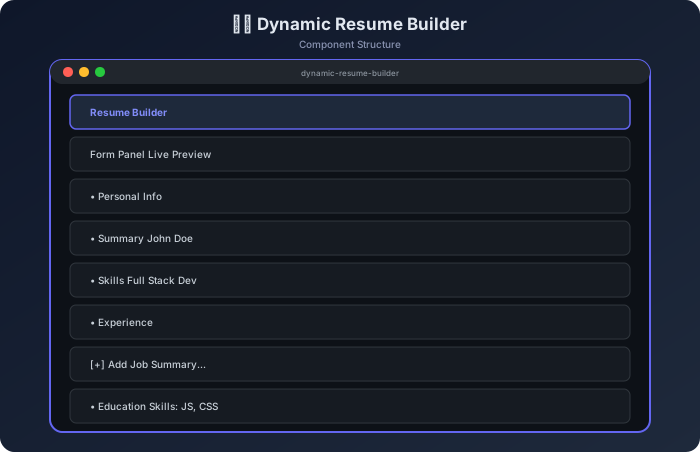
The resume builder has two panels: a form on the left and a live preview on the right. Every keystroke in the form instantly updates the preview. Users can also add multiple work experience or education entries dynamically.
Component Structure
How It Works — Flow Diagram
Step-by-Step Build
Step 1 — HTML Structure
Example
<div class="builder-container">
<!-- LEFT: Form -->
<aside class="form-panel">
<section>
<h3>Personal Info</h3>
<input id="fullName" type="text" placeholder="Full Name">
<input id="jobTitle" type="text" placeholder="Job Title">
<input id="email" type="email" placeholder="Email">
<input id="phone" type="tel" placeholder="Phone">
<input id="location" type="text" placeholder="Location">
<input id="linkedin" type="url" placeholder="LinkedIn URL">
</section>
<section>
<h3>Summary</h3>
<textarea id="summary" rows="4" placeholder="Professional summary..."></textarea>
</section>
<section>
<h3>Skills</h3>
<input id="skills" type="text" placeholder="JavaScript, CSS, React, ...">
</section>
<section id="experienceSection">
<h3>Work Experience</h3>
<div id="experienceEntries"></div>
<button id="addExperience" class="btn-add-section">+ Add Job</button>
</section>
<section id="educationSection">
<h3>Education</h3>
<div id="educationEntries"></div>
<button id="addEducation" class="btn-add-section">+ Add Education</button>
</section>
<div class="form-actions">
<button id="saveDraft">💾 Save Draft</button>
<button id="printResume">🖨 Print / PDF</button>
</div>
</aside>
<!-- RIGHT: Preview -->
<main class="preview-panel" id="preview"></main>
</div>
Step 2 — Dynamic Experience / Education Entries
Example
let experienceCount = 0;
let educationCount = 0;
function addExperienceEntry() {
const i = experienceCount++;
const div = document.createElement("div");
div.className = "entry-group";
div.dataset.index = i;
div.innerHTML = `
<input type="text" class="exp-company" placeholder="Company Name">
<input type="text" class="exp-role" placeholder="Role / Title">
<input type="text" class="exp-period" placeholder="Jan 2022 – Present">
<textarea class="exp-desc" rows="3" placeholder="Key responsibilities..."></textarea>
<button class="btn-remove-entry">− Remove</button>
`;
div.querySelector(".btn-remove-entry").addEventListener("click", () => {
div.remove();
renderPreview(collectFormData());
});
document.getElementById("experienceEntries").appendChild(div);
}
Step 3 — Collect Form Data
Example
function collectFormData() {
const experience = [...document.querySelectorAll("#experienceEntries .entry-group")].map(div => ({
company: div.querySelector(".exp-company").value,
role: div.querySelector(".exp-role").value,
period: div.querySelector(".exp-period").value,
desc: div.querySelector(".exp-desc").value
}));
const education = [...document.querySelectorAll("#educationEntries .entry-group")].map(div => ({
school: div.querySelector(".edu-school").value,
degree: div.querySelector(".edu-degree").value,
period: div.querySelector(".edu-period").value,
}));
return {
fullName: document.getElementById("fullName").value,
jobTitle: document.getElementById("jobTitle").value,
email: document.getElementById("email").value,
phone: document.getElementById("phone").value,
location: document.getElementById("location").value,
linkedin: document.getElementById("linkedin").value,
summary: document.getElementById("summary").value,
skills: document.getElementById("skills").value,
experience,
education
};
}
Step 4 — Render Preview
Example
function renderPreview(data) {
const expHTML = data.experience.map(e => `
<div class="resume-job">
<div class="resume-job-header">
<strong>${e.company}</strong><span>${e.role}</span>
<span class="period">${e.period}</span>
</div>
<p>${e.desc.replace(/\n/g, "<br>")}</p>
</div>
`).join("");
const eduHTML = data.education.map(e => `
<div class="resume-edu">
<strong>${e.school}</strong> — ${e.degree}
<span class="period">${e.period}</span>
</div>
`).join("");
document.getElementById("preview").innerHTML = `
<div class="resume">
<header class="resume-header">
<h1>${data.fullName || "Your Name"}</h1>
<p class="resume-subtitle">${data.jobTitle}</p>
<p class="resume-contact">
${data.email} · ${data.phone} · ${data.location}
${data.linkedin ? `· <a href="${data.linkedin}">LinkedIn</a>` : ""}
</p>
</header>
${data.summary ? `<section><h2>Summary</h2><p>${data.summary}</p></section>` : ""}
${data.skills ? `<section><h2>Skills</h2><p>${data.skills}</p></section>` : ""}
${expHTML ? `<section><h2>Experience</h2>${expHTML}</section>` : ""}
${eduHTML ? `<section><h2>Education</h2>${eduHTML}</section>` : ""}
</div>
`;
}
Step 5 — Live Update Binding
Example
// Re-render whenever any field in the form changes
document.querySelector(".form-panel").addEventListener("input", () => {
renderPreview(collectFormData());
});
document.getElementById("addExperience").addEventListener("click", () => {
addExperienceEntry();
});
document.getElementById("addEducation").addEventListener("click", () => {
addEducationEntry();
});
Step 6 — Save Draft & Print
Example
document.getElementById("saveDraft").addEventListener("click", () => {
const data = collectFormData();
localStorage.setItem("resumeDraft", JSON.stringify(data));
showToast("Draft saved!");
});
document.getElementById("printResume").addEventListener("click", () => {
window.print();
});
Console Output
Output
// User types "John Doe" in fullName field
input event fired
collectFormData() → { fullName: "John Doe", jobTitle: "", ... }
renderPreview()   → preview shows "John Doe" as h1

// User clicks "+ Add Job"
addExperienceEntry() → 1 entry group added to DOM

// User fills in company "Google" and role "Engineer"
input event fired → collectFormData()
renderPreview()   → Experience section appears in preview

// User clicks Save Draft
localStorage.setItem("resumeDraft", '{"fullName":"John Doe",...}')
Toast: "Draft saved!"
Edge Cases to Handle
| Situation | Expected Behavior |
|---|---|
| Empty fields | Show placeholder text or omit section |
| Remove all experience | Section header disappears from preview |
| Long skill list | Wraps naturally in preview |
| Print before filling | Prints blank template gracefully |
| Reload page | Load draft from localStorage |
Challenge Yourself
- Photo upload — let users add a profile photo to the resume
- Multiple templates — offer 3 different resume style themes
- Drag-to-reorder — let users drag experience entries to reorder
- JSON export — download resume data as a
.jsonfile - Word count — show a character/word counter on the summary field
Best Practices
- Use a single event listener on the form (input delegation), not per-field listeners
- Build the entire preview from a template literal — don't patch individual elements
- Escape user content before inserting into
innerHTMLin production - Add
@media printCSS to hide the form panel during printing - Use
CSS Gridfor the two-panel layout to handle responsive behavior
Continue the lesson path
Study next in this module
01Mini ProjectsBuild a JavaScript Digital Clock - Step by Step Project TutorialLearn to build a live digital clock in JavaScript using Date object, setInterval, 12/24-hour toggle, AM/PM display, and smooth CSS styling.02Mini ProjectsBuild a JavaScript Email Validator - Step by Step Project TutorialLearn to build an email validator in JavaScript using regex, real-time feedback, common domain suggestions, and bulk validation. A great regex and DOM project.03Mini ProjectsBuild a JavaScript Counter Application - Step by Step Project TutorialLearn to build a counter app in JavaScript with increment, decrement, reset, min/max limits, and localStorage persistence. Great first JavaScript DOM project.04Mini ProjectsBuild a JavaScript Employee Database Management App - Step by Step TutorialLearn to build an employee CRUD database app in JavaScript with add, edit, delete, search, sort, and localStorage persistence. Great intermediate JS project.