JavaScript Notes
Learn Event Bubbling in JavaScript with examples, diagrams & interview questions. What is event bubbling and how it works – complete guide 2026.
Introduction
Event Bubbling is one of the most important concepts in JavaScript DOM event handling. When you click on a button inside a <div>, the click event doesn't just fire on the button — it "bubbles up" through every parent element all the way to the document and window.
Real-World Analogy: Imagine you drop a stone in a pond. The splash starts at the exact point where the stone hits (the target element), and then ripples spread outward in circles (bubbling up to parent elements). Each ripple is like the event reaching the next parent in the DOM tree.
Another way to think about it: Imagine you're in a meeting room inside a building. If you shout something, first the people in your room hear it (target), then people in the hallway hear it (parent div), then people on the floor hear it (section), and eventually the whole building knows (document). That's event bubbling — the event travels from the innermost element up to the outermost.
Event Bubbling is the default behavior in all modern browsers. Understanding it is crucial for writing efficient event handlers, implementing event delegation, and avoiding bugs caused by unintended event propagation.
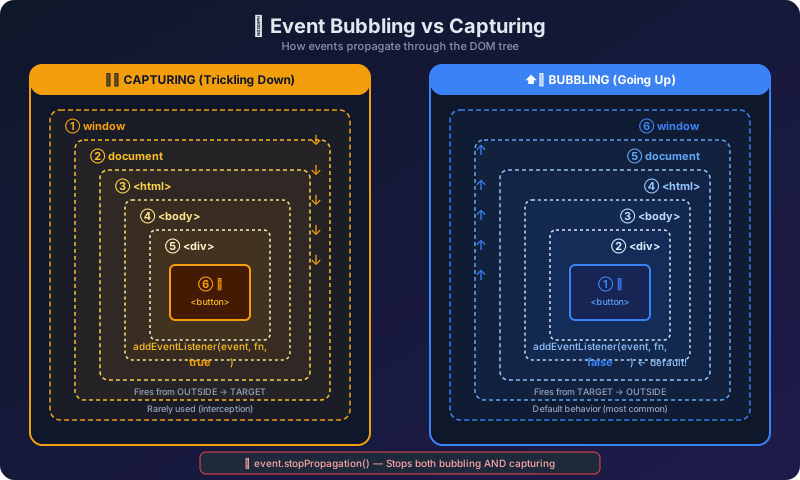
Event Bubbling Flow Diagram
Here's how an event travels through the DOM when you click on a <button> nested inside multiple elements:
How Event Bubbling Works
When an event occurs on a DOM element, JavaScript follows a specific propagation path:
The Three Phases of Event Propagation
- Capturing Phase (Phase 1): The event travels DOWN from
window→document→<html>→<body>→ ... → target's parent. This is also called "trickling down."
- Target Phase (Phase 2): The event reaches the actual element that was clicked/interacted with. Handlers on the target fire here.
- Bubbling Phase (Phase 3): The event travels back UP from the target's parent → ... →
<body>→<html>→document→window.
By default, event listeners added with addEventListener() listen during the bubbling phase. This means when you click a deeply nested element, all ancestor elements with click handlers will also fire their handlers — from inside out.
Key Rules of Event Bubbling
- Almost all events bubble (click, keydown, input, etc.)
- Some events do NOT bubble:
focus,blur,load,unload,scroll(on non-document elements) event.targetalways points to the original element that was clickedevent.currentTargetpoints to the element whose listener is currently running- You can stop bubbling with
event.stopPropagation()
Code Examples
Example 1: Basic Event Bubbling
// HTML Structure:
// <div id="grandparent">
//   <div id="parent">
//     <button id="child">Click Me</button>
//   </div>
// </div>

document.getElementById("grandparent").addEventListener("click", function () {
  console.log("Grandparent clicked!");
});

document.getElementById("parent").addEventListener("click", function () {
  console.log("Parent clicked!");
});

document.getElementById("child").addEventListener("click", function () {
  console.log("Child clicked!");
});

// User clicks the buttonChild clicked! Parent clicked! Grandparent clicked!
Notice how clicking the button fires all three handlers, starting from the innermost (child) and bubbling up to the outermost (grandparent). This is event bubbling in action.
Example 2: Understanding event.target vs event.currentTarget
// HTML Structure:
// <div id="outer">
//   <div id="inner">
//     <button id="btn">Click</button>
//   </div>
// </div>

document.getElementById("outer").addEventListener("click", function (event) {
  console.log("event.target:", event.target.id);
  console.log("event.currentTarget:", event.currentTarget.id);
  console.log("this:", this.id);
});

// User clicks the button with id="btn"event.target: btn event.currentTarget: outer this: outer
Even though the listener is on #outer, event.target tells us the actual element that was clicked (the button). event.currentTarget and this both point to the element that owns the listener (#outer).
Example 3: Event Bubbling with Multiple Levels
text was triggered
paragraph was triggered
wrapper was triggered
article was triggered
section was triggered
The event starts at <span> and bubbles through every ancestor that has a listener attached. This clearly shows the bottom-to-top bubbling order.
Example 4: Checking event.eventPhase
// HTML Structure:
// <div id="parent">
//   <button id="child">Click</button>
// </div>

const parent = document.getElementById("parent");
const child = document.getElementById("child");

parent.addEventListener("click", function (e) {
  console.log("Parent - Phase:", e.eventPhase);
  // eventPhase: 1 = Capturing, 2 = Target, 3 = Bubbling
});

child.addEventListener("click", function (e) {
  console.log("Child - Phase:", e.eventPhase);
});

// User clicks the child buttonChild - Phase: 2 Parent - Phase: 3
Phase 2 means the event is at the target element. Phase 3 means the event is in the bubbling phase. The parent receives the event during bubbling (phase 3).
Example 5: Event Delegation using Bubbling
// HTML Structure:
// <ul id="todo-list">
//   <li>Task 1</li>
//   <li>Task 2</li>
//   <li>Task 3</li>
//   <li>Task 4</li>
// </ul>

const todoList = document.getElementById("todo-list");

// Instead of adding listener to each <li>, we add ONE listener to parent
todoList.addEventListener("click", function (event) {
  if (event.target.tagName === "LI") {
    console.log("Clicked:", event.target.textContent);
    event.target.style.textDecoration = "line-through";
  }
});

// User clicks on "Task 2"Clicked: Task 2
This is event delegation — one of the most powerful patterns enabled by event bubbling. Instead of attaching listeners to every <li>, we attach a single listener to the parent <ul> and use event.target to identify which child was clicked. This is more memory-efficient and works even for dynamically added items.
Example 6: Bubbling with Form Elements
// HTML Structure:
// <form id="myForm">
//   <div id="formGroup">
//     <input id="nameInput" type="text" />
//   </div>
// </form>

document.getElementById("myForm").addEventListener("click", function () {
  console.log("Form clicked");
});

document.getElementById("formGroup").addEventListener("click", function () {
  console.log("Form group clicked");
});

document.getElementById("nameInput").addEventListener("click", function () {
  console.log("Input clicked");
});

// User clicks on the input fieldInput clicked Form group clicked Form clicked
Even form elements follow the same bubbling rules. Clicking the input triggers handlers on all ancestor elements in order.
stopPropagation() – How to Stop Bubbling
Sometimes you don't want an event to bubble up. You can stop it using event.stopPropagation().
Example: Stopping Bubbling
// HTML Structure:
// <div id="outer">
//   <div id="middle">
//     <button id="inner">Click Me</button>
//   </div>
// </div>

document.getElementById("outer").addEventListener("click", function () {
  console.log("Outer div clicked");
});

document.getElementById("middle").addEventListener("click", function (event) {
  console.log("Middle div clicked");
  event.stopPropagation(); // Stop bubbling here!
});

document.getElementById("inner").addEventListener("click", function () {
  console.log("Inner button clicked");
});

// User clicks the buttonInner button clicked Middle div clicked
Notice that "Outer div clicked" is NOT printed. The stopPropagation() on the middle element prevents the event from reaching the outer element.
stopPropagation() vs stopImmediatePropagation()
// HTML Structure:
// <button id="btn">Click</button>

const btn = document.getElementById("btn");

btn.addEventListener("click", function (event) {
  console.log("Handler 1");
  event.stopImmediatePropagation();
});

btn.addEventListener("click", function () {
  console.log("Handler 2");
});

btn.addEventListener("click", function () {
  console.log("Handler 3");
});

// User clicks the buttonHandler 1
stopImmediatePropagation() not only stops bubbling but also prevents any other handlers on the same element from running. In contrast, stopPropagation() would still allow Handler 2 and Handler 3 to run (since they're on the same element), but would prevent parent handlers from firing.
stopPropagation() with Regular Propagation
const btn = document.getElementById("btn");

btn.addEventListener("click", function (event) {
  console.log("Handler 1");
  event.stopPropagation(); // Only stops bubbling to parents
});

btn.addEventListener("click", function () {
  console.log("Handler 2"); // Still runs! Same element.
});

// Parent listener
document.body.addEventListener("click", function () {
  console.log("Body clicked"); // Won't run - stopped by stopPropagation
});

// User clicks the buttonHandler 1 Handler 2
Event Bubbling vs Event Capturing
| Feature | Event Bubbling | Event Capturing |
|---|---|---|
---------|---------------|-----------------|
| Direction | Bottom → Top (child to parent) | Top → Bottom (parent to child) |
|---|---|---|
| Default | Yes (default behavior) | No (must opt-in) |
| addEventListener | addEventListener("click", fn) or addEventListener("click", fn, false) | addEventListener("click", fn, true) |
| Order | Target fires first, then parents | Parents fire first, then target |
| Use Case | Most common, event delegation | Rarely used, intercepting before target |
| Support | All browsers | All modern browsers |
Example: Bubbling vs Capturing Side by Side
// HTML Structure:
// <div id="parent">
//   <button id="child">Click</button>
// </div>

const parent = document.getElementById("parent");
const child = document.getElementById("child");

// Capturing (third argument = true)
parent.addEventListener(
  "click",
  function () {
    console.log("Parent - CAPTURING");
  },
  true
);

// Bubbling (third argument = false or omitted)
parent.addEventListener(
  "click",
  function () {
    console.log("Parent - BUBBLING");
  },
  false
);

child.addEventListener("click", function () {
  console.log("Child - TARGET");
});

// User clicks the child buttonParent - CAPTURING Child - TARGET Parent - BUBBLING
The complete event flow: First capturing goes down (parent captures), then the target phase fires, then bubbling goes up (parent bubbles). This demonstrates the full lifecycle of a DOM event.
Real World Use Cases
1. Event Delegation for Dynamic Lists
// Adding items dynamically — no need to re-attach listeners
const list = document.getElementById("item-list");

list.addEventListener("click", function (e) {
  if (e.target.classList.contains("delete-btn")) {
    const item = e.target.closest("li");
    item.remove();
    console.log("Item removed:", item.textContent);
  }
});

// This works even for items added AFTER the listener was attached
const newItem = document.createElement("li");
newItem.innerHTML = 'New Task <button class="delete-btn">×</button>';
list.appendChild(newItem);Item removed: New Task ×
2. Closing Dropdown/Modal on Outside Click
// Close dropdown when clicking anywhere outside
document.addEventListener("click", function (e) {
  const dropdown = document.getElementById("dropdown");
  const toggleBtn = document.getElementById("toggle-btn");

  if (!dropdown.contains(e.target) && e.target !== toggleBtn) {
    dropdown.classList.add("hidden");
    console.log("Dropdown closed");
  }
});

// Prevent clicks inside dropdown from closing it
document.getElementById("dropdown").addEventListener("click", function (e) {
  e.stopPropagation();
  console.log("Click inside dropdown - stays open");
});Click inside dropdown - stays open
3. Form Validation with Delegation
const form = document.getElementById("registration-form");

form.addEventListener("blur", function (e) {
  if (e.target.tagName === "INPUT") {
    if (e.target.value.trim() === "") {
      e.target.classList.add("error");
      console.log(e.target.name + " is empty - showing error");
    } else {
      e.target.classList.remove("error");
      console.log(e.target.name + " is valid");
    }
  }
}, true); // Note: blur doesn't bubble, so we use capturing!email is empty - showing error
4. Analytics Click Tracking
Analytics: signup-btn clicked
🚫 Common Mistakes
Mistake 1: Forgetting that events bubble by default
Wrong:
// Developer adds click handler to a card
document.getElementById("card").addEventListener("click", function () {
  window.location.href = "/details";
});

// Developer adds a delete button inside the card
document.getElementById("delete-btn").addEventListener("click", function () {
  console.log("Delete clicked");
  // BUG: After this runs, the card's click handler ALSO fires!
  // User gets redirected instead of just deleting
});Delete clicked // Then page navigates to /details (UNWANTED!)
Correct:
document.getElementById("delete-btn").addEventListener("click", function (event) {
  event.stopPropagation(); // Prevent bubbling to card
  console.log("Delete clicked - no redirect!");
});Delete clicked - no redirect!
Mistake 2: Using event.target when you mean event.currentTarget
Wrong:
// HTML: <button id="btn"><span>Click <strong>Here</strong></span></button>

document.getElementById("btn").addEventListener("click", function (e) {
  // If user clicks on <strong>, event.target is the <strong>, NOT the button!
  console.log("Clicked element:", e.target.tagName);
  console.log("Button id:", e.target.id); // undefined!
});Clicked element: STRONG Button id:
Correct:
document.getElementById("btn").addEventListener("click", function (e) {
  // Use currentTarget to always get the element with the listener
  console.log("Listener element:", e.currentTarget.tagName);
  console.log("Button id:", e.currentTarget.id);
});Listener element: BUTTON Button id: btn
Mistake 3: Assuming all events bubble
Wrong:
// focus event does NOT bubble!
document.getElementById("form").addEventListener("focus", function () {
  console.log("Form focused"); // This will NEVER fire via bubbling!
});

document.getElementById("input").focus(); // focus fires on input but doesn't bubble// Nothing printed! focus doesn't bubble.
Correct:
// Use focusin (which DOES bubble) or use capturing
document.getElementById("form").addEventListener("focusin", function () {
  console.log("Form focused via focusin"); // Works!
});

// OR use capturing phase
document.getElementById("form").addEventListener("focus", function () {
  console.log("Form focused via capturing");
}, true); // true = capture phaseForm focused via focusin
Mistake 4: Overusing stopPropagation()
Wrong:
// Developer stops propagation everywhere "just to be safe"
document.getElementById("menu-item").addEventListener("click", function (e) {
  e.stopPropagation(); // Stops ALL bubbling
  console.log("Menu item clicked");
});

// Later, another developer adds a document-level listener for analytics
document.addEventListener("click", function () {
  console.log("Track: page click"); // NEVER fires for menu items!
  // Analytics is broken and it's hard to debug why
});Menu item clicked // Analytics tracking is silently broken!
Correct:
// Only stop propagation when you have a specific reason
document.getElementById("menu-item").addEventListener("click", function (e) {
  // Don't stop propagation unless necessary
  console.log("Menu item clicked");
});

// Better approach: check target in the document listener
document.addEventListener("click", function (e) {
  console.log("Track: page click");
  if (e.target.closest("#menu-item")) {
    console.log("Track: menu interaction");
  }
});Menu item clicked Track: page click Track: menu interaction
Mistake 5: Not understanding event delegation with dynamically added elements
Wrong:
// Adding listeners directly to elements
document.querySelectorAll(".item").forEach(function (item) {
  item.addEventListener("click", function () {
    console.log("Item clicked:", this.textContent);
  });
});

// Later, new items are added dynamically
const newItem = document.createElement("div");
newItem.className = "item";
newItem.textContent = "New Item";
document.getElementById("list").appendChild(newItem);

// Clicking "New Item" does NOTHING - no listener was attached!// Clicking new item: Nothing happens! (BUG)
Correct:
// Use event delegation on the parent
document.getElementById("list").addEventListener("click", function (e) {
  if (e.target.classList.contains("item")) {
    console.log("Item clicked:", e.target.textContent);
  }
});

// Now even dynamically added items work!
const newItem = document.createElement("div");
newItem.className = "item";
newItem.textContent = "New Item";
document.getElementById("list").appendChild(newItem);

// Clicking "New Item" works perfectlyItem clicked: New Item
Mistake 6: Confusing preventDefault() with stopPropagation()
Wrong:
// Developer wants to stop bubbling but uses preventDefault instead
document.getElementById("child").addEventListener("click", function (e) {
  e.preventDefault(); // This does NOT stop bubbling!
  console.log("Child clicked");
});

document.getElementById("parent").addEventListener("click", function () {
  console.log("Parent still fires!"); // Still bubbles!
});Child clicked Parent still fires!
Correct:
// preventDefault() = stops default browser action (like link navigation)
// stopPropagation() = stops event from bubbling up

document.getElementById("child").addEventListener("click", function (e) {
  e.stopPropagation(); // THIS stops bubbling
  console.log("Child clicked - bubbling stopped");
});

document.getElementById("parent").addEventListener("click", function () {
  console.log("Parent never fires");
});Child clicked - bubbling stopped
🎯 Key Takeaways
- Event Bubbling means events travel from the target element UP through all ancestor elements to the
window. - Bubbling is the default phase — you don't need to do anything special to use it.
event.targetalways refers to the original element that triggered the event, regardless of where the listener is attached.event.currentTarget(orthisin regular functions) refers to the element that owns the listener.- Use
event.stopPropagation()to prevent an event from continuing to bubble up. Use it sparingly! event.stopImmediatePropagation()stops bubbling AND prevents other handlers on the same element from firing.- Event Delegation is the most powerful pattern using bubbling — attach one listener to a parent to handle events on all children (including future ones).
- Not all events bubble —
focus,blur,load,scroll,mouseenter, andmouseleavedo NOT bubble. Usefocusin/focusoutas bubbling alternatives tofocus/blur. - The third argument of
addEventListenercontrols the phase:false(default) = bubbling,true= capturing. - Always prefer event delegation over attaching individual listeners to many elements — it's better for performance and works with dynamic content.
❓ Interview Questions
Q1: What is Event Bubbling in JavaScript?
Answer: Event Bubbling is a propagation mechanism where an event triggered on a nested/child element propagates upward through its ancestor elements in the DOM tree. When you click a button inside a div, the click event first fires on the button, then on the div, then on body, html, document, and finally window. This bottom-to-top propagation is called "bubbling" because it resembles a bubble rising to the surface.
Q2: What is the difference between event.target and event.currentTarget?
Answer: event.target is the actual element where the event originated — the element that was clicked/interacted with. event.currentTarget is the element that the event listener is attached to. During bubbling, event.target stays the same (always the original clicked element), but event.currentTarget changes as the event passes through each ancestor element. In a regular function (not arrow function), this is the same as event.currentTarget.
Q3: How do you stop event bubbling?
Answer: You can stop event bubbling using event.stopPropagation(). This prevents the event from traveling further up the DOM tree. If you also want to prevent other handlers on the same element from firing, use event.stopImmediatePropagation(). However, you should use these methods sparingly as they can break other functionality that relies on event delegation or document-level listeners.
Q4: What is Event Delegation and how does it use bubbling?
Answer: Event Delegation is a pattern where you attach a single event listener to a parent element instead of attaching individual listeners to multiple child elements. When a child is clicked, the event bubbles up to the parent where the listener catches it. You then use event.target to determine which specific child was clicked. Benefits include: (1) fewer event listeners = better memory usage, (2) automatically works for dynamically added children, (3) cleaner code.
Q5: What is the difference between Event Bubbling and Event Capturing?
Answer: They are opposite directions of event propagation. Event Capturing (also called "trickling") goes from the outermost element DOWN to the target — the event is captured on the way down. Event Bubbling goes from the target UP to the outermost element — the event bubbles on the way up. By default, addEventListener listens in the bubbling phase. To listen in the capturing phase, pass true as the third argument: addEventListener("click", handler, true).
Q6: Which events do NOT bubble?
Answer: Several events do not bubble: focus and blur (use focusin/focusout as bubbling alternatives), mouseenter and mouseleave (use mouseover/mouseout as bubbling alternatives), load, unload, abort, error, and scroll (when on elements other than document). You can check if an event bubbles by reading event.bubbles (returns true/false).
Q7: Can you explain the complete event flow in the DOM?
Answer: When an event occurs, it goes through three phases in this order:
- Capturing Phase: The event travels from
window→document→<html>→<body>→ ... → target's parent. Handlers registered withuseCapture: truefire during this phase. - Target Phase: The event reaches the target element. Both capturing and bubbling handlers on the target fire here (in the order they were registered).
- Bubbling Phase: The event travels from target's parent → ... →
<body>→<html>→document→window. Handlers registered without the capture flag fire during this phase.
You can check which phase you're in using event.eventPhase (1 = Capturing, 2 = Target, 3 = Bubbling).
📝 FAQ
Q: What is event bubbling in simple words?
A: Event bubbling is a mechanism where when you click on a child element (or trigger any event), the event doesn't stop at that element — it travels upward through all parent elements until it reaches the document. This allows a parent to "hear" events from its children.
Q: What is the difference between stopPropagation() and preventDefault()?
A: stopPropagation() stops the event from reaching parent elements (stops bubbling). preventDefault() stops the browser's default action (like navigating when a link is clicked). They are independent — one doesn't affect the other. You can use both together.
Q: When should event delegation be used?
A: Use event delegation when: (1) There are many similar child elements that need the same event handling (like list items), (2) Elements are being dynamically added/removed (like todo list items), (3) You want to reduce the number of event listeners for performance.
Q: Do all events bubble?
A: No! Some events don't bubble: focus, blur, mouseenter, mouseleave, load, unload, and scroll. If you need their bubbling versions, use alternatives — use focusin instead of focus, focusout instead of blur, and mouseover/mouseout instead of mouseenter/mouseleave.
Q: How do you explain event bubbling in an interview?
A: Explain it like this in an interview: "Event bubbling is a DOM event propagation mechanism. When an event fires on an element, it's first handled on that element, then it bubbles up to the parent, grandparent, and all the way to the document. We leverage this through event delegation — attaching a single listener to a parent instead of many listeners on children."
Continue the lesson path