ChatGPT Update: Why Product Teams Still Need Better UX Around AI
A ChatGPT update can improve capability, but product success still depends on layout, trust, navigation, and clear user guidance.
Introduction: The Capability-Experience Gap
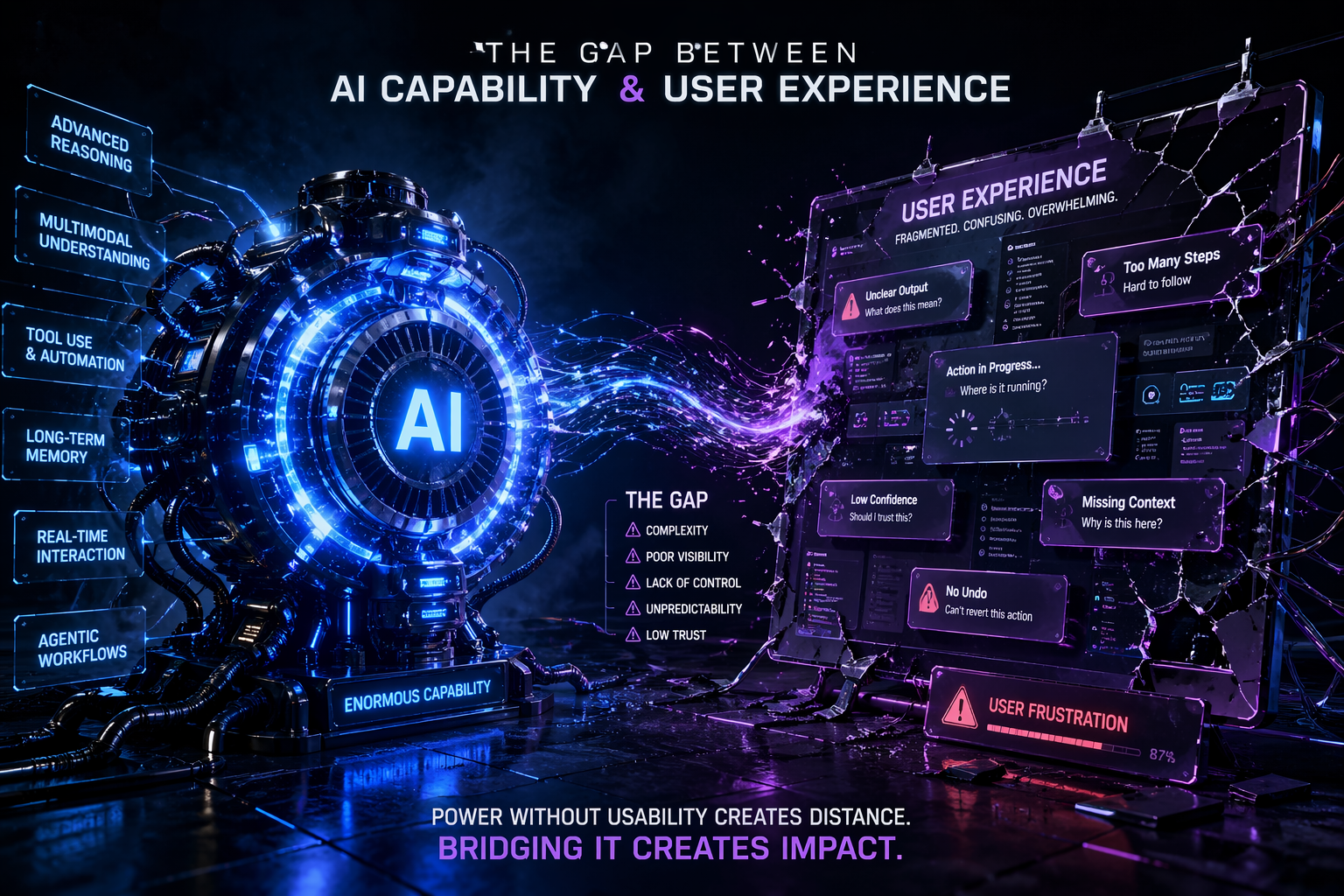
We've entered an era where AI models can reason, browse, code, analyze spreadsheets, generate multimodal outputs, and remember context across sessions. The latest ChatGPT updates have pushed boundaries in tool integration, memory control, real-time voice interaction, and agentic task execution. On paper, the technology is staggering. In practice, something remains stubbornly misaligned: the user experience.
Product teams are learning a hard but necessary lesson. Better models don't automatically translate to better products. A more capable foundation model is like upgrading an engine: it can produce more power, but if the steering, suspension, dashboard, and driver training haven't evolved, the car remains difficult to control. AI products are hitting the same wall. The gap between what the system can do and what users can reliably, safely, and intuitively do with it is widening, not closing.
This isn't a criticism of AI progress. It's a reality check for product strategy. As models grow more autonomous, the UX burden shifts from teaching users how to prompt to designing systems that manage uncertainty, expose reasoning, preserve control, and align with real workflows. The teams that recognize this early will ship products that scale. The ones that treat AI as a solved problem once the model improves will ship features that confuse, frustrate, or erode trust.
This article examines why UX remains the critical bottleneck in AI product development, even after the latest ChatGPT updates. It breaks down the core experience challenges, maps emerging interface patterns beyond the chat paradigm, and provides a practical framework for product teams building AI-driven workflows in 2026 and beyond.
The 2025-2026 ChatGPT Update Landscape: What Actually Changed?
To understand why UX still lags, we first need to acknowledge what has genuinely improved. The recent wave of ChatGPT updates hasn't been marketing fluff; it reflects measurable shifts in capability, integration, and control. However, each advancement introduces new UX responsibilities that product teams must design for.
1. Agentic Tool Use & Cross-App Execution
Earlier iterations of AI assistants operated largely within a closed conversational loop. Today's systems can chain tools: search the web, query APIs, run code, manipulate documents, and interact with third-party services. ChatGPT's expanded plugin ecosystem and native tool-use architecture allow it to perform multi-step workflows with reduced human prompting.
UX implication: Users now interact with systems that act on their behalf across boundaries they can't see. When an AI books a meeting, drafts an email, pulls CRM data, and updates a project tracker, the experience feels magical until it fails. Product teams must design for visibility, consent, and rollback. Agentic AI requires transparent state machines, not hidden automation.

2. Persistent Memory & Personalization
Memory features allow the system to retain preferences, project context, and user-specific details across sessions. This reduces repetitive prompting and enables more tailored interactions. Admin dashboards now offer granular control over what is stored, how long it persists, and when it's cleared.
UX implication: Memory creates an intimacy contract. Users expect the system to remember accurately, forget gracefully, and explain why it recalled or ignored something. Poor memory UX leads to creepiness, confusion, or frustration when the AI misapplies outdated context. Product teams need explicit memory management interfaces, contextual recall indicators, and clear opt-in/opt-out flows.

3. Multimodal & Real-Time Interaction
Voice conversations with emotional tone modeling, live camera analysis, screen sharing, and document annotation have moved from experimental to production-grade. Latency has dropped, interruption handling has improved, and contextual grounding across modalities is stronger.
UX implication: Multimodal AI breaks traditional UI paradigms. When voice, text, image, and real-time video coexist, product teams must design for modality switching, attention management, and accessibility. A voice-first flow can't assume users are in quiet environments. A screen-reading feature must respect privacy boundaries. Real-time AI demands graceful degradation, not perfect synchronization.

4. Structured Output & Workspace Integration
Updates have introduced canvas-style editing, structured data extraction, template generation, and direct integration with productivity suites. The shift from conversational replies to editable, versioned workspaces marks a significant step toward utility.
UX implication: Structured output changes the mental model from "chat" to "collaboration." Users expect track changes, diff views, approval workflows, and export flexibility. When AI generates a spreadsheet, a design spec, or a code module, the UX must treat it as a living artifact, not a static message. Product teams are learning that output quality is only half the battle; editability is the other.
5. Reasoning Transparency & Confidence Signaling
Recent updates emphasize step-by-step reasoning, source citations, and confidence indicators. Systems now show more of their internal logic, cite sources, and flag uncertainty. Enterprise tiers include audit logs, compliance checks, and role-based access controls.
UX implication: Transparency without context creates cognitive overload. Showing every reasoning step can overwhelm users; hiding it breeds mistrust. Product teams must design progressive disclosure of AI reasoning, actionable confidence signals, and clear escalation paths. Transparency should empower decisions, not paralyze them.

These updates prove that AI is moving from novelty to infrastructure. But infrastructure requires interfaces that manage complexity, not hide it. That's where UX falls short.
Why UX Is Still the Bottleneck
If models are smarter, why do AI products still feel fragile, unpredictable, or hard to integrate? The answer lies in a fundamental mismatch: AI capabilities are probabilistic, but user workflows demand determinism.
Traditional software operates on explicit rules. Click a button, get a result. Submit a form, receive confirmation. AI breaks this contract. It operates in likelihoods, generates plausible outputs, adapts to context, and sometimes fails in subtle ways. Users bring decades of deterministic mental models to interfaces that now behave probabilistically. The friction isn't in the model; it's in the mismatch between human expectation and system reality.
Product teams often treat UX as a wrapper around AI: design the chat window, add a few buttons, ship it, and wait for adoption. This approach fails for three reasons:
1. AI UX requires state management at scale. Every interaction leaves context, modifies memory, triggers tool calls, and generates editable output. Without clear state indicators, users feel lost.
2. AI UX demands trust architecture. Trust isn't built through accuracy alone; it's built through predictability, control, transparency, and graceful failure. Most AI interfaces lack all four.
3. AI UX must align with workflow, not replace it. Users don't want to chat with AI; they want to complete tasks. When AI forces a conversational paradigm onto non-conversational work, adoption stalls.
The bottleneck isn't technical capability. It's experience design. Product teams that recognize this shift from "prompt-centric" to "workflow-centric" design are the ones seeing sustained engagement, lower support tickets, and higher retention.
The Core UX Challenges in AI Products
1. Trust & Transparency
Trust is the currency of AI adoption. Users will tolerate occasional errors if they understand how the system works, when to rely on it, and how to intervene. Most AI products still fail at this.
The problem: Black-box outputs, unexplained reasoning, and inconsistent behavior erode trust quickly. When an AI summarizes a document, generates code, or drafts an email, users need to know: Where did this come from? What assumptions were made? How confident is it? What happens if it's wrong?
What's missing:
- Progressive reasoning disclosure: Instead of dumping a chain of thought, interfaces should show high-level logic with expandable details. Users should be able to toggle between "quick answer" and "show work" modes.
- Source grounding & citation visibility: Claims, data points, and references must be traceable. When AI pulls from internal docs, APIs, or the web, users need clear attribution.
- Confidence calibration: Confidence scores should be contextual, not arbitrary. "High confidence" must mean something consistent. When confidence drops, the UI should suggest verification steps or human review.
- Failure transparency: When AI fails, it should explain why, what it tried, and what the user can do next. Silent errors or generic "try again" messages destroy trust.
Product pattern: Implement a trust dashboard. Show reasoning state, source citations, confidence levels, and fallback options in a consistent, non-intrusive layout. Make transparency configurable: power users want details; casual users want clarity.
2. Control & Reversibility
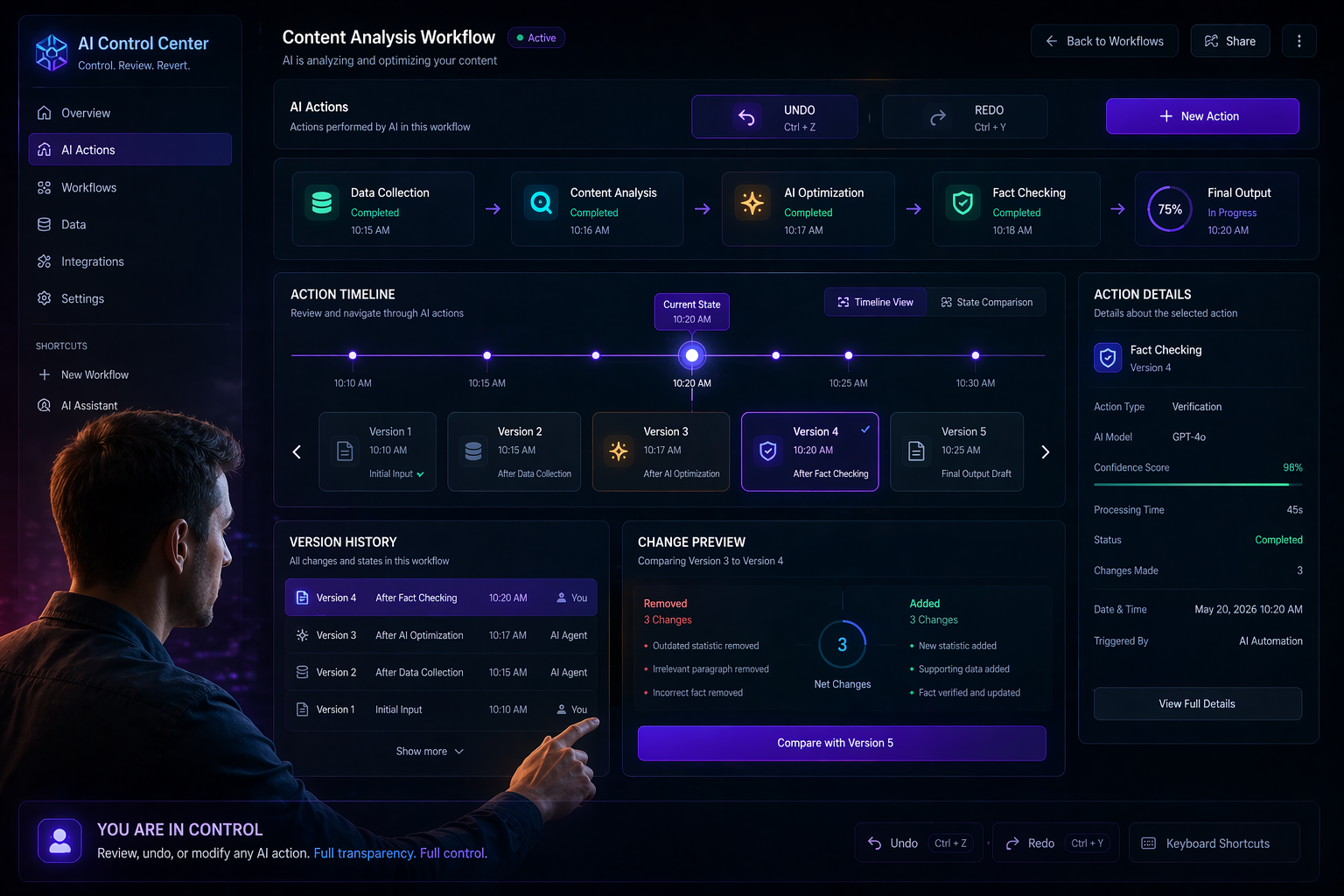
AI systems act. Users need the ability to steer, stop, and undo. Without control, automation feels like surrender.
The problem: Many AI interfaces assume one-way execution. Users submit a prompt, get a result, and hope it's usable. When it's not, they restart the conversation, losing context. Agentic features compound this: AI books meetings, updates records, or sends messages without clear preview or approval gates.
What's missing:
- Preview & consent flows: Before AI executes multi-step actions, show a summary of what will happen, what data will be used, and what permissions are required. Require explicit approval for high-impact actions.
- Version history & diff views: Every AI-generated output should be versioned. Users need to compare iterations, restore previous states, and track changes over time.
- Interruptibility & override: AI should be stoppable mid-execution. Users must be able to correct course without losing progress. Provide clear "pause," "modify," or "take over" controls.
- Undo/redo at workflow level: Traditional software offers Ctrl+Z. AI products need contextual rollback: undo the last tool call, revert a memory update, or discard a generated draft without losing the entire session.
Product pattern: Treat AI interactions as collaborative editing sessions, not one-off requests. Build revision trails, action previews, and explicit override controls. Make reversibility a first-class feature, not an afterthought.

3. Feedback & Learning Loops
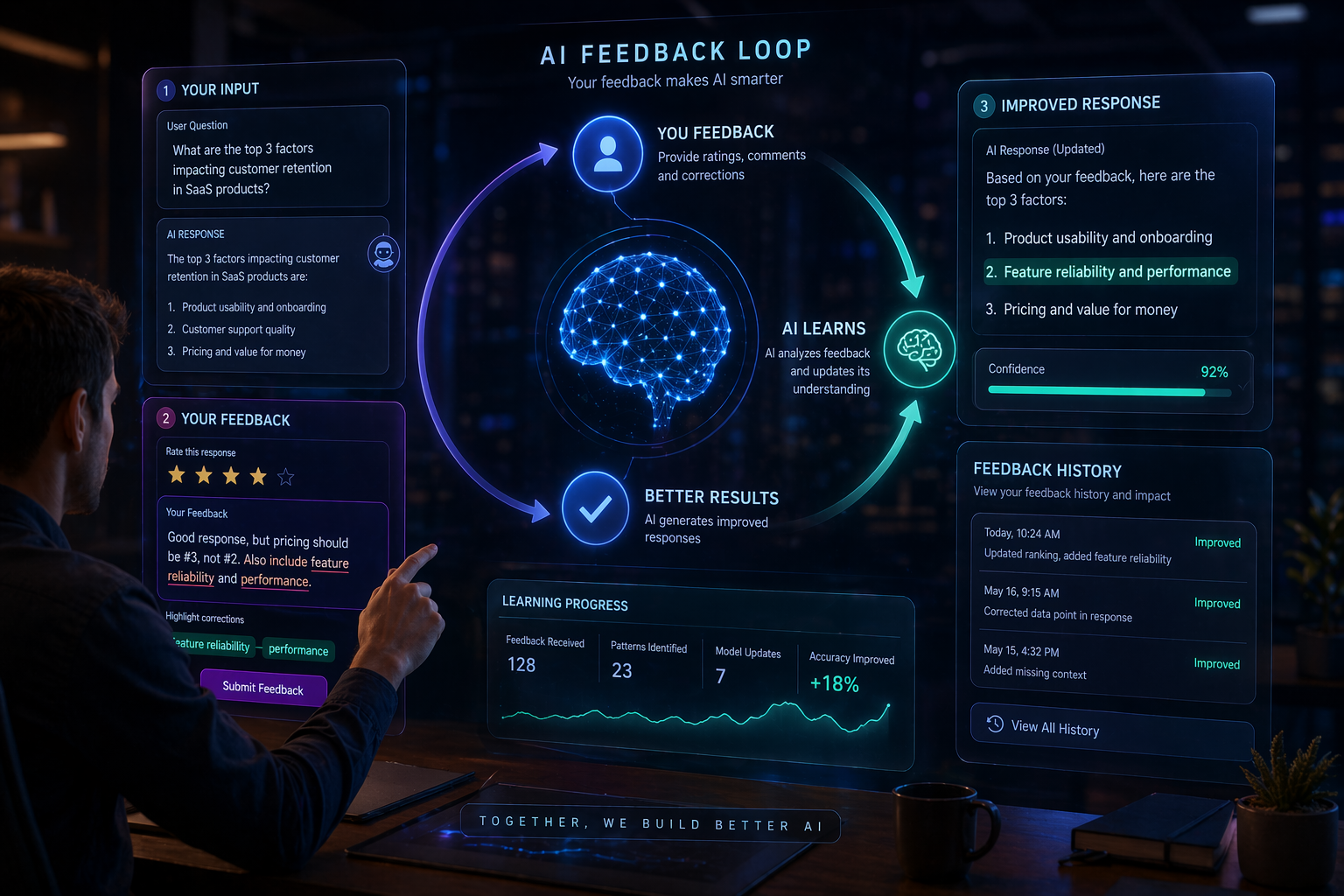
AI improves with feedback, but most products collect it poorly. Thumbs up/down buttons are insufficient. They don't explain why, don't tie to specific outputs, and don't close the loop with users.
The problem: Feedback is often binary, disconnected, and opaque. Users click "not helpful" and never know if the system adapted. Product teams aggregate vague metrics without actionable signals. AI models miss fine-grained correction data.
What's missing:
- Contextual feedback mechanisms: Instead of global ratings, tie feedback to specific outputs, tool calls, or reasoning steps. Let users highlight inaccuracies, suggest corrections, or flag missing context.
- Closed-loop communication: Show users how their feedback changed behavior. "We updated the template based on your correction" or "We now prioritize source X based on your preference."
- Preference inference with opt-out: AI should learn implicitly but allow explicit correction. If the system misremembers a preference, users should be able to edit or delete it easily.
- Feedback routing & prioritization: Not all feedback is equal. Route corrections to training pipelines, product roadmaps, or model fine-tuning processes. Make feedback actionable for both users and builders.
Product pattern: Implement a feedback canvas. Allow inline corrections, preference edits, and behavior reports. Close the loop with visible updates. Treat feedback as a product feature, not a metric dashboard.
4. Mental Models & Expectation Management
Users approach AI with assumptions shaped by traditional software, search engines, or human assistants. When AI behaves differently, frustration follows.
The problem: AI doesn't follow rules; it follows patterns. It's creative, inconsistent, and context-dependent. Products that present AI as deterministic set users up for disappointment. Products that overpromise autonomy create safety risks.
What's missing:
- Clear capability boundaries: Onboarding should explicitly state what AI can and cannot do, where it excels, where it struggles, and when human review is required.
- Progressive complexity introduction: Don't dump users into agentic workflows on day one. Start with constrained tasks, build trust, then unlock advanced features.
- Expectation calibration through design: Use UI cues to signal uncertainty, draft status, and verification needs. Avoid presenting AI outputs as final until confirmed.
- Contextual onboarding & tooltips: Provide just-in-time guidance based on user behavior, role, and task complexity. Generic tutorials fail; contextual hints succeed.
Product pattern: Map the user journey against capability maturity. Design onboarding that scales with trust. Use visual language to distinguish drafts from finalized outputs, suggestions from decisions, and AI actions from user approvals.
5. Accessibility & Inclusive Design
AI products are often built for power users first, then retrofitted for accessibility. This is a critical mistake. AI introduces new barriers: voice-only flows exclude hearing-impaired users, fast-paced real-time interactions overwhelm cognitive processing, and complex reasoning displays confuse screen readers.
The problem: Multimodal AI, agentic workflows, and dynamic outputs create accessibility debt. Products assume users can read quickly, process audio in noisy environments, or navigate complex interfaces with standard inputs.
What's missing:
- Modal parity: Every voice feature needs a text equivalent. Every visual reasoning display needs a screen-reader-friendly structure. Every real-time interaction needs pause/resume controls.
- Cognitive load management: AI outputs should be chunked, summarized, and navigable. Provide "simplify," "expand," or "focus mode" options for complex content.
- Customizable interaction speeds: Real-time AI shouldn't force pace. Allow users to adjust playback speed, response timing, and interruption sensitivity.
- Inclusive testing from day one: Accessibility isn't a checklist; it's a design constraint. Test with diverse users early, not after launch.
Product pattern: Build accessibility into AI interaction layers, not just the UI shell. Ensure modal parity, cognitive flexibility, and customizable pacing. Treat inclusive design as a quality multiplier, not a compliance requirement.
Beyond the Chat Interface: Rethinking AI UX Patterns
The chat window was a useful prototype, but it's not the end state. As AI moves into production workflows, product teams must design interfaces that match the work, not the model.
1. Task-Specific UIs Over Conversational Prompts
Users don't want to type prompts; they want to complete tasks. Instead of forcing everything into a chat box, design dedicated interfaces for specific workflows: document editing, data analysis, code review, project planning, customer support. AI should be embedded where the work happens, not isolated in a sidebar.
Example: Instead of a chat-based spreadsheet assistant, provide a native grid view with AI suggestions inline, formula validation, and one-click transformations. The interface feels familiar; the intelligence is contextual.
2. Structured Workflows With AI Checkpoints
Complex tasks require stages, not monolithic generation. Break workflows into phases with AI checkpoints: draft -> review -> validate -> finalize. At each stage, AI provides targeted assistance, users provide targeted feedback, and the system maintains state.
Example: A legal contract workflow might use AI to extract clauses, flag ambiguities, suggest revisions, and verify compliance. Each step is reviewable, editable, and versioned. The UI reflects progress, not conversation history.
3. Dashboard-Style Oversight for Agentic AI
When AI acts autonomously, users need oversight, not interruption logs. Design dashboards that show active tasks, pending approvals, completed actions, and risk indicators. Allow users to prioritize, pause, or redirect workflows without restarting.
Example: A marketing team using AI for campaign generation needs a board view: draft creatives awaiting review, scheduled posts pending approval, performance data updating in real time. The dashboard replaces chat threads with operational clarity.
4. Editable Artifacts, Not Static Messages
AI outputs should be treated as living documents, not chat replies. Provide rich editing, version history, collaboration tools, and export flexibility. When AI generates code, design docs, or reports, the interface should support iteration, not regeneration.
Example: A product spec generated by AI should open in a workspace with comments, track changes, approval workflows, and linked requirements. Users edit alongside AI, not after it.
5. Context-Aware Tool Integration
AI shouldn't ask users to switch apps; it should operate within them. Deep integrations with CRM, design tools, dev environments, and analytics platforms allow AI to assist without disrupting flow. Context should be pulled automatically, not prompted repeatedly.
Example: A developer using AI in their IDE should see inline suggestions, test generation, and dependency analysis without leaving the codebase. Context is inferred from files, branches, and commit history, not manual prompts.
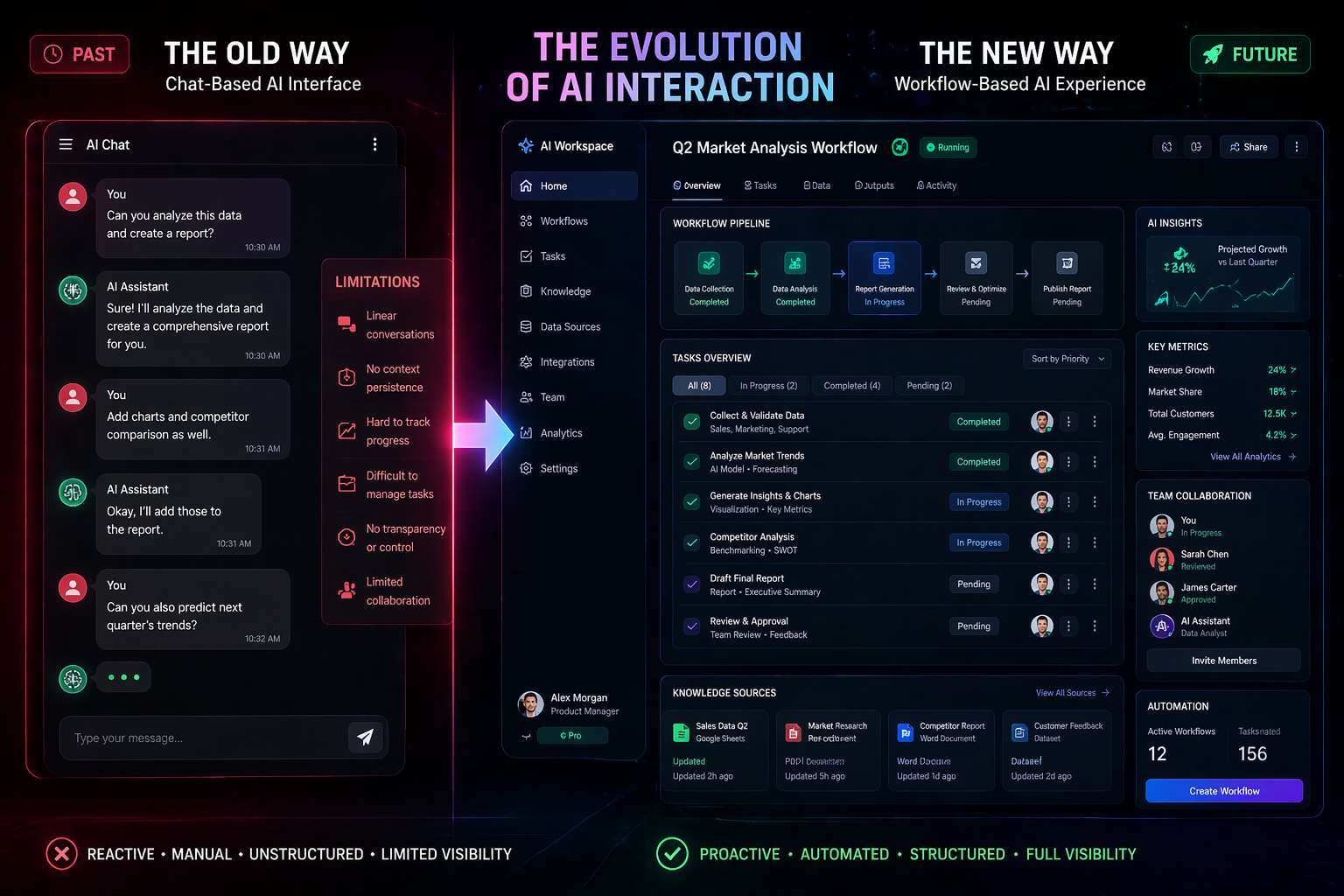
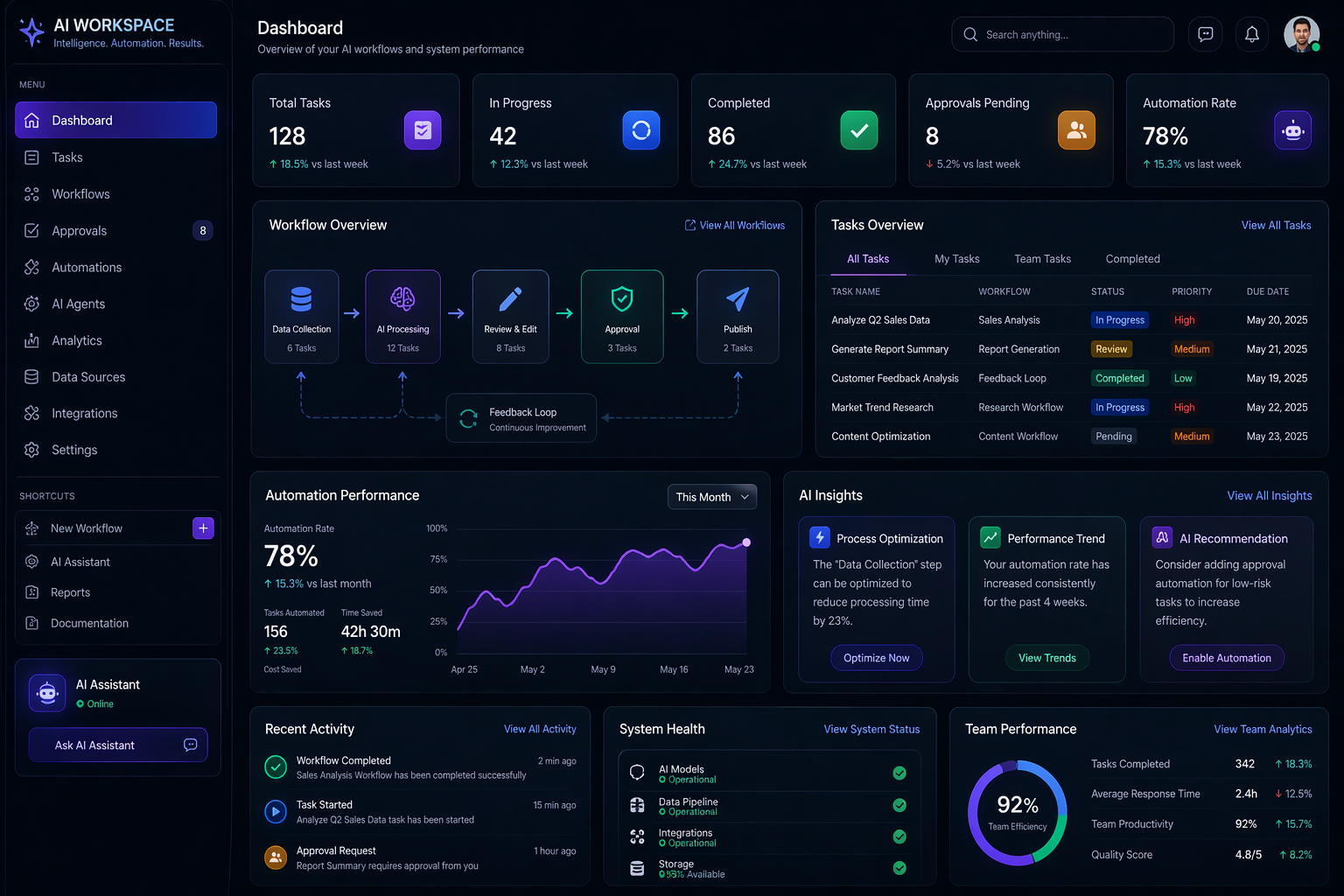

The shift from chat to workflow-aligned interfaces is non-negotiable. AI products that cling to conversational paradigms will lose to those that embed intelligence into existing work patterns.
A Practical Framework for AI UX
Product teams need actionable guidance, not theoretical ideals. This framework provides a structured approach to designing AI experiences that scale, build trust, and integrate into real workflows.
Phase 1: Define the Interaction Contract
- Scope capabilities: What can the AI do reliably? What requires human review? Where does it fail?
- Set boundaries: Define data usage, privacy limits, and action permissions. Communicate these clearly.
- Establish success metrics: Beyond accuracy, measure task completion time, user confidence, error recovery rate, and adoption depth.
Phase 2: Design for State & Transparency
- Map interaction states: Idle, processing, confident, uncertain, failed, reviewing, finalized.
- Expose reasoning progressively: Show high-level logic first, allow expansion for details.
- Signal confidence contextually: Use visual cues, not just numbers. Tie signals to actionable next steps.
- Provide failure paths: Every error should have a clear recovery route, not a dead end.
Phase 3: Build Control & Reversibility
- Preview before execution: Summarize actions, data usage, and impact. Require explicit approval for high-stakes tasks.
- Version everything: Drafts, outputs, memory updates, and tool calls should be trackable and restorable.
- Enable interruption & override: Users must be able to pause, correct, or take over without losing progress.
- Implement workflow-level undo: Allow rollback of specific actions, not entire sessions.
Phase 4: Close the Feedback Loop
- Collect contextual feedback: Tie ratings and corrections to specific outputs, steps, or decisions.
- Show adaptation: Communicate how feedback changed behavior, preferences, or future outputs.
- Route insights productively: Feed corrections to training, product roadmaps, and model updates. Make feedback actionable.
Phase 5: Align With Workflow, Not Replace It
- Embed AI where work happens: Avoid isolating intelligence in chat windows. Integrate into native tools and interfaces.
- Structure complex tasks: Break workflows into stages with AI checkpoints and human review gates.
- Treat outputs as editable artifacts: Support iteration, collaboration, and version control.
- Design for oversight, not replacement: Users should feel augmented, not automated out of the process.
Phase 6: Test for Trust, Not Just Accuracy
- Simulate failure modes: How does the UI behave when confidence drops, tools fail, or context is missing?
- Measure cognitive load: Can users understand what's happening without excessive explanation?
- Validate accessibility: Ensure modal parity, pacing control, and screen-reader compatibility.
- Track trust metrics: Monitor user confidence, override frequency, feedback quality, and retention.
This framework isn't a checklist; it's a design philosophy. AI UX requires systems thinking, not screen-by-screen iteration. Product teams that adopt it will build experiences that scale.
What Product Teams Must Prioritize Next
The next 12-18 months will separate AI products that endure from those that fade. Prioritization matters more than feature velocity. Here's where product teams should focus:
1. Workflow Integration Over Novelty
Stop building AI for AI's sake. Map existing user workflows, identify friction points, and embed intelligence where it reduces effort, not adds steps. Novelty drives adoption; utility drives retention.
2. Trust Architecture as a Core Feature
Invest in transparency, control, and feedback loops. Trust isn't a nice-to-have; it's the foundation of sustainable AI usage. Design for predictability, not perfection.
3. Editable Outputs & Version Control
Treat AI generation as collaborative drafting, not final delivery. Build version history, diff views, approval workflows, and export flexibility. Users need to own the output, not just receive it.
4. Context-Aware & Permission-Safe Execution
AI must respect data boundaries, role-based access, and organizational policies. Build permission-aware tool use, data isolation, and audit trails. Security and UX aren't separate; they're intertwined.
5. Inclusive & Accessible Interaction Design
Ensure modal parity, cognitive flexibility, and customizable pacing. Test with diverse users early. Accessibility isn't a post-launch fix; it's a design constraint that improves quality for everyone.
6. Feedback Loops That Close the Circle
Move beyond thumbs up/down. Implement contextual corrections, preference management, and visible adaptation. Make feedback a product feature, not a metric dashboard.
7. Progressive Disclosure & Expectation Management
Don't overwhelm users with capability. Introduce features gradually, calibrate expectations, and provide contextual guidance. Trust builds through consistency, not complexity.
8. Observability & AI UX Analytics
Track how users interact with AI: where they override, where they abandon, what feedback they give, how confidence signals are used. Use data to refine design, not just model performance.
Prioritization requires discipline. It's easy to chase the latest capability; it's harder to design the experience that makes it usable. Product teams that focus on workflow, trust, and inclusivity will win.
Conclusion: The UX Debt We Can't Ignore
AI capability will continue to accelerate. Models will reason faster, integrate deeper, and adapt more fluidly. But capability without experience is just potential. Product teams are sitting on a growing UX debt: interfaces that don't manage uncertainty, workflows that don't align with real work, and trust architecture that hasn't been designed intentionally.
The latest ChatGPT updates prove that AI is maturing. The bottleneck is no longer the model; it's the interface between human intent and machine execution. Product teams that treat UX as an afterthought will ship features that confuse, frustrate, or erode trust. Teams that treat UX as infrastructure will build products that scale, endure, and genuinely augment human work.
The path forward is clear: design for transparency, build for control, embed intelligence into workflows, close feedback loops, and test for trust. Stop asking what AI can do. Start asking what users need to do with it, and design accordingly.
The future of AI isn't in smarter models. It's in better experiences. And that future belongs to product teams willing to do the hard work of designing for reality, not hype.
FAQ
Why do product teams need better AI UX even after a ChatGPT update?
Because model capability alone does not create a reliable product experience. Teams still need strong trust signals, better control patterns, clear workflows, and readable interfaces.
What are the biggest UX challenges in AI products?
The biggest challenges are trust and transparency, reversibility, feedback loops, expectation management, workflow alignment, and accessibility across different interaction modes.
What should replace chat-only AI interfaces in 2026?
Task-specific interfaces, workflow dashboards, editable artifacts, approval checkpoints, and context-aware integrations are increasingly replacing chat-only AI experiences in production products.
Related posts
View all WebThe Road to Learn React by Robin Wieruch: Why This Is the Best Book to Master React.js
A beginner-friendly review of The Road to Learn React by Robin Wieruch, covering its plain React first philosophy, project-based structure, updates, learning path, reader fit, and value.
ProgrammingApple MacBook Pro M5 Review (2026): Complete In-Depth Review, Performance, Battery, AI Features & Real-World Experience
Detailed Apple MacBook Pro M5 review covering design, performance, gaming, battery life, AI features, display quality, software experience, creator workflow, and comparison with competitors.
ToolsPercentage Kaise Nikale? Percentage Calculator Ka Sahi Upyog Aur Formulas
Percentage kaise nikale, percentage calculator ka sahi use kaise kare, marks percentage, discount, profit-loss aur percentage change ke formulas simple Hindi me samjhein.
Next article
Google Cloud, AI Chips, and Cybersecurity Concerns: What Alphabet's Latest Moves Mean
Alphabet is pushing harder into AI cloud infrastructure with new TPUs, bigger enterprise partnerships, and a sharper focus on security as cyber risks around advanced AI systems rise.