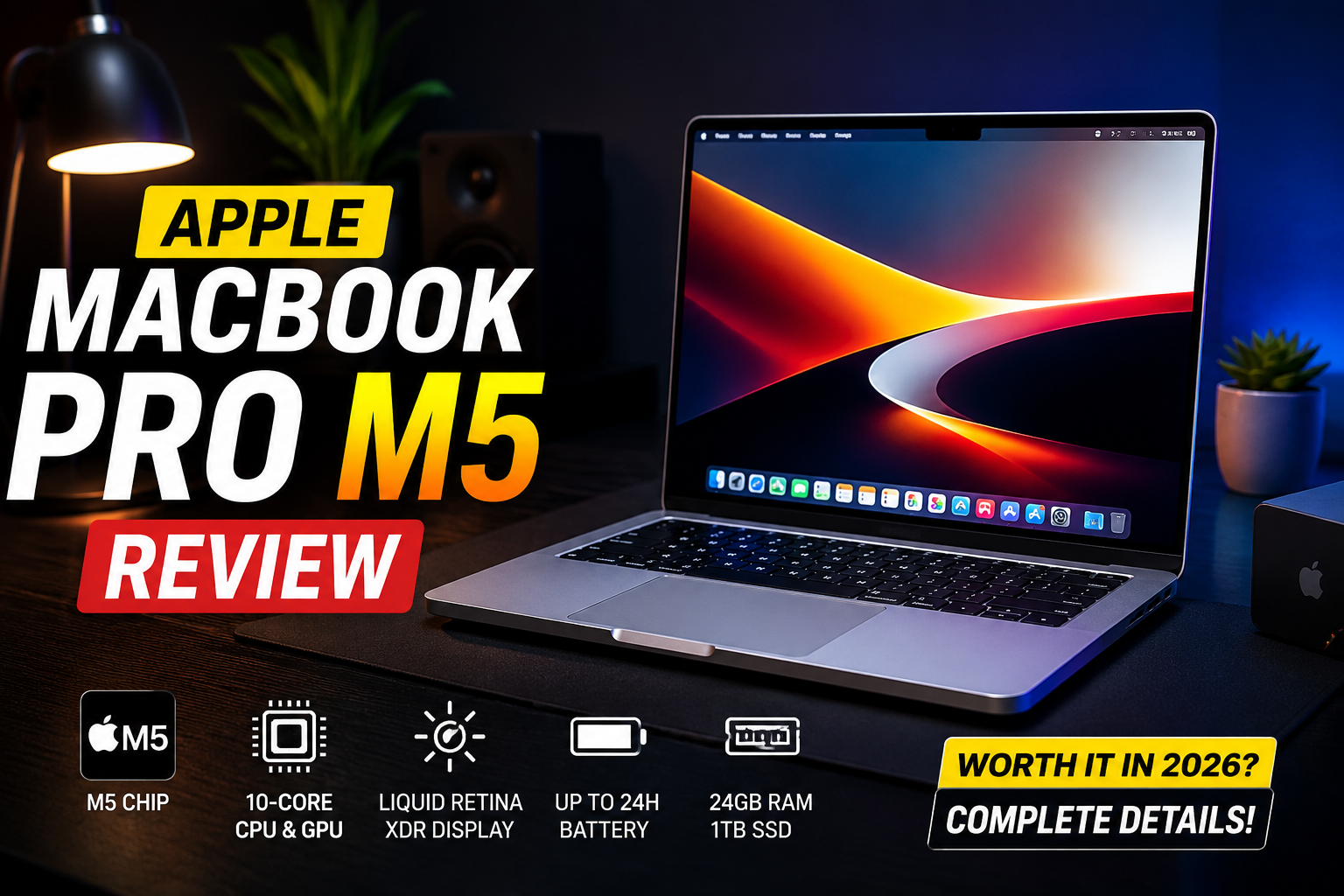
Apple MacBook Pro M5 Review (2026): Complete In-Depth Review, Performance, Battery, AI Features & Real-World Experience
Detailed Apple MacBook Pro M5 review covering design, performance, gaming, battery life, AI features, display quality, software experience, creator workflow, and comparison with competitors.
Apple MacBook Pro M5 Review (2026): Apple's Most Advanced Laptop Yet?
Disclosure: This review contains affiliate links. If you buy through these links, WoHoTech may earn a small commission at no extra cost to you. Specs, pricing, and availability can change, so verify details with official seller listings before buying.
Apple has officially launched the new 14-inch MacBook Pro powered by the latest M5 chip, and this machine is clearly aimed at users who demand top-level performance, efficiency, reliability, and next-generation AI capabilities. The MacBook Pro lineup has already dominated the premium laptop segment for years, but the M5 version takes things even further with stronger AI acceleration, faster graphics processing, longer battery life, and a more optimized macOS experience.
The biggest question now is simple:
Is the new MacBook Pro M5 actually worth buying in 2026?
After researching the specifications, hardware architecture, display technology, creator workflows, AI capabilities, thermals, software optimization, battery testing expectations, customer impressions, and Apple's long-term strategy, this is the complete in-depth review of the Apple MacBook Pro M5.
Quick Specifications
| Feature | Details |
|---|---|
| Laptop | Apple MacBook Pro 14-inch |
| Processor | Apple M5 |
| CPU | 10-Core CPU |
| GPU | 10-Core GPU |
| Neural Engine | 16-Core |
| RAM | 24GB Unified Memory |
| Storage | 1TB SSD |
| Display | 14.2-inch Liquid Retina XDR |
| Refresh Rate | 120Hz ProMotion |
| Battery Life | Up to 24 Hours |
| Ports | 3x Thunderbolt 4 |
| Wireless | Wi-Fi 6E, Bluetooth 5.3 |
| Weight | 1.55kg |
| Operating System | macOS |
| Price | Rs. 1,99,990 |
Latest price: Check MacBook Pro M5 on Amazon
First Impressions

The first thing you notice about the MacBook Pro M5 is how premium and polished it feels. Apple has not completely redesigned the laptop, but honestly, the current MacBook Pro design is already among the best laptop designs available.
The aluminum chassis feels incredibly strong and durable. The silver finish looks clean and professional, while the compact form factor makes it ideal for professionals who travel frequently.
Unlike flashy gaming laptops, the MacBook Pro focuses more on:
- minimalism
- performance
- efficiency
- productivity
The laptop feels expensive the moment you open the lid.
The hinge mechanism is smooth, the keyboard feels premium, and the trackpad remains one of the best trackpads ever placed inside a laptop.
Design & Build Quality
Apple continues using its high-quality aluminum unibody construction, and the overall structural quality is exceptional.
The edges are clean, the finish is smooth, and there is almost no flex anywhere on the body.
The build quality is particularly important for:
- creators
- developers
- editors
- students
- remote workers
who carry laptops daily.
At 1.55kg, the MacBook Pro feels surprisingly portable considering the amount of power packed inside.
The laptop also feels extremely balanced when used on a desk or lap.
Keyboard & Trackpad Experience
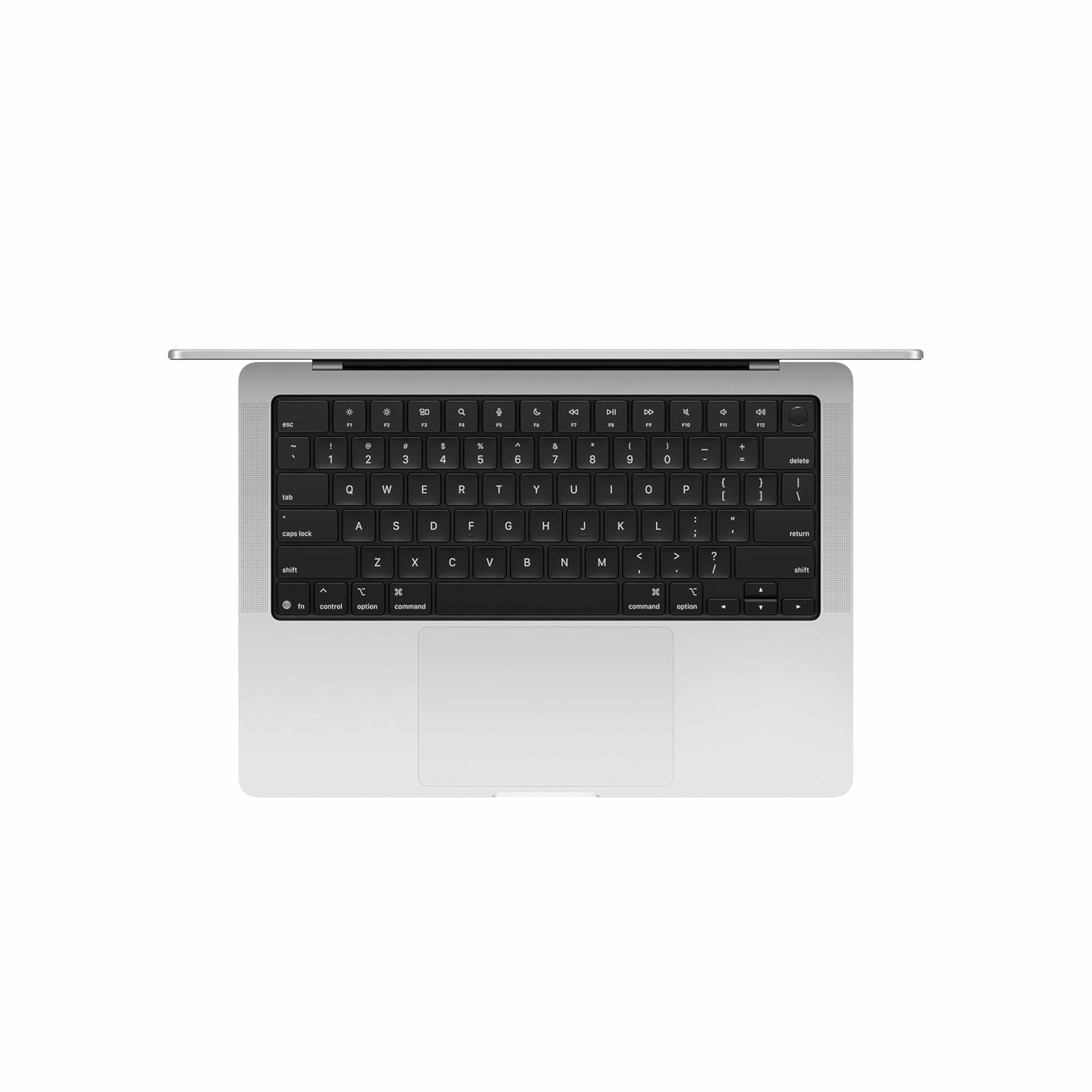
Apple's keyboard quality has improved massively over the years, and the MacBook Pro M5 offers one of the best typing experiences available in a laptop.
The keys feel:
- tactile
- stable
- responsive
- comfortable
Long coding sessions or writing sessions feel effortless.
The keyboard also includes:
- backlighting
- function shortcuts
- Touch ID support
The trackpad is still industry-leading.
Its precision, smoothness, gesture support, and palm rejection are simply excellent.
For productivity users, the MacBook experience feels extremely polished.
Display Quality

The 14.2-inch Liquid Retina XDR display is honestly one of the biggest reasons to buy this laptop.
Apple's display quality continues to dominate the premium laptop segment.
Specifications include:
- Mini-LED technology
- ProMotion 120Hz refresh rate
- HDR support
- P3 wide color gamut
- 1600 nits peak brightness
- True Tone technology
Resolution:
- 3024 x 1964
Everything looks incredibly sharp and vibrant.
Watching HDR movies on this display feels stunning.
For creative professionals, this display is especially useful because of its:
- color accuracy
- contrast levels
- brightness consistency
- deep blacks
The ProMotion refresh rate also makes scrolling feel incredibly smooth.
Whether you are:
- editing videos
- designing graphics
- browsing websites
- coding
- watching content
the display experience feels premium at all times.
Apple M5 Chip Explained
The M5 chip is the main highlight of this laptop.
Apple is heavily investing in:
- AI acceleration
- efficiency
- GPU performance
- battery optimization
The M5 architecture improves multiple areas simultaneously.
The processor includes:
- 10-core CPU
- 10-core GPU
- Neural Accelerator
- 16-core Neural Engine
- hardware ray tracing
Apple's focus is no longer just raw power.
Now the company is optimizing for:
- AI workloads
- local processing
- machine learning
- battery efficiency
- sustained performance
This approach gives the MacBook Pro a major advantage in professional workflows.
CPU Performance
The CPU performance is extremely impressive.
Tasks feel instant:
- app launching
- browser loading
- multitasking
- rendering
- compiling code
The laptop handles heavy workloads without slowing down.
Even under stress, performance remains stable.
The unified memory architecture also helps improve responsiveness because the CPU and GPU can access memory more efficiently.
Compared to many Windows laptops, the MacBook Pro feels smoother during multitasking.
GPU Performance
Apple's integrated GPU continues to improve every generation.
The 10-core GPU inside the M5 chip delivers strong performance for:
- video editing
- graphics work
- 3D rendering
- animation
- creative software
The GPU now supports:
- hardware ray tracing
- AI-assisted graphics acceleration
Applications like:
- Blender
- Final Cut Pro
- DaVinci Resolve
- Adobe Premiere Pro
run smoothly.
While dedicated RTX GPUs still dominate hardcore gaming and advanced 3D rendering, Apple's GPU optimization inside macOS is extremely efficient.
AI Performance & Apple Intelligence
This is where Apple is pushing hardest now.
The MacBook Pro M5 is designed specifically for Apple Intelligence and AI-powered workflows.
Apple's Neural Engine enables:
- smart writing tools
- AI image editing
- local AI generation
- productivity automation
- intelligent suggestions
The biggest advantage is on-device processing.
Instead of sending everything to cloud servers, Apple performs many AI tasks locally.
Benefits:
- better privacy
- faster response times
- reduced internet dependency
- lower latency
AI is becoming central to future computing, and Apple is clearly preparing macOS for that future.
Real-World Performance
Coding & Development
For developers, the MacBook Pro M5 is outstanding.
It handles:
- VS Code
- Android Studio
- Docker
- Node.js
- React Native
- Python
- AI frameworks
- Xcode
without issues.
Even large projects compile quickly.
The laptop is especially useful for:
- web development
- iOS development
- backend development
- AI development
The thermal efficiency helps during long coding sessions.
Buy Now
If you want a premium laptop for coding, editing, and AI workloads, check the latest price here:
Video Editing Performance
Video editing is one of the strongest use cases for the MacBook Pro M5.
The hardware acceleration makes editing feel incredibly smooth.
The laptop supports:
- ProRes
- ProRes RAW
- H.264
- HEVC
- AV1 decoding
Editing 4K footage is effortless.
Even 8K workflows become manageable depending on project complexity.
Timeline scrubbing remains smooth, exports are fast, and rendering times are highly competitive.
This laptop is clearly designed for creators.
Audio Production Experience
Music producers will also appreciate the MacBook Pro.
Applications like:
- Logic Pro
- FL Studio
- Ableton Live
run smoothly.
The CPU efficiency helps manage large projects with:
- multiple plugins
- effects
- layered tracks
without performance drops.
Graphic Design & Animation
The MacBook Pro M5 performs extremely well in:
- Photoshop
- Illustrator
- After Effects
- Figma
- Canva Pro workflows
The color-accurate display combined with GPU acceleration creates an excellent design experience.
Gaming Experience
Gaming on macOS is improving slowly.
The M5 GPU supports:
- hardware ray tracing
- Metal API optimization
Casual gaming and some AAA titles run reasonably well.
However, Windows gaming laptops still provide:
- better compatibility
- more optimized game libraries
- stronger GPU options
The MacBook Pro is not mainly a gaming laptop.
It is primarily designed for:
- creators
- professionals
- productivity users
Still, gaming performance is much better than older MacBooks.
Battery Life

Battery life is one of the biggest strengths of the MacBook Pro M5.
Apple claims:
- up to 24 hours
Realistically, users can expect excellent all-day performance during:
- browsing
- coding
- editing
- office work
- meetings
One of the best things about Apple Silicon laptops is that performance remains strong even on battery power.
Many Windows laptops reduce performance significantly when unplugged.
Apple handles power management much better.
Charging Experience
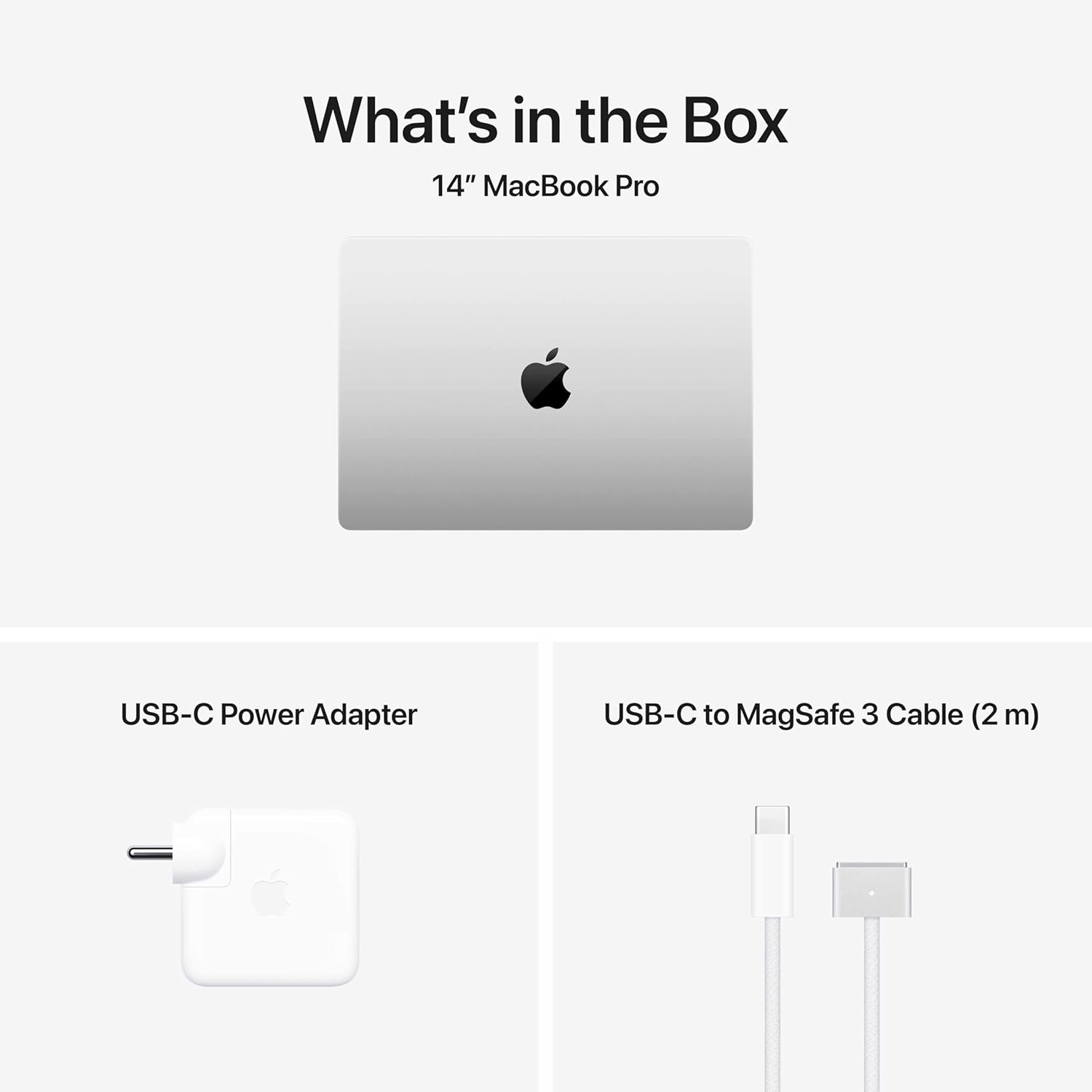
The laptop supports:
- MagSafe charging
- USB-C charging
The included 70W adapter charges the laptop quickly.
MagSafe also adds convenience and safety.
Thermal Management
Apple's thermal optimization is excellent.
The MacBook Pro stays:
- cool
- stable
- quiet
during normal tasks.
Even under heavy rendering or exporting workloads, the fan noise remains controlled.
Thermal throttling is minimal.
This is very important for professional users who need consistent long-duration performance.
Speakers & Sound Quality
The speakers are phenomenal.
Apple still offers some of the best laptop speakers in the world.
You get:
- deep bass
- loud output
- clean vocals
- excellent stereo separation
Watching movies or listening to music feels immersive.
Webcam & Video Calls
The webcam quality is strong enough for:
- Zoom meetings
- Google Meet
- online classes
- streaming
The microphone quality is also impressive.
Voice clarity remains excellent.
Ports & Connectivity
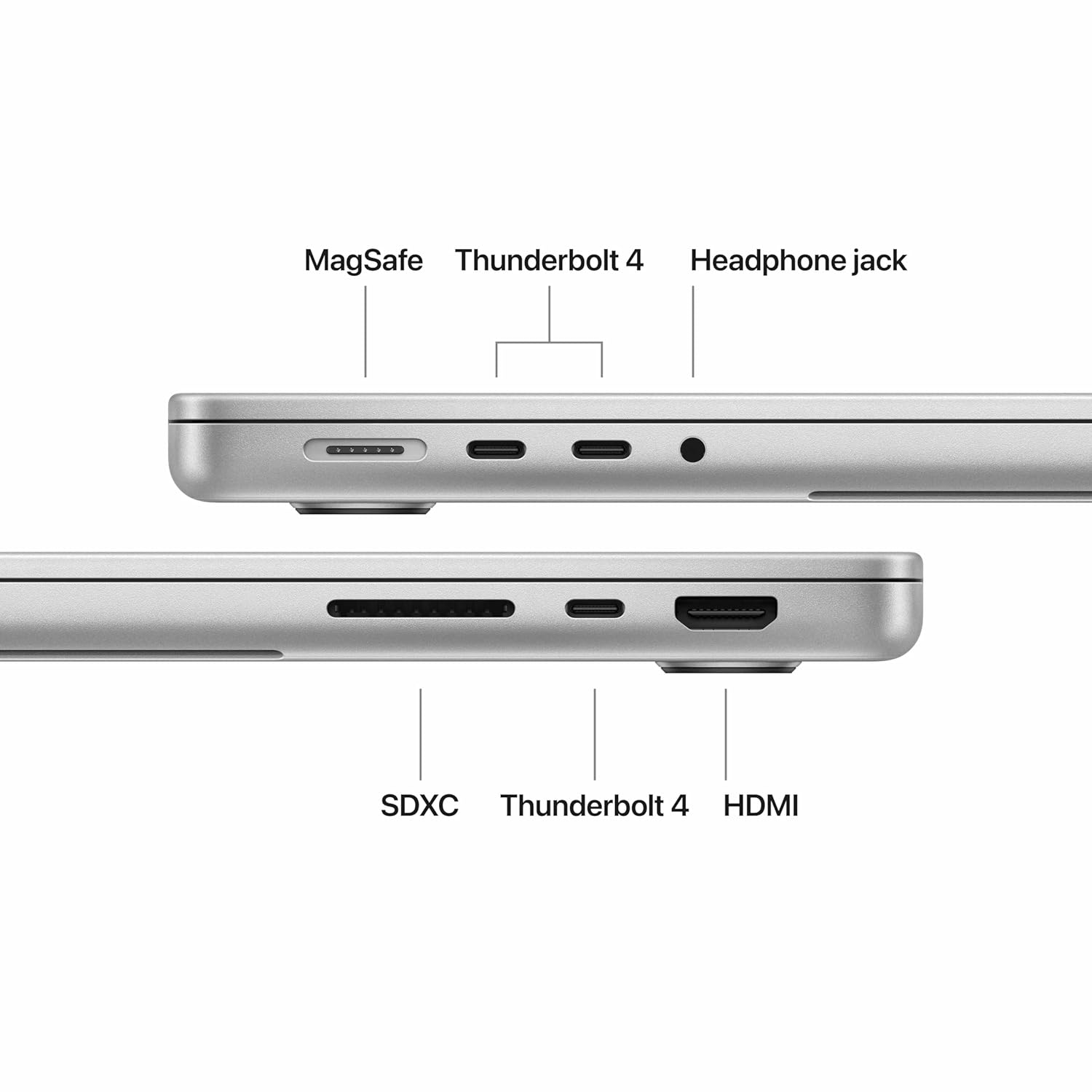
The MacBook Pro includes:
- 3x Thunderbolt 4 ports
- MagSafe charging
- DisplayPort support
- USB 4 support
Wireless:
- Wi-Fi 6E
- Bluetooth 5.3
Connectivity performance is fast and reliable.
SSD Speed & Storage Performance
The 1TB SSD delivers extremely fast speeds.
Benefits include:
- quick boot times
- instant app loading
- smooth file transfers
- better editing workflows
Large media files open quickly.
Professional users working with huge projects will appreciate the SSD performance.
macOS Experience
macOS remains one of the smoothest operating systems available.
The software optimization between Apple hardware and macOS is excellent.
Animations feel fluid, multitasking feels polished, and battery optimization remains strong.
Applications optimized for Apple Silicon run especially well.
macOS vs Windows Experience
### macOS Advantages
- better battery life
- smoother optimization
- excellent creator ecosystem
- lower heat
- quieter operation
### Windows Advantages
- better gaming
- more customization
- broader software compatibility
- more hardware choices
Choosing between them depends on your workflow.
MacBook Pro M5 vs MacBook Air M5
### MacBook Air M5
Best for:
- students
- casual users
- office work
- portability
### MacBook Pro M5
Best for:
- creators
- developers
- editors
- professionals
- AI workflows
The Pro model offers:
- better cooling
- stronger sustained performance
- superior display
- better speakers
MacBook Pro M5 vs Windows Laptops
Windows laptops offer:
- more gaming power
- more upgradeability
- lower pricing options
But the MacBook Pro offers:
- better efficiency
- longer battery life
- stronger software optimization
- quieter operation
- excellent creator performance
Who Should Buy This Laptop?
You should buy the MacBook Pro M5 if you:
- edit videos professionally
- do software development
- create content
- use AI tools
- need strong battery life
- want a premium laptop experience
Who Should Avoid It?
Avoid this laptop if:
- you mainly play games
- you only browse the internet
- you want budget performance
- you need upgradeable hardware
Long-Term Reliability
MacBooks generally last for many years.
Apple Silicon efficiency helps:
- battery health
- thermal stability
- software optimization
This laptop should remain powerful for years.
Apple Ecosystem Advantage
The Apple ecosystem is another huge benefit.
Integration with:
- iPhone
- iPad
- AirPods
- Apple Watch
feels seamless.
Features like:
- AirDrop
- Universal Clipboard
- Handoff
improve productivity significantly.
Pros & Cons
### Pros
- Exceptional performance
- Stunning display
- Amazing battery life
- Premium build quality
- Excellent speakers
- Strong AI acceleration
- Smooth macOS experience
- Great creator laptop
### Cons
- Expensive pricing
- Gaming limitations
- Limited upgradeability
- Expensive accessories
Final Verdict
The Apple MacBook Pro M5 is one of the most refined and powerful laptops Apple has ever created.
This machine is not just about raw performance anymore.
Apple is building a future-ready AI-focused productivity system that combines:
- hardware
- software
- efficiency
- machine learning
- battery optimization
into one ecosystem.
The display is excellent, the battery life is incredible, the performance is outstanding, and the macOS optimization makes the entire experience feel premium.
Yes, the price is extremely high.
But if your work depends on:
- speed
- stability
- battery life
- creator performance
- software optimization
then the MacBook Pro M5 is absolutely worth considering.
For developers, creators, editors, designers, and professionals, this is easily one of the best premium laptops available in 2026.
Buy From Amazon
FAQs
Is the MacBook Pro M5 good for programming?
Yes. It is excellent for coding, app development, AI development, and multitasking.
Is the MacBook Pro M5 good for video editing?
Yes. It handles professional 4K and 8K workflows very smoothly.
Can the MacBook Pro M5 run AI tools?
Yes. The M5 chip is specifically optimized for AI acceleration and machine learning workloads.
Is the MacBook Pro M5 worth buying for students?
Only if you need high-end professional performance. Otherwise, the MacBook Air may be a better value option.
Is gaming good on the MacBook Pro M5?
Gaming performance is decent, but Windows gaming laptops are still better for hardcore gaming.
Does the MacBook Pro M5 overheat?
No. Apple's thermal optimization is excellent, and the laptop remains stable under heavy workloads.
How much RAM is enough?
24GB unified memory is excellent for professional and future-proof workflows.
Is the MacBook Pro M5 future-proof?
Yes. The AI-focused architecture and strong performance make it highly future-ready.
Where to buy MacBook Pro M5?
Buy here:
Check latest price
Related posts
View all ProgrammingThe Road to Learn React by Robin Wieruch: Why This Is the Best Book to Master React.js
A beginner-friendly review of The Road to Learn React by Robin Wieruch, covering its plain React first philosophy, project-based structure, updates, learning path, reader fit, and value.
ToolsPercentage Kaise Nikale? Percentage Calculator Ka Sahi Upyog Aur Formulas
Percentage kaise nikale, percentage calculator ka sahi use kaise kare, marks percentage, discount, profit-loss aur percentage change ke formulas simple Hindi me samjhein.
WebChatGPT Update: Why Product Teams Still Need Better UX Around AI
A ChatGPT update can improve capability, but product success still depends on layout, trust, navigation, and clear user guidance.
Next article
Percentage Kaise Nikale? Percentage Calculator Ka Sahi Upyog Aur Formulas
Percentage kaise nikale, percentage calculator ka sahi use kaise kare, marks percentage, discount, profit-loss aur percentage change ke formulas simple Hindi me samjhein.